Keeping Filtering in the Repository Layer
Separation of concerns · 2026-04-04
Filtering often begins in the UI layer, but this can lead to duplication and inconsistent behavior over time. This article explores why filtering drifts into the UI and how moving it into the repository layer can provide a more stable foundation.
Keeping Filtering in the Repository Layer
1. Context
When working with applications that present and manipulate collections of data, filtering and search are almost always required.
Users expect to:
- Narrow down results
- Search within content
- Combine multiple criteria
A recurring question is where this logic should be placed.
2. The Problem
In many systems, filtering gradually ends up in the UI layer, not by design, but by accumulation.
This frequently happens through small, incremental changes:
- A search box is added
- A quick filter is introduced
- A condition is applied directly to an in-memory collection
At first, this approach works well enough. Over time, however, it tends to introduce inconsistencies and duplication.
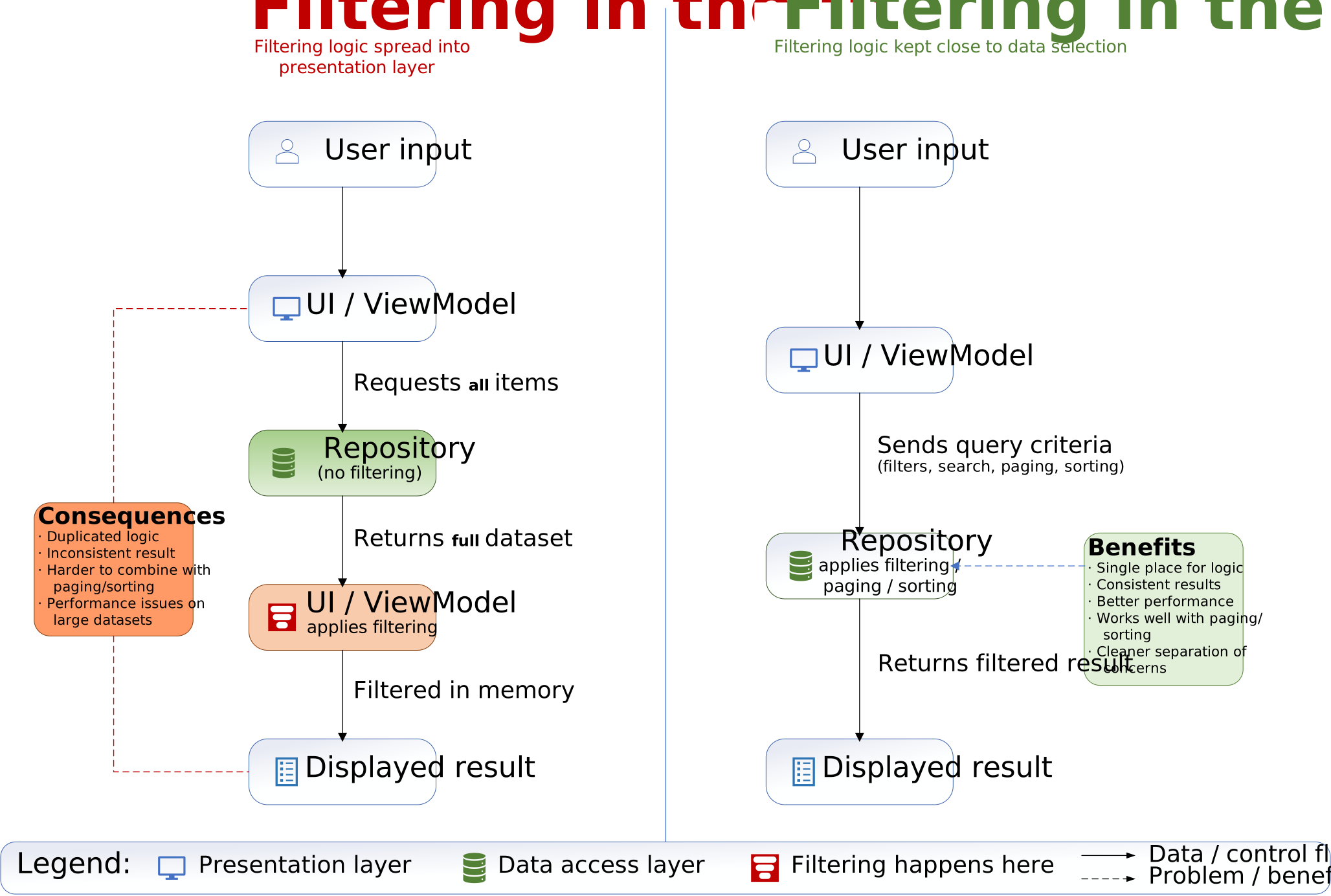
Filtering applied in the UI compared to filtering handled in the repository layer. Click the diagram to open it in full size.
3. Typical Symptoms
When filtering is handled in the UI layer, a number of issues tend to appear:
- Filtering logic duplicated across multiple views
- Slightly different results depending on where and how filtering is applied
- Difficulties combining filtering with paging
- Performance issues when working with larger data sets
- Reduced clarity around what constitutes the “correct” result set
These issues are often subtle at first, but become more visible as the system evolves.
4. Why this happens
Filtering ends up in the UI layer for several understandable reasons:
- The UI has direct access to user input
- It is quick to implement
- Repository interfaces may not yet support flexible queries
- Early data volumes are small, so performance is not a concern
In this sense, placing filtering in the UI is not necessarily wrong – it is often just the most immediate solution.
5. Moving Filtering into the Repository
An alternative is to treat filtering as part of the data access concern.
In this approach, the repository is responsible for:
- Applying filters
- Handling search
- Managing paging
The UI layer then communicates intent, rather than implementing logic.
6. Example
6.1. Filtering in the UI
A typical UI-driven approach might look like this:
var items = await _repository.GetAllAsync();

var filtered = items
    .Where(x => x.IsPinned)
    .Where(x => x.Text.Contains(searchText))
    .ToList();
6.2. Filtering in the repository
A repository-driven approach shifts this responsibility:
var result = await _repository.SearchAsync(new SearchQuery
{
    SearchText = searchText,
    OnlyPinned = true,
    Page = page,
    PageSize = pageSize
});
7. Effects of the Change
Moving filtering into the repository layer typically results in:
- A single place for filtering logic
- More consistent results across the application
- Better performance when backed by a database
- Clearer separation between UI and data access
- Improved ability to combine filtering, paging, and sorting
This becomes particularly important once multiple views or features depend on the same underlying data.
8. Trade-offs
This approach also introduces some complexity:
- Repository interfaces become more expressive
- Query objects need to be designed carefully
- A risk of over-engineering if introduced too early
As with most architectural decisions, the benefits depend on the scale and evolution of the system.
9. Architectural Perspective
At a broader level, this is a question of responsibility.
Keeping filtering in the repository aligns with a clearer separation of concerns:
- The UI expresses what the user is trying to achieve
- The repository determines how the data is selected
This makes the system easier to reason about, especially as it grows.
10. Conclusion
Filtering often begins in the UI layer because it is easy to implement there.
As the system evolves, however, this approach tends to introduce duplication and inconsistency.
Moving filtering into the repository layer is not a universal rule, but in many cases it provides a more stable and maintainable foundation over time.
Need a second opinion on a .NET codebase?
I offer practical architecture and maintainability advisory for .NET teams working on long-lived business applications.
Want occasional updates?
Subscribe to receive occasional practical notes on .NET architecture, maintainable software, project progress, and new articles.