Projects
Below is a selection of work that reflects how I approach software engineering: with attention to structure, maintainability, usability, and long-term quality.
UCSM — Universal Clipboard & Snippet Manager
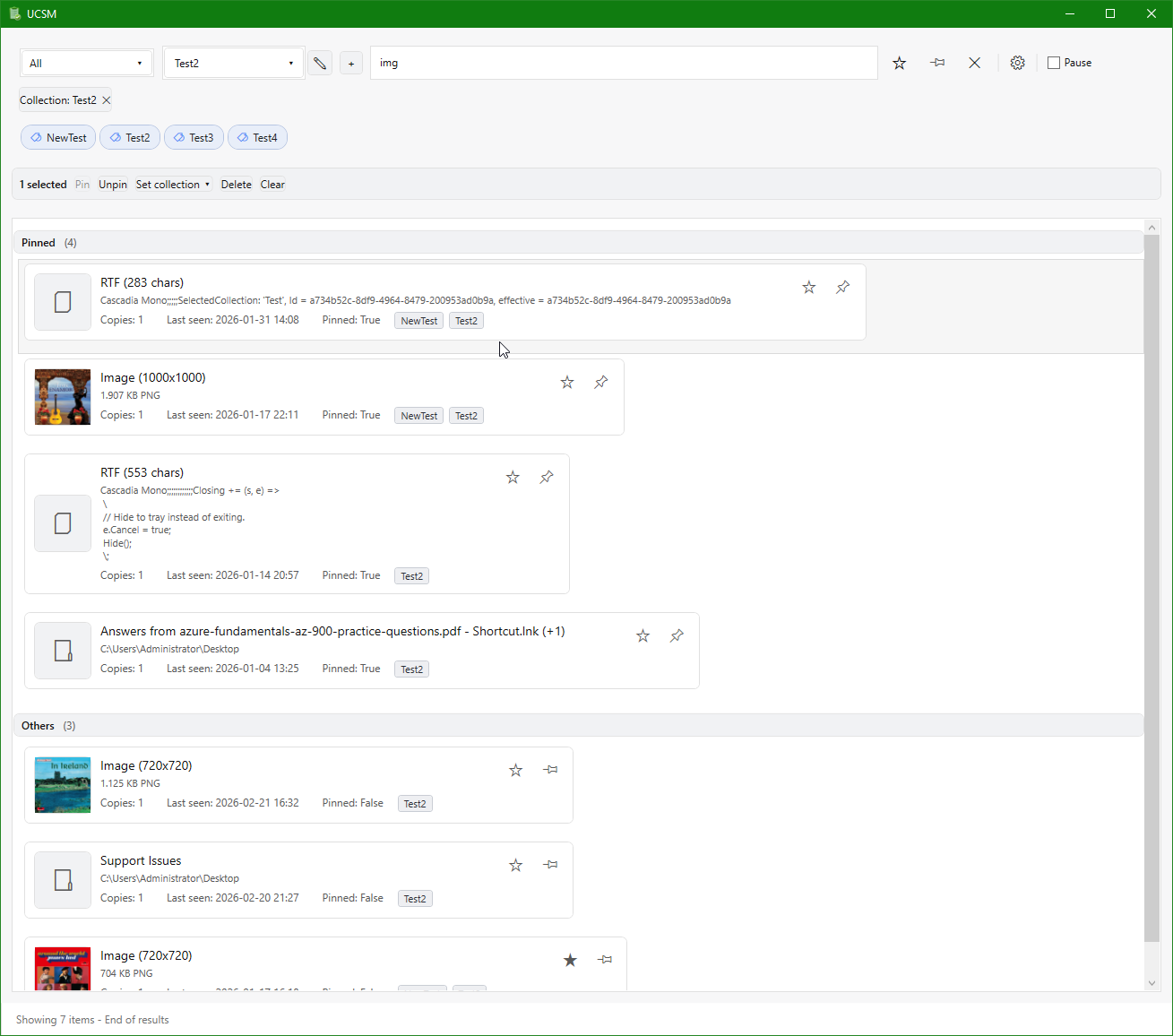
UCSM is a personal software product focused on capturing, organizing, searching, and reusing clipboard content efficiently. It is being developed as a structured .NET desktop application with strong emphasis on usability, responsiveness, and long-term maintainability.
Main window showing search, filtering, and pinned items
Latest update
Introduced licensing foundation and continued core refinements
2026.04.14 — Feature
Introduced an initial licensing foundation for UCSM, including support for loading and validating licenses and integrating the mechanism into the application startup flow. This establishes the groundwork for controlled distribution and future productization. In parallel, continued refinement of highlighting and match processing logic, simplifying how match data flows between search, preview rendering, and UI layers to improve consistency, readability, and maintainability.
Why I am building it
Clipboard history is often treated as a small utility problem, but in practice it involves several non-trivial concerns: handling multiple data formats, supporting fast search and filtering, and enabling workflows where users repeatedly reuse and reorganize information. I wanted to approach this space as a real product rather than a simple convenience tool.
UCSM is therefore both a useful application and an engineering exercise in designing software that remains understandable, adaptable, and robust as it evolves.
Design approach
The system is structured using a layered architecture that separates Domain, Application, Infrastructure, and UI concerns. The intention is to keep core behavior independent of presentation and storage details, making the system easier to reason about, test, and refine over time.
- C#, .NET, WPF, and XAML
- SQLite-based persistence with search-oriented capabilities
- Clear separation of concerns across architectural layers
- Focus on responsiveness, usability, and maintainability
Engineering focus
Much of the work in UCSM is not just about adding features, but about improving structure and clarity as the product grows. That includes refining boundaries between components, reducing coupling, improving testability, and ensuring that the UI remains responsive while the codebase stays maintainable.
The project reflects how I prefer to build software: incrementally, thoughtfully, and with continuous refactoring as a normal part of development rather than a late corrective step.
Recent UCSM progress
Consolidated highlighting and preview consistency
2026.04.12 — Quality
Continued consolidation of highlighting and preview behavior following earlier unification work. Refined how match information flows between search, preview rendering, and UI presentation to ensure consistent results across both collapsed rows and expanded previews. Simplified parts of the supporting logic to reduce edge cases and improve readability, with additional tests added to verify consistent behavior across different input scenarios.
Refined text highlighting and matching behavior
2026.04.10 — Quality
Continued refinement of text highlighting and match handling to improve consistency and correctness across different input scenarios. Adjusted merging of match ranges and handling of edge cases such as overlapping and case-insensitive matches. Simplified the underlying logic to make behavior easier to reason about and more predictable, supported by additional targeted tests to ensure stability.
Unified preview, highlighting, and ranking behavior
2026.04.08 — Architecture
Completed a broader refinement of the search and preview experience by unifying structured preview rendering, match highlighting, and ranking behavior. Preview formatting and truncation were clarified for structured content such as JSON, XML, and tables, while search highlighting was aligned across both collapsed rows and expanded preview areas through shared matching logic. Ranking was also moved to a more explicit and configurable model with named profiles, reducing hardcoded behavior and making relevance tuning easier to reason about and test. In parallel, the WPF project structure was cleaned up further and supported by a short internal guideline document to help preserve consistency as the solution continues to evolve.
Stabilized text highlighting and match handling
2026.04.05 — Quality
Refined text highlighting and match detection logic to ensure consistent behavior across varying input cases, including mixed casing and overlapping matches. Improved merging of match ranges and corrected edge cases identified through test failures. Added targeted tests to validate stability of the highlighting logic, resulting in more predictable and reliable search result presentation.
Improved item interaction and preview behavior
2026.04.04 — UI
Refined interaction patterns for clipboard items with focus on clarity and consistency. Improved handling of item activation, preview expansion, and keyboard-driven interactions to better align behavior across different content types. The changes simplify the responsibilities between UI and supporting services, and make interactions more predictable when navigating, previewing, and activating items.
What this project demonstrates
- Ability to design and implement a non-trivial desktop application from the ground up
- Architectural thinking applied in practice, not just in theory
- Strong focus on maintainability, refactoring, and long-term code quality
- A product mindset that balances technical quality with practical usability
Enterprise Desktop Systems
Over the years, I have worked on a range of commercial Windows desktop applications in professional environments where reliability, maintainability, and alignment with business needs were essential.
Much of this work has been for customer-owned systems, so I cannot publish full implementations publicly. The common thread, however, has been consistent: understanding real workflows, building robust solutions, and improving software in ways that continue to support users over time.
- Designing and implementing features in C# and .NET
- Improving existing codebases through refactoring and clearer boundaries
- Balancing new development with stability and maintainability
- Translating business needs into practical and usable desktop software
Architecture and Modernization
A recurring theme in my work has been helping software become easier to understand, safer to change, and better prepared for future growth. That includes both building systems well from the start and improving existing systems that need stronger structure.
I am particularly motivated by work where architecture is not just documentation, but something that actively improves maintainability, delivery confidence, and long-term product quality.
- Introducing clearer separation of concerns
- Improving testability and reducing hidden coupling
- Refactoring toward more maintainable and comprehensible designs
- Supporting long-term quality without losing sight of practical delivery