Why Application Code Should Speak the Language of the Workflow
Architecture Principles · 2026-09-24
A practical look at why application code should describe workflow intent, decisions, and outcomes in application language instead of letting technical mechanisms define what the system appears to mean.
Why Application Code Should Speak the Language of the Workflow
1. Application Code Should Reveal What the System Is Doing
Application code should be easy to read for the reason it exists.
When someone opens an application service, command handler, workflow, or use case, they should be able to see what the system is trying to accomplish. The code should not only show a sequence of technical steps. It should reveal the operation being performed, the decisions being made, and the outcome the caller can expect.
That sounds obvious.
But it is easy for application code to lose that clarity.
A workflow may begin with a clear purpose, but gradually become dominated by details. It receives a DTO. It validates fields. It loads a record. It calls a provider. It checks a status. It saves an entity. It returns a response. Each step may be necessary, but the larger meaning can become harder to see.
The code explains how the system moves data around.
It does not clearly explain what the system is doing.
This matters because application code often becomes the place where people look for the meaning of the system. It is where workflow rules are expected to live. It is where expected outcomes are named. It is where the difference between a valid request, a rejected request, a completed operation, and a recoverable failure should be visible.
If application code speaks mostly in technical language, that meaning becomes harder to find.
A developer has to translate the code mentally. They have to read through provider terminology, persistence shapes, transport details, and framework conventions before they can understand the workflow. The code may still be correct, but it asks the reader to reconstruct the intent from the mechanics.
Good application code reduces that burden.1
It uses names that describe what the workflow means. It accepts inputs that represent user intent rather than transport shape. It returns results that describe application outcomes rather than raw technical failures. It calls infrastructure in a way that supports the workflow instead of allowing infrastructure to define it.
This is not about making code decorative.
It is about making code honest.
If the system is activating a license, the application code should make that visible. If it is confirming a payment, restoring access, rejecting an invalid request, sending a message, or deciding whether a workflow may continue, that should be clear from the language of the code.
Application code does not need to hide every technical detail.
But it should not let those details become the main story.
The main story should be the workflow.
2. Workflow Language Is Different From Technical Language
Workflow language describes what the application means.
Technical language describes how the system happens to do it.
Both are necessary, but they should not be confused.
A workflow may need to activate a license, confirm a payment, restore access, create an account, send a message, approve a request, or reject an operation because a rule was not satisfied. Those phrases describe the work from the application’s point of view. They say what is being attempted and what kind of decision the system needs to make.
Technical language is different.
It speaks in terms of requests, responses, DTOs, entities, tables, status codes, exceptions, provider payloads, route values, form fields, and framework types. Those details are useful because the system needs them to run. But they are not usually the language that best explains the workflow.
The difference matters because language shapes design.
If application code is written primarily in technical language, the workflow becomes harder to see. A method that handles a provider response may hide the fact that the application is confirming a payment. A service that updates an entity may hide the fact that the user is restoring access. A handler that returns an HTTP-style status may hide the fact that the workflow has accepted, rejected, or delayed a request.
The code may still work.
But it asks the reader to translate every technical step back into application meaning.
Workflow language reduces that translation.
It gives the application its own vocabulary. It lets commands describe what the caller is trying to do. It lets result types describe what happened in terms the caller can act on. It lets tests describe behavior rather than implementation details. It lets boundaries translate mechanisms into concepts that belong to the application.
This does not mean technical language should disappear.
A system still needs technical names in the places where technical work is being done. Repositories, adapters, controllers, serializers, providers, persistence mappings, and transport handlers all need to deal with mechanism. The problem begins when that vocabulary moves inward and starts to describe the application itself.
A good design lets each kind of language stay where it belongs.
At the edge, technical language can be precise about protocols, payloads, storage, and integration details. Inside the application, workflow language should describe intent, decisions, rules, and outcomes.
When those languages are kept separate, the code becomes easier to read.
The mechanisms remain visible where they matter.
The workflow remains visible where it belongs.
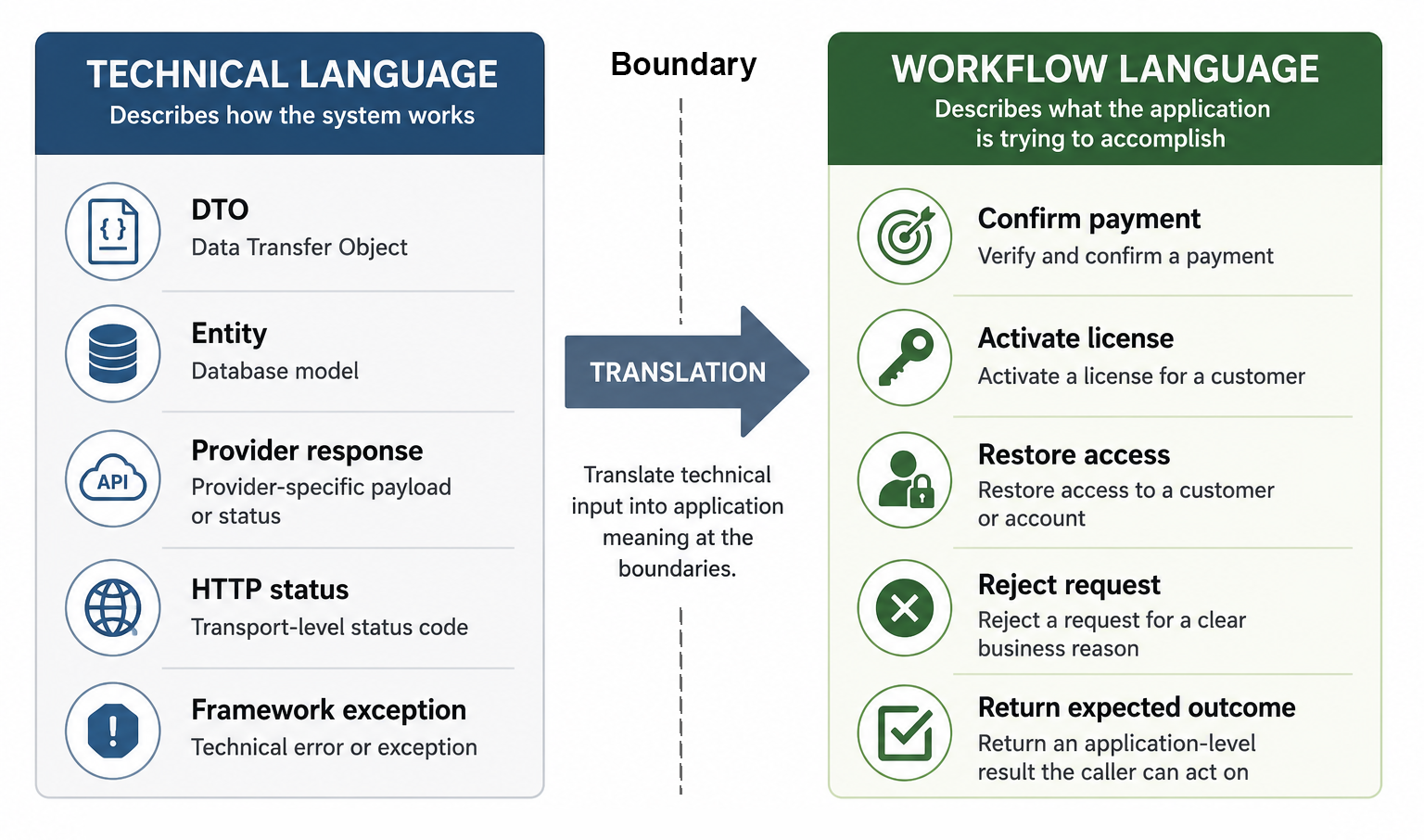
Technical language describes how the system works; workflow language describes what the application is trying to accomplish.
3. Why Technical Vocabulary Creeps Into Application Code
Technical vocabulary usually enters application code for practical reasons.
It is already there.
A controller receives a request model. A repository returns an entity. A provider client returns a response object. A framework throws an exception. A database exposes a status column. A transport layer already has a convenient way to describe whether something succeeded or failed.
Using those names directly can feel natural.
It can also feel efficient.
There are fewer models to create. There is less mapping. There are fewer small types to name. The workflow can use the object it already received instead of translating it into something else. In the short term, that can make the code look simpler.
But convenience is one of the main ways technical language spreads.
A provider status becomes the name of an application outcome. A database field becomes the name of a workflow concept. A DTO becomes the shape of a use case. An HTTP status begins to influence how application results are named. A framework exception becomes part of the normal decision flow.
None of these choices may look serious when they are introduced.
Each one may be a small shortcut.
The problem is that small shortcuts create local vocabulary. Once the application begins using technical names, future code tends to follow those names. New cases are added in the same style. Tests are written around the same concepts. Callers begin depending on the same shapes. Before long, the application is no longer describing the workflow in its own language.
It is describing the workflow through borrowed language.
This can be especially tempting when the technical detail looks authoritative. A provider has official documentation. A database schema feels concrete. A framework type is familiar. A transport status has a standard meaning. Those things can make the technical vocabulary seem like the safest vocabulary to use.
But external precision is not the same as application clarity.
The application may need a different distinction than the provider makes. It may need to combine several persistence details into one meaningful outcome. It may need to treat several technical failures the same way because the caller has the same decision in each case. It may need to name an outcome in terms of what the user can do next, not in terms of what an external mechanism returned.
Technical vocabulary also creeps in when boundaries are too thin.
If the boundary does not translate, the next layer has to understand the mechanism. If a repository returns persistence entities directly, application code starts thinking in persistence terms. If an adapter exposes raw provider responses, application code starts thinking in provider terms. If a controller passes transport models inward, application code starts thinking in request-shape terms.
That does not mean every technical term is wrong.
Some technical concepts genuinely belong in application code when they are part of the problem the application must solve. But many do not. They belong near the mechanism that produced them.
The question is not whether the technical word is familiar.2
The question is whether it expresses the workflow.
When it does not, the application begins to lose its own language.
4. The Cost of Code That Describes Mechanism Before Meaning
Code becomes harder to understand when it describes mechanism before meaning.
The reader sees what the system touches, but not what the system is trying to accomplish. They see DTOs, entities, provider responses, status codes, repositories, validators, and mapping steps. They may be able to follow the movement of data, but the purpose of the workflow is hidden behind the machinery.
That creates a reading cost.
A developer has to reconstruct the meaning from the technical path. They have to infer that this status check means the payment is pending, that this entity update means access has been restored, that this provider response means the operation can be retried, or that this exception means the request was rejected for an expected reason.
The code is not only being read.
It is being translated.
That translation may seem small in one method, but it becomes expensive across a system. Every workflow requires the same mental work. Every change requires the developer to understand which technical details are part of the mechanism and which ones represent real application decisions.
This makes maintenance slower.
It also makes mistakes more likely.
When meaning is hidden behind mechanism, a developer may change the wrong thing. They may treat a provider-specific value as a business rule. They may preserve a database shape because it looks like part of the workflow. They may add another technical branch where the application really needs a clearer outcome. They may copy logic because the real responsibility is hard to see.
Code that leads with mechanism can also make reviews less useful.
The discussion becomes focused on whether the technical steps are correct, while the workflow decision receives less attention. The reviewer may check that the right object is mapped, the right method is called, and the right value is returned, but still miss that the application language is unclear.
That matters because application code should be one of the best places to understand the system.
If it reads like infrastructure orchestration, the design loses an important source of clarity. The workflow becomes something the team has to remember rather than something the code explains.
This also affects tests.
When application code describes mechanism before meaning, tests often follow the same pattern. They verify internal steps, provider-shaped results, persistence details, or exact call sequences instead of describing what the workflow should do. The tests may provide coverage, but they do not explain the behavior very well.
A better design changes the emphasis.
The technical steps still exist, but they are not the main language of the application. The application names the operation, the decision, and the outcome. The mechanism is used in service of that meaning.
That makes the code easier to read.
It also makes change easier to place.
When meaning comes first, the reader can see what the workflow owns. When mechanism comes first, the reader has to discover it.
5. Commands Should Represent User Intent
Commands are one of the clearest places to express workflow language.
A command should describe what the caller is trying to do, not merely the technical shape of the request that arrived. It should represent an application action. It should give the workflow a clear starting point.
That makes naming important.
There is a difference between a request model called PaymentCallbackDto and a command called ConfirmPayment. There is a difference between a form model that contains fields from a screen and a command that says RestoreCustomerAccess. There is a difference between passing a provider payload inward and passing an application request that says what the system should attempt.
The technical input may be necessary.
But the command should express intent.
A good command gives the application a language of action. It says that something meaningful is being attempted: activate a license, register a customer, send a confirmation email, change a subscription, approve an invitation, or reject a request. The workflow can then decide what should happen in response to that intent.
This helps keep the application code readable.
When a handler accepts a command with a clear name, the reader does not have to start by understanding the UI, transport, or provider that produced it. They can begin with the application meaning. The command tells them what kind of operation is being performed before the code reveals how the operation is carried out.
That is an important separation.
A UI form may contain fields arranged for presentation. An HTTP request may contain route values, query strings, headers, or bound data. A provider callback may contain names and statuses chosen by the provider. A persistence model may contain fields shaped by storage. None of those shapes should automatically become the application command.
The boundary should translate them.
It should turn incoming technical input into a command that belongs to the application. The command may still contain data from the request, but the shape and name should reflect the workflow rather than the mechanism.
This does not mean every command needs to be large or formal.
Some commands are simple. They may contain only a few values. In some cases, a method name and parameters may be enough. The important point is not the amount of structure. The important point is whether the application receives input in a form that describes what is being attempted.
A command that represents user intent also helps with change.
If the UI changes, the command may remain stable. If the transport mechanism changes, the command may remain stable. If a provider changes its payload, the command may remain stable. The application can continue to describe the same workflow even when the way the request arrives changes.
That stability is valuable.
It means the application owns the language of the operation.
Commands should not merely carry data into the application.
They should name the work the application is being asked to do.
6. Results Should Represent Workflow Outcomes
Results should describe what happened in the workflow.3
They should not merely expose what happened in the mechanism behind it.
That distinction matters because callers usually need to make decisions in application terms. They need to know whether the operation succeeded, whether the request was rejected, whether something is pending, whether the user must correct input, whether a retry makes sense, or whether the workflow reached a final state.
Those are workflow outcomes.
They are different from provider responses, database errors, HTTP status codes, framework exceptions, or transport failures. Those technical details may explain how the outcome was produced, but they are not always the best language for the caller to use.
A result type gives the application a place to name those outcomes clearly.
A payment workflow may return Confirmed, Pending, Rejected, or ProviderUnavailable. A license activation workflow may return Activated, AlreadyActivated, DeviceLimitReached, or LicenseNotFound. A message-sending workflow may return Sent, InvalidRecipient, TemporarilyUnavailable, or Failed.
Those names describe what the caller can understand and act on.
They do not require the caller to know every technical reason behind the result.
This helps protect workflow language. Instead of letting a provider status become the application result, the application translates the provider status into a meaningful outcome. Instead of allowing a database exception to travel through the system, the boundary can turn it into a result that describes whether the requested operation could continue. Instead of forcing callers to catch several technical failures, the workflow can return expected outcomes directly.
That makes the code easier to read.
It also makes the contract more honest.
If an operation can fail in expected ways, those outcomes should usually be visible. A caller should not have to discover them through documentation, exception handling, or knowledge of the infrastructure. The result should say what can happen.
This does not mean every method needs a complex result object.
Some operations are simple. A returned value, a bool, or an empty success result may be enough. But when the caller has different decisions to make depending on the outcome, the result should make those differences explicit.
The result should not be shaped only by what the mechanism returned.
It should be shaped by what the workflow means.
Good results reduce accidental coupling because they give the application its own language for success, rejection, delay, failure, and follow-up. They allow technical mechanisms to change without forcing callers to understand the new technical shape.
That is one of the practical benefits of workflow language.
The application does not only name what it is asked to do.
It also names what happened when it tried.
7. Application Services Should Read Like Use Cases
Application services should read like use cases.
They do not need to hide every technical step, but they should make the workflow easy to follow. A reader should be able to understand what the operation is trying to accomplish, which decisions are being made, and what outcome is returned to the caller.
That is different from reading like a script of infrastructure operations.
Load this entity. Call this repository. Map this DTO. Invoke this provider. Save this record. Return this status. Those steps may all be necessary, but if they dominate the application service, the meaning of the use case becomes harder to see.
The service becomes a technical coordinator.
Not a clear expression of the workflow.
A well-shaped application service gives the workflow a readable structure. It accepts a command that represents intent. It checks rules that belong to the operation. It asks collaborators for the information it needs. It translates expected outcomes into application results. It leaves infrastructure details behind the boundaries that own them.
The code should tell a story in application language.
A license activation service should read as if the system is activating a license, not as if it is merely loading rows and updating fields. A payment confirmation service should read as if the system is confirming a payment, not as if it is only processing a provider response. A restore-access workflow should read as if access is being restored, not as if a collection of technical flags is being rearranged.
This does not mean application services should become vague.
They still need concrete behavior. They still need to call repositories, adapters, validators, clocks, mail senders, or other collaborators. But those collaborators should appear as supporting roles inside a use case that remains visible.
The workflow should be the main subject.
That is why names matter so much. Method names, command names, result names, and collaborator names all influence how the service reads. If the names come from the workflow, the reader can follow the application’s meaning. If the names mostly come from infrastructure, the reader has to translate the code back into meaning.
Application services also provide a useful test for design quality.
If a service is hard to describe without listing technical steps, the workflow language may not be clear enough. If the service has no obvious use case, it may have become a procedural dumping ground. If every branch depends on provider or persistence details, the boundaries may be too thin.
A good application service does not need to be large.
In fact, many useful services are quite small. What matters is that they give the operation a clear place to live. They make the important decisions visible. They keep the workflow readable enough that future changes have somewhere natural to go.
When application services read like use cases, the code becomes easier to discuss.
A developer can ask whether the workflow is correct, not only whether the technical steps are arranged correctly. A reviewer can see whether the operation returns the right outcome. A test can describe the behavior in the same language as the code.
That is the practical value.
The application service becomes more than a place where dependencies are called.
It becomes the place where the application explains what it is doing.
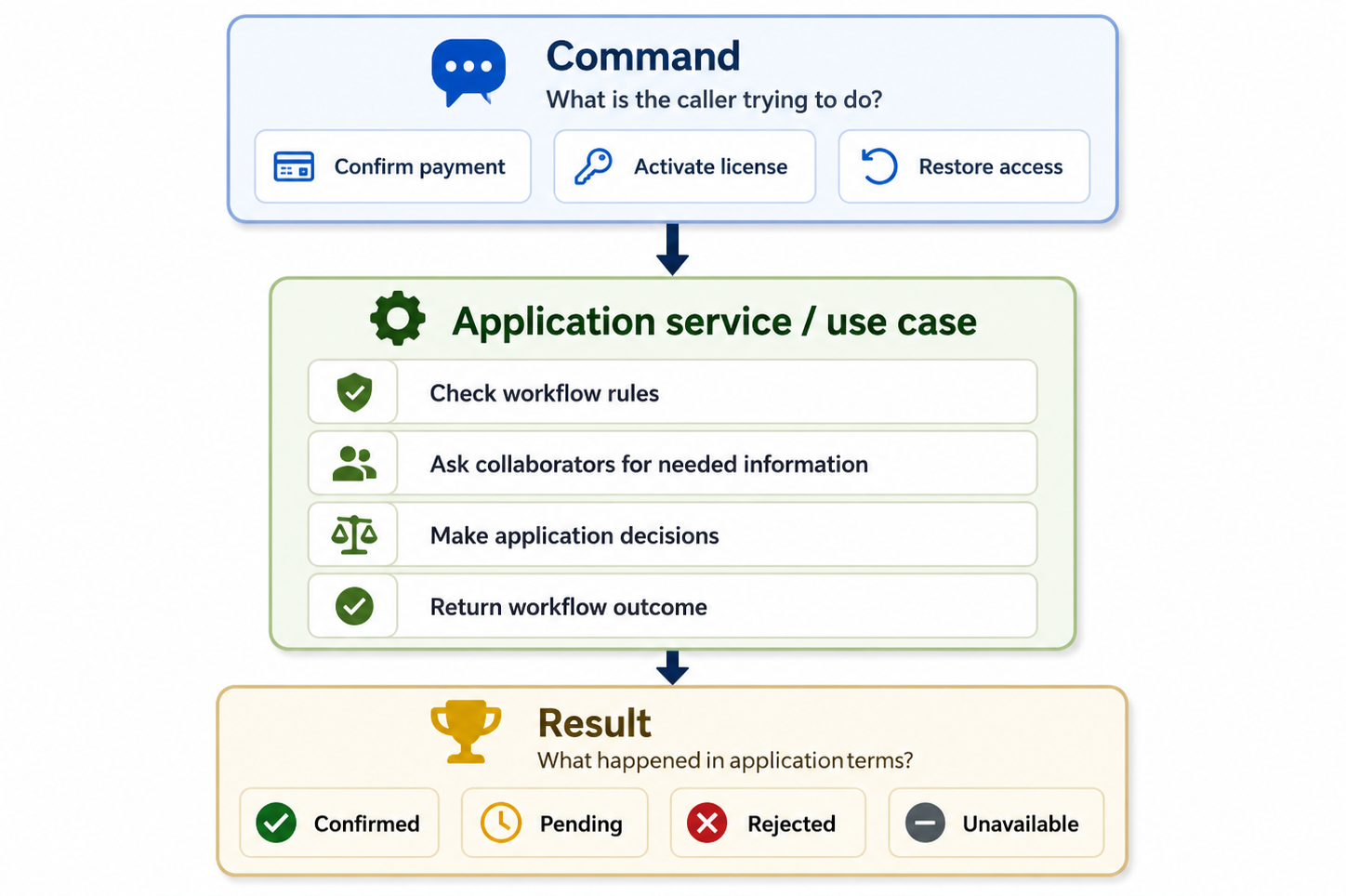
A well-shaped application service receives intent, makes workflow decisions, and returns outcomes in application language.
8. Infrastructure Should Be Named From the Application’s Point of View
Infrastructure should support the workflow without taking over its language.4
That means infrastructure-facing abstractions should often be named from the application’s point of view. The application should not need to think in the exact vocabulary of a database, provider, file system, framework, or transport mechanism. It should depend on collaborators that describe what the application needs, not every detail of how that need is satisfied.
This is a small distinction, but it has a large effect on readability.
A workflow that depends on a StripeClient, a SmtpClient, an EntityFrameworkRepository, or a BlobStorageWrapper is already speaking in technical terms. Those names may be accurate inside infrastructure, but they are often too specific for application code. They tell the application which mechanism is being used before they tell it what purpose the mechanism serves.
A workflow usually needs something more meaningful.
It may need to confirm a payment, send an email, store a file, load a license, reserve a name, publish a message, or restore access. Those needs can be expressed through names that belong to the application. The implementation can still use Stripe, SMTP, Entity Framework, Azure storage, or another technical mechanism behind the boundary.
The application does not need to start there.
A name such as IPaymentConfirmationGateway may express the application’s need more clearly than a provider-specific client. A name such as IEmailSender may be enough when the application only needs to send a message. A repository or query interface can be named around the data the workflow needs rather than around the storage technology used to retrieve it.
This helps keep infrastructure in a supporting role.
The application asks for a capability. Infrastructure provides it. The application should not have to carry the vocabulary of the mechanism unless that vocabulary is part of the workflow itself.
This also makes change easier.
If the provider changes, the application-facing name may remain valid. If storage changes, the workflow may still ask the same question. If the email mechanism changes, the use case may still need to send the same message. A well-named abstraction lets the application remain stable while the technical implementation changes behind it.
The opposite creates coupling through language.
When application code depends on provider-specific names, provider concepts become harder to remove. When workflow code speaks in database terms, persistence details become harder to change. When a use case names its collaborators after frameworks, the framework becomes part of the application’s mental model.
That may be acceptable in small or short-lived code.
But in code that is expected to evolve, names should be chosen carefully.
This does not mean all infrastructure names must be generic.
Inside the infrastructure layer, specific names are useful. A class that talks to a provider should be clear about that provider. A persistence implementation should be clear about the storage mechanism it uses. A transport adapter should be clear about the protocol it handles.
The important question is where those names appear.
Application code should usually speak in terms of the capability it needs and the workflow it supports. Infrastructure code can speak in terms of the mechanism it uses to provide that capability.
When names follow that boundary, the design becomes easier to read.
The application says what it needs.
Infrastructure says how that need is fulfilled.
9. Avoiding Accidental Provider, UI, and Persistence Language
Application code can lose its workflow language gradually.
It usually does not happen because someone deliberately decides to make the code harder to read. It happens because provider language, UI language, and persistence language are already available. They are convenient, concrete, and often close to the code being written.
That makes them easy to reuse.
A provider returns a status, so the workflow starts using that status. A UI form has a field name, so the command receives the same name. A database entity has a property, so the application begins to treat that property as part of its own model. A transport layer has a response code, so the result is shaped around that code.
Each choice may look small.
Together, they can change the language of the application.
Provider language is especially easy to import because providers often define detailed concepts. They may have their own statuses, failure reasons, identifiers, lifecycle states, and retry rules. Some of those concepts may be useful to the application, but they should not cross the boundary unchanged unless they truly express the workflow.
The application may not need to know that a provider returned a specific technical code.
It may need to know whether the payment is confirmed, pending, rejected, or unavailable.
UI language creates a different kind of risk.
A screen is shaped around presentation. It may group fields for convenience, use labels that help the user, include temporary values, or expose options in a way that makes sense for the interface. That does not mean the same shape should become the application command. The workflow should receive a request that describes what the user is trying to do, not merely what the screen happened to submit.
Persistence language can be even more subtle.
Database names often feel stable and authoritative. Entities, columns, relationships, and stored states can easily become the vocabulary of the application. But persistence is shaped by storage needs. It may optimize for queries, constraints, migrations, or historical compatibility. Those concerns are not always the same as workflow meaning.
A persistence model can explain how data is stored.
It should not automatically define what the application means.
Avoiding accidental language does not mean rejecting every external term. Some terms are correct because they are part of the real workflow. If the application genuinely works with licenses, payments, messages, users, subscriptions, or approvals, those words belong in the application. The problem is not external vocabulary by itself. The problem is vocabulary that belongs to a mechanism but is treated as if it belongs to the workflow.
A useful test is to ask where the word came from.
Did it come from the user’s goal, the business process, or the application decision?
Or did it come from a provider API, a database schema, a screen layout, or a framework convention?
If the word came from the mechanism, the boundary should probably translate it before it becomes part of the application language. That translation may be small. It may be a different type name, a clearer result value, a command shaped around intent, or a mapper that prevents persistence details from spreading.
The goal is not to make the code artificially abstract.
The goal is to make the application honest about what it owns.
Provider, UI, and persistence language can all be useful in the right place. They become harmful when they quietly replace workflow language. When that happens, the code may still run correctly, but it becomes harder to understand what the system is really doing.
Good application code chooses its words deliberately.
It lets mechanisms keep their own language at the edge.
Inside the workflow, the application should speak for itself.
10. Tests Should Describe Workflow Behavior
Tests should speak the same language as the workflow.5
When application code is written in workflow language, tests have a better chance of describing behavior clearly. They can say what the caller is trying to do, what decision the application should make, and what outcome should be returned. The test becomes a small explanation of the use case.
That is different from testing only the technical path.
A test may verify that a repository was called, a provider response was mapped, an entity property was changed, or a specific internal method was invoked. Sometimes those details matter. But if the test focuses mainly on internal steps, it may say very little about the behavior the workflow is supposed to protect.
The test can pass while the intent remains unclear.
A good application test should usually make the behavior visible.
It should be possible to read the test name, setup, action, and assertion and understand the workflow in application terms. A license activation test should describe whether a license is activated, already active, missing, expired, or blocked by a device limit. A payment confirmation test should describe whether the payment is confirmed, pending, rejected, or unavailable. A restore-access test should describe whether access was restored or why it could not be restored.
Those are workflow outcomes.
They are more useful than tests that only describe technical movement.
This does not mean tests should ignore implementation entirely. Some tests need to verify interactions with boundaries. Some need to confirm that a message is sent, a record is saved, or a collaborator is called in a particular case. But even then, the test should be framed around the behavior that makes the interaction necessary.
The technical assertion should support the workflow meaning.
It should not replace it.
Workflow-language tests also make change easier. If the internal implementation changes but the behavior remains the same, the tests should not require unnecessary rewriting. If the workflow outcome changes, the tests should make that change visible. This helps the test suite act as a guide rather than a source of noise.
When tests are written in technical language, they often become brittle.
They may depend on provider terms, persistence shapes, DTO names, call order, or framework details that are not central to the use case. That can make refactoring harder because tests fail for reasons that do not reflect a real change in behavior.
When tests are written in workflow language, they become more useful as documentation.
They show what the application promises to do. They describe expected outcomes. They reveal which cases matter. They help future developers understand not only that the code works, but what kind of work it is supposed to perform.
This is one of the practical benefits of making application code speak the language of the workflow.
The tests can speak that language too.
And when both code and tests use the same application vocabulary, the system becomes easier to read, easier to discuss, and easier to change.
11. Refactoring Toward Clearer Workflow Language
Refactoring toward clearer workflow language usually starts with noticing where the code has become hard to explain.
A method may be correct, but difficult to describe without listing technical steps. A service may work, but its name may not say what use case it represents. A command may contain the right data, but still look like a UI form or transport DTO. A result may be useful, but shaped around provider or persistence details instead of application outcomes.
Those are good signals.
They show where the application may have borrowed too much language from the mechanisms around it.
The first step is often to ask what the code is really trying to say. Is this operation activating a license, confirming a payment, restoring access, sending a message, approving a request, or rejecting an expected case? Is this result telling the caller that the operation succeeded, failed, is pending, is unavailable, or requires correction? Is this collaborator providing a capability the workflow needs, or exposing a specific technical implementation?
Those questions help reveal better names.
Sometimes the refactoring is mostly naming. A method can be renamed so it describes the application action. A result value can be renamed so it describes the workflow outcome. A collaborator can be renamed from the application’s point of view. A test can be rewritten so it describes behavior instead of internal movement.
Small naming changes can have a large effect.
They make the next reader do less mental translation.
Other times, clearer workflow language requires moving or reshaping code. A controller may need to translate a request model into a command before calling the application. An adapter may need to translate provider responses into application results. A repository may need to stop exposing persistence entities directly to a workflow. A large service may need to be split because it contains several different use cases with different reasons to change.
These refactorings do not need to happen all at once.
In fact, they are often safer when done gradually. Choose one place where the language is misleading. Rename one concept. Introduce one command that expresses intent. Replace one provider-shaped result with a workflow outcome. Move one technical branch closer to the boundary that understands it.
The goal is not to make the code sound elegant.
The goal is to make the code more honest.
A useful refactoring should make it easier to answer basic questions. What is the caller trying to do? What decision does the workflow own? What outcome can be returned? Which details belong to infrastructure, UI, persistence, or transport? Which words should be part of the application’s vocabulary?
When those answers become clearer, the design improves.
This kind of refactoring also helps tests. Once the workflow language is clearer, tests can often be rewritten to describe the same language. A test that previously asserted a provider-shaped status may assert an application outcome instead. A test that previously verified several internal calls may describe the result of a use case.
That makes the test suite easier to read.
It also makes future refactoring less risky, because the tests protect behavior rather than every internal step.
Refactoring toward workflow language is not about hiding complexity.
It is about placing complexity where it belongs and naming it in the language of the decision it represents. Technical details still exist. They still need careful implementation. But they should not be allowed to define the application’s meaning by accident.
A system becomes easier to change when its language is clear.
And application code becomes clearer when it speaks in terms of the workflow it exists to support.
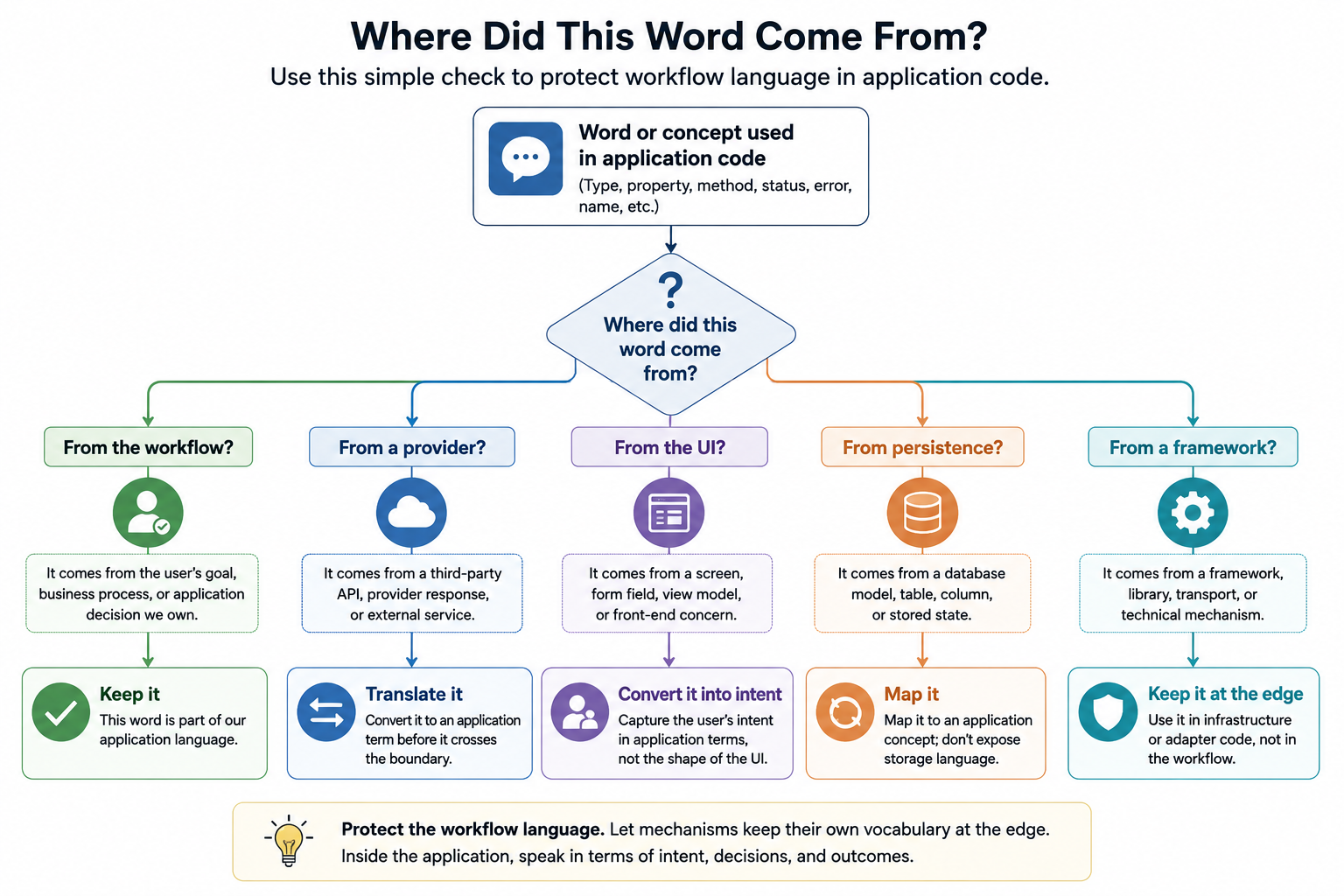
A useful way to protect workflow language is to ask where each important word in the application code came from.
12. Closing
Application code should help the system explain itself.
It should not require every reader to reconstruct the workflow from DTOs, entities, provider responses, framework types, persistence shapes, and status codes. Those details may all be necessary, but they are not the reason the application exists.
The workflow is.
That is why language matters.
The names used in application code shape how developers understand the system. They influence where decisions appear to belong. They affect how tests are written. They make some changes feel natural and others feel awkward. Over time, the language of the code becomes part of the architecture.
When application code speaks the language of the workflow, intent remains visible.
Commands describe what the caller is trying to do. Results describe what happened in terms the caller can act on. Application services read like use cases. Infrastructure is named from the application’s point of view. Tests describe behavior rather than only technical movement.
That does not remove the need for technical code.
A real system still needs controllers, repositories, adapters, persistence models, provider clients, serializers, and framework integrations. But those mechanisms should not be allowed to define the application’s meaning by accident. They should support the workflow without replacing its language.
Clear workflow language also makes change easier.
When a new case appears, the code gives it somewhere natural to go. When a result needs to become more precise, the application already has a place to name that outcome. When a provider changes, the workflow can remain stable because the provider’s language has not become the application’s language. When tests fail, they can point toward behavior rather than incidental structure.
This is not only a matter of style.
It is a matter of maintainability.
Code that speaks clearly about the workflow is easier to read, easier to review, easier to test, and easier to change. It gives future developers fewer things to translate before they can understand what the system is doing.
The application layer should be the place where the system says what it means.
If that layer speaks mostly in the language of mechanisms, the meaning becomes harder to find.
If it speaks in the language of the workflow, the system becomes easier to understand.
And easier to keep healthy over time.
Need a second opinion on a .NET codebase?
I offer practical architecture and maintainability advisory for .NET teams working on long-lived business applications.
Want occasional updates?
Subscribe to receive occasional practical notes on .NET architecture, maintainable software, project progress, and new articles.