Why Method Names Should Reveal Intent, Not Implementation
Practice · 2026-11-14
A practical look at how method names shape API usability by revealing intent, separating application language from implementation details, making commands visible, and giving tests clearer language.
Why Method Names Should Reveal Intent, Not Implementation
1. Introduction: A Method Name Is Part of the API
A method name is not just a label.
It is part of the API.
It tells the caller what kind of operation is being offered, what kind of behavior to expect, and what kind of responsibility the method owns. Even before the caller looks at the parameters or return type, the method name has already created an expectation.
That expectation matters.
For example:
await articleService.ProcessAsync(
    request,
    ct);
This call may compile. It may even work correctly.
But the name does not say much.
What does ProcessAsync mean?
- Does it create an article?
- Does it update an article?
- Does it publish an article?
- Does it validate the request?
- Does it render Markdown?
- Does it send a notification?
- Does it do all of those things?
The method name tells the reader that something happens, but it does not say what the application operation is.
A clearer name gives the caller more help:
await articlePublishingService.PublishAsync(
    request,
    ct);
or:
await articlePreviewService.RenderPreviewAsync(
    request,
    ct);
or:
await articleDraftService.UpdateDraftAsync(
    request,
    ct);
These names do more than identify methods.
They reveal intent.
They tell the reader which operation is being performed. They also make incorrect use easier to notice. A caller looking for a preview is less likely to call PublishAsync by mistake. A caller trying to publish an article is less likely to call UpdateDraftAsync. The name guides the caller toward the right method.
That is one of the simplest ways an API can become harder to misuse.
A method name should reduce guessing.
It should not force the caller to inspect the implementation just to understand what the method means.
This is true for public libraries, but it is just as true for internal application code. An internal service method, repository method, domain method, helper method, test builder method, or adapter method is still called by someone. That “someone” may be another developer, a future version of yourself, or a test written months later.
The API still teaches them how the code is meant to be used.
For example:
await licenseService.HandleAsync(
    request,
    ct);
This method may be part of a command handler pattern, where HandleAsync is expected. In that context, the command type may carry the meaning:
public Task HandleAsync(
    RestoreLicenseCommand command,
    CancellationToken ct);
Here, HandleAsync can be acceptable because the surrounding convention explains what is being handled.
But outside such a convention, vague names are weaker:
public Task HandleAsync(
    Request request,
    CancellationToken ct);
Now both the method name and the request type are vague.
The caller receives very little guidance.
A more intentional API might say:
public Task<RestoreLicenseResult> RestoreAsync(
    RestoreLicenseRequest request,
    CancellationToken ct);
This signature tells a clearer story.
The method restores a license.
The request contains the information needed for that operation.
The result contains the outcome the caller should handle.
The name, parameter type, and return type work together.
That is what good API design often looks like. It does not rely on one part of the signature to carry all meaning. The name points to the operation, the input type describes what the operation needs, and the result type describes what the caller can learn afterward.
Method names become especially important when code grows.
A small class with two methods can survive vague naming for a while. The reader can inspect the class quickly. The cost of guessing is low.
But as systems grow, vague names create friction.
A service may accumulate methods such as:
ProcessAsync
HandleAsync
UpdateAsync
ApplyAsync
ExecuteAsync
RunAsync
SaveAsync
ManageAsync
Each name may have made sense when it was written.
Together, they make the API harder to navigate.
The caller has to ask:
- Which method should I use?
- What is the difference between
UpdateAsyncandApplyAsync? - Does
SaveAsynconly persist data, or does it also publish changes? - Does
ProcessAsyncvalidate, transform, store, notify, or all of those things? - Does
ExecuteAsyncreturn a meaningful outcome, or does it only perform side effects?
The API no longer guides the caller. It makes the caller investigate.
That investigation is not harmless. Every time a caller has to inspect implementation details to choose a method, the API has failed to communicate something important.
Sometimes the problem is not the name alone.
Sometimes the name reveals a deeper design issue.
A method named ProcessAsync may be vague because the operation itself is vague. It may contain several responsibilities that have not been separated. It may validate input, update state, send email, write analytics, and generate output in one broad operation.
In that case, renaming the method is not enough.
The better question is:
What decision does this method actually represent?
If the answer is clear, the method can usually have a clearer name.
If the answer is not clear, the API may be exposing a design problem.
For example:
await articleService.ProcessAsync(
    request,
    ct);
might become:
await articleDraftService.SaveDraftAsync(
    request,
    ct);
or:
await articlePublishingService.PublishAsync(
    request,
    ct);
or:
await articleImportService.ImportAsync(
    request,
    ct);
Those are not merely different names.
They may be different responsibilities.
The clearer names help reveal whether the original method was doing one thing or several.
This is why method naming is not only a style concern.
It is a design concern.
A good name can show that an operation has a clear purpose.
A weak name can show that the purpose is unclear.
A misleading name can hide side effects, wrong responsibilities, or implementation details that have escaped into the API.
For example:
var article = await articleService.GetAsync(
    articleId,
    ct);
A caller will normally expect this method to read data.
If it also records a view, updates a timestamp, creates a missing record, or publishes an event, the name may be misleading.
The issue is not that side effects are always wrong.
The issue is that the method name should not hide behavior the caller should understand.
A clearer name might be:
var article = await articleReadingService.OpenForReadingAsync(
    articleId,
    ct);
or the behavior could be separated:
var article = await articleQueryService.GetDetailsAsync(
    articleId,
    ct);

await articleViewTracker.RecordViewAsync(
    articleId,
    ct);
The right design depends on the application.
But the principle is the same.
The method name should help the caller understand whether the operation only reads, changes state, coordinates a workflow, or triggers consequences.
A method name is also part of how the code is reviewed.
In a pull request, this line is easy to understand:
await articlePublishingService.PublishAsync(
    request,
    ct);
This line requires more investigation:
await articleService.ProcessAsync(
    request,
    ct);
The reviewer may need to open the method, read the implementation, inspect the request type, and understand the surrounding service before knowing what changed.
That extra work adds up.
Clear names make reviews more focused because they let the reviewer discuss behavior and responsibility instead of decoding intent.
Tests benefit in the same way.
Compare:
[Fact]
public async Task ProcessAsync_ReturnsFalse_WhenInputIsInvalid()
{
}
with:
[Fact]
public async Task PublishAsync_ReturnsNotReady_WhenArticleHasNoContent()
{
}
The second test name is easier to understand because the method under test has clearer intent.
The API gives the test better language.
That is a useful design signal.
If tests are hard to name, the API may be too vague.
A good method name does not need to explain everything.
The name should not become a sentence.
The parameters, request type, result type, class name, and surrounding context all help carry meaning.
For example:
article.Publish(publishedAt);
This is short and clear because the receiver gives the context. Inside an Article, the method name Publish is enough.
But this is weaker:
service.Publish(value);
The receiver and parameter are vague, so the method name has to do more work.
This is why naming cannot be judged in isolation.
A method name should fit the API around it.
Publish may be excellent on an Article.
PublishAsync may be excellent on an ArticlePublishingService.
ExecuteAsync may be acceptable on a framework-defined background service.
HandleAsync may be acceptable in a command handler convention.
But vague names become a problem when there is no other clear source of meaning.
A useful question is:
What would a caller reasonably expect this method to do from its name alone?
If the answer is close to the actual behavior, the name is probably useful.
If the answer is uncertain, the name may be too vague.
If the answer is wrong, the name is dangerous.
Another useful question is:
Does this name describe intent, or only activity?
Names such as Process, Handle, Run, and Execute often describe activity.
Names such as Publish, Archive, Restore, Confirm, RenderPreview, and RecordView describe intent more clearly.
The difference matters because callers do not only need to know that code runs.
They need to know what operation they are asking for.
That is why method names are part of the API design.
- They guide callers.
- They reveal responsibility.
- They make behavior easier to discuss.
- They help tests explain intent.
- They help reviews catch misuse.
And when they are vague, they often show where the design itself needs more clarity.
The rest of this article looks at how method names can either reduce or increase API misuse, and how clearer names can make ordinary C# code easier to read, test, and change.
2. Vague Names Make Callers Guess
Vague method names make the caller do extra work.
They force the reader to ask what the method really does, what kind of state it changes, which rules it applies, and what consequences it may trigger. Sometimes the answer is obvious from the surrounding context. Often it is not.
For example:
await articleService.ProcessAsync(
    request,
    ct);
This name gives very little guidance.
The caller knows that something is being processed, but not what kind of operation is being performed.
- The method might create a draft.
- It might publish an article.
- It might validate metadata.
- It might render Markdown.
- It might send notifications.
- It might update search indexes.
- It might do several of those things.
The name does not help the caller choose the method confidently.
A vague name often shifts responsibility from the API to the caller. Instead of the API saying what it does, the caller must remember it, infer it, or inspect the implementation.
That is where misuse begins.
A caller may use ProcessAsync because it sounds general enough. Another caller may use it in a slightly different context. A third caller may add another behavior because the method name does not clearly limit its responsibility.
Over time, the method becomes a convenient place to put more work.
The name allows it.
This is a common problem with names such as:
Process
Handle
Execute
Run
Apply
Update
Manage
DoWork
Perform
These names are not always wrong.
They can be reasonable when a framework or pattern supplies the missing meaning. A background service may have an ExecuteAsync method because the hosting framework defines that contract. A command handler may have a HandleAsync method because the command type describes the operation. A pipeline step may have a ProcessAsync method because the pipeline itself gives the method its context.
For example:
public Task HandleAsync(
    PublishArticleCommand command,
    CancellationToken ct);
This can be clear enough.
The method name is generic, but the command type carries the intent.
The caller can see that this handler handles a publish-article command.
But this is different:
public Task HandleAsync(
    Request request,
    CancellationToken ct);
Here, both the method name and the request type are vague.
The API gives the caller almost no help.
The same applies to service methods.
public Task ExecuteAsync(
    ArticleRequest request,
    CancellationToken ct);
This name says that something executes.
But it does not say what application decision is being made.
A clearer name might be:
public Task<PublishArticleResult> PublishAsync(
    PublishArticleRequest request,
    CancellationToken ct);
or:
public Task<UpdateArticleContentResult> UpdateContentAsync(
    UpdateArticleContentRequest request,
    CancellationToken ct);
or:
public Task<ArticlePreview> RenderPreviewAsync(
    RenderArticlePreviewRequest request,
    CancellationToken ct);
Each of these names narrows the meaning.
That makes the API easier to use correctly.
The caller can choose the method based on intent instead of guessing from a generic verb.
Vague names are especially risky in broad services.
For example:
public sealed class ArticleService
{
    public Task ProcessAsync(
        ArticleRequest request,
        CancellationToken ct);

    public Task UpdateAsync(
        ArticleRequest request,
        CancellationToken ct);

    public Task ApplyAsync(
        ArticleRequest request,
        CancellationToken ct);

    public Task SaveAsync(
        ArticleRequest request,
        CancellationToken ct);
}
This API is hard to navigate.
The caller has to understand the difference between processing, updating, applying, and saving. Those differences may exist in the implementation, but they are not clear at the surface.
The service has methods.
But it does not provide a strong language for the operations.
A more useful API might separate the responsibilities:
public sealed class ArticleDraftService
{
    public Task<UpdateArticleDraftResult> UpdateDraftAsync(
        UpdateArticleDraftRequest request,
        CancellationToken ct);
}

public sealed class ArticlePublishingService
{
    public Task<PublishArticleResult> PublishAsync(
        PublishArticleRequest request,
        CancellationToken ct);
}

public sealed class ArticlePreviewService
{
    public Task<ArticlePreview> RenderPreviewAsync(
        RenderArticlePreviewRequest request,
        CancellationToken ct);
}
This is not better because there are more classes.
It is better only if the responsibilities are clearer.
Each method now has a name that points to the operation the caller wants.
That makes misuse harder.
The caller no longer has to decide whether publishing is done by ProcessAsync, ApplyAsync, or SaveAsync.
The API says it.
Vague names can also hide side effects.
For example:
await licenseService.ValidateAsync(
    request,
    ct);
This may sound like a query or check.
But what if the method also records the current device, refreshes usage, updates the last validation time, and writes an audit record?
The method may still be doing the right work.
License validation may reasonably include usage tracking.
But the name ValidateAsync may not reveal enough.
A clearer name might be:
var result = await licenseValidationService.ValidateUsageAsync(
    request,
    ct);
or:
var result = await licenseActivationService.ValidateActivationAsync(
    request,
    ct);
The revised name gives the operation more shape.
It tells the caller that this is not just a harmless predicate. It is part of a workflow.
That distinction matters.
A vague query-like name can cause callers to treat a method as safe to repeat, safe to cache, or safe to call just for inspection.
If the method changes state, that assumption can create bugs.
For example:
var article = await articleService.GetAsync(
    articleId,
    ct);
A caller would normally expect this to retrieve an article.
If it also creates a missing article, records a view, updates statistics, or changes workflow state, the method name is hiding behavior that matters.
A clearer design could separate the operations:
var article = await articleQueryService.GetDetailsAsync(
    articleId,
    ct);

await articleViewTracker.RecordViewAsync(
    articleId,
    ct);
or name the combined behavior explicitly:
var article = await articleReadingService.OpenForReadingAsync(
    articleId,
    ct);
The combined method may still have side effects, but the name makes the operation less surprising.
Vague names also make error handling harder to understand.
For example:
var result = await service.ExecuteAsync(
    request,
    ct);
If this returns a failure, what kind of failure should the caller expect?
- Validation failure?
- Missing data?
- Permission denied?
- External provider failure?
- Workflow not ready?
The method name does not help.
A clearer method name can make the result easier to interpret:
var result = await articlePublishingService.PublishAsync(
    request,
    ct);
Now a result such as NotReady, NotFound, or AlreadyPublished makes sense in the context of publishing.
The operation name gives meaning to the outcome.
This is why names and results should be designed together.
A vague operation often leads to vague results.
For example:
public sealed record ProcessResult(
    bool Success,
    string? Message);
This result type may be flexible, but it does not say much.
A more specific operation can have a more specific result:
public sealed record PublishArticleResult(PublishArticleStatus Status);
The result is clearer because the method is clearer.
The method is clearer because the responsibility is clearer.
Those things reinforce each other.
Vague names can also make tests weaker.
A test named like this does not explain much:
[Fact]
public async Task ProcessAsync_ReturnsFalse_WhenRequestIsInvalid()
{
}
- What process?
- What request?
- What kind of invalid state?
- What behavior is being protected?
Compare that with:
[Fact]
public async Task PublishAsync_ReturnsNotReady_WhenArticleHasNoContent()
{
}
The second test explains more because the API gives it better language.
The method name says what operation is being tested.
The result says what outcome matters.
The condition says why that outcome occurs.
This is a good sign.
When tests become easier to name, the API is often becoming clearer.
When tests require vague phrases such as Process, Handle, Execute, or ReturnsFalse, the API may be hiding too much.
Vague names also make code reviews less effective.
A reviewer seeing this line may need to investigate:
await articleService.ProcessAsync(
    request,
    ct);
A reviewer seeing this line has more context immediately:
await articlePublishingService.PublishAsync(
    request,
    ct);
The second call does not explain every detail, but it points the reviewer in the right direction.
The reviewer can ask useful questions:
- Is this the right place to publish?
- Is the request complete?
- Is the result handled?
- Should this operation notify subscribers?
- Should this happen before or after saving?
With ProcessAsync, the first question is often more basic:
What does this actually do?
That is not the best use of review attention.
A useful question when evaluating a method name is:
Could a reasonable caller choose this method for the wrong reason?
If the answer is yes, the name may be too broad.
For example, a method named UpdateAsync may be chosen for many different changes: updating content, changing metadata, rescheduling publication, changing a slug, or updating internal state. If those operations have different rules, the name may be hiding important distinctions.
Another useful question is:
Does this name invite more responsibilities?
Some names are magnets for future behavior.
ProcessAsync invites more process.
ManageAsync invites more management.
UpdateAsync invites more updates.
HandleAsync invites more handling.
If the name has no clear boundary, new behavior can be added without feeling out of place.
That can be convenient in the short term.
It can also make the method harder to understand over time.
A clearer name creates a boundary.
PublishAsync should publish.
RenderPreviewAsync should render a preview.
MoveToTrashAsync should move something to trash.
RecordViewAsync should record a view.
If someone adds unrelated behavior, the name starts to resist it.
That resistance is useful.
It makes design drift more visible.
This does not mean method names must be overly specific.
A method can be too narrow or too long. A name that tries to describe every internal step becomes noisy.
For example:
ValidateArticleThenRenderMarkdownThenSaveAndNotifySubscribersAsync
This name is not good.
It describes implementation steps rather than a meaningful operation.
A better name asks what the caller is trying to achieve:
PublishAsync
or, if the scope needs to be clearer:
PublishArticleAsync
The caller does not need every step in the name.
The caller needs the intent.
That is the difference.
Vague names often describe activity without intent.
Overly detailed names often describe implementation without abstraction.
Good names describe the operation at the right level.
A useful standard is:
The name should say what the caller is asking for, not merely what the method happens to do internally.
For example:
SaveToDatabaseAsync
may be appropriate inside a persistence adapter.
But at the application level, the caller may be asking to save a draft, publish an article, confirm a download, or restore a license.
Those are different intentions.
The method name should match the layer where it appears.
- At the infrastructure layer, technical names can be appropriate.
- At the application layer, names should usually describe application operations.
- At the domain level, names should usually describe domain behavior.
- At the test-helper level, names should describe the test scenario being created.
Vague names are not a spelling problem.
They are usually a communication problem.
Sometimes they are a design problem.
When a method name makes callers guess, the API has left too much meaning outside the signature.
A better name brings that meaning closer to the place where the method is used.
That makes the code easier to read.
It makes the API easier to choose.
It makes misuse easier to spot.
And it gives future changes a clearer boundary.
3. Intent Names Make Correct Use Easier
A good method name does not only describe that something happens.
It describes what the caller is asking for.
That difference matters.
A name such as ProcessAsync tells the reader that code will run. A name such as PublishAsync tells the reader what operation is being requested. The first name describes activity. The second name describes intent.
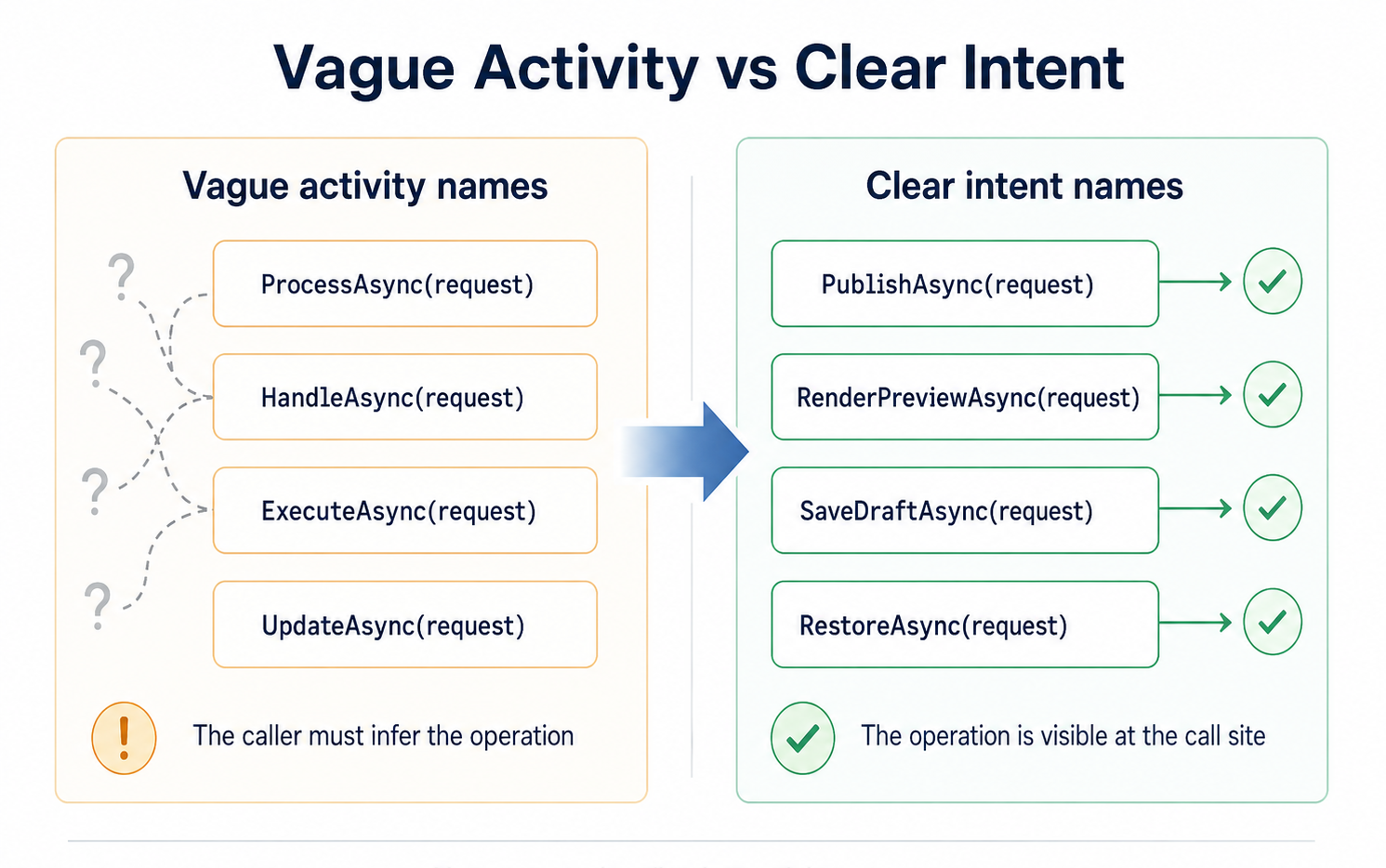
Vague names describe that work happens; intent-focused names describe what the caller is asking the system to do.
Intent is what helps the caller choose correctly.
For example:
await articleService.ProcessAsync(
    request,
    ct);
This call gives the caller very little direction.
A caller may need to inspect the request type, read the implementation, or search for other call sites to understand whether this method publishes an article, updates a draft, renders a preview, imports content, or sends notifications.
A clearer API names the operation:
await articlePublishingService.PublishAsync(
    request,
    ct);
Now the call says what the caller wants.
The method is not merely doing work.
It is publishing.
That makes the call easier to understand, easier to review, and easier to test.
The same principle applies to many ordinary APIs.
For example:
await fileService.HandleAsync(
    file,
    ct);
does not say much.
But these names say more:
await fileImportService.ImportAsync(
    file,
    ct);

await fileArchiveService.ArchiveAsync(
    fileId,
    ct);

await fileExportService.ExportForDownloadAsync(
    request,
    ct);
The caller can see the intended operation.
That reduces the chance of calling the wrong method merely because the method sounded general enough.
Intent names also help the reader understand the level of the API.
For example:
await articleService.SaveToDatabaseAsync(
    article,
    ct);
This name exposes an implementation detail.
It may be appropriate inside an infrastructure component.
But in application code, the caller may not care whether the article is saved to a database, JSON file, queue, or external service. The caller cares about the application operation.
A more intent-oriented name might be:
await articleDraftService.SaveDraftAsync(
    request,
    ct);
or:
await articlePublishingService.PublishAsync(
    request,
    ct);
Those names describe why the caller is making the call.
They do not expose how the result is stored.
This distinction is important because implementation names can pull technical details into places where they do not belong.
If an application service calls SaveToDatabaseAsync, the application language has started to include the database. That may be acceptable in a small system, but it is still a design signal.
The method name shows which concept has crossed the boundary.
An intent name keeps the application focused on the operation:
SaveDraft
Publish
Archive
Restore
Confirm
RenderPreview
RecordView
An implementation name focuses on the mechanism:
SaveToDatabase
CallProvider
RunQuery
SendSmtpMessage
MapData
WriteFile
SerializeJson
Both kinds of names can be valid.
They belong in different places.
Inside an SMTP adapter, SendSmtpMessageAsync may be appropriate. Inside an application workflow, SendWelcomeMessageAsync or RequestPasswordResetAsync may be clearer.
Inside a repository implementation, RunQueryAsync may make sense. At the application boundary, GetPublishedArticlesAsync says more about the caller’s intent.
Good method names match the level of the code.
Intent names also make call sites read like small pieces of the application language.1
For example:
if (!article.CanBePublished(now))
{
    return PublishArticleResult.NotReady();
}

article.Publish(now);

await articleRepository.SaveAsync(
    article,
    ct);

await articlePublishedEvents.PublishAsync(
    new ArticlePublished(article.Id, now),
    ct);
- The names tell a coherent story.
- The article can be published or not.
- The article is published.
- The repository saves it.
- An article-published event is published.
The reader can follow the workflow without needing to decode generic method names.
Compare that with:
if (!article.Check(now))
{
    return ProcessResult.Failed();
}

article.Apply(now);

await articleRepository.UpdateAsync(
    article,
    ct);

await eventService.ExecuteAsync(
    new EventData(article.Id, now),
    ct);
This version may perform the same work.
But the names are weaker.
The reader has to infer what Check, Apply, UpdateAsync, and ExecuteAsync mean in this context.
The code may still be correct.
But it gives the reader less help.
Intent names make the code more self-explanatory.
They also make mistakes feel more visible.
For example:
await articlePublishingService.PublishAsync(
    request,
    ct);
inside code that should only generate a preview would look suspicious.
But this may not stand out as clearly:
await articleService.ProcessAsync(
    request,
    ct);
A clear name can make a wrong call look wrong.
That is valuable.
A good API should not only make correct use possible. It should also make incorrect use easier to notice.
Intent names help with that.
They create friction when a method is used outside its purpose.
For example, a method named PermanentlyDeleteAsync makes the risk visible:
await articleAdministrationService.PermanentlyDeleteAsync(
    articleId,
    ct);
A reviewer will notice this.
A future maintainer will notice this.
The call site announces that something destructive is happening.
By contrast:
await articleService.UpdateAsync(
    articleId,
    ct);
or:
await articleService.ProcessAsync(
    articleId,
    ct);
could hide a serious operation behind a harmless-sounding name.
This is why intent names matter most when an operation is important, destructive, expensive, security-sensitive, or workflow-specific.
The more important the operation is, the less vague the name should be.
Intent names also help separate similar operations.
For example:
public Task SaveAsync(
    Article article,
    CancellationToken ct);
may be too broad if the application has several ways to save or change an article.
Different operations may have different rules:
public Task<UpdateArticleDraftResult> SaveDraftAsync(
    SaveArticleDraftRequest request,
    CancellationToken ct);

public Task<PublishArticleResult> PublishAsync(
    PublishArticleRequest request,
    CancellationToken ct);

public Task<RescheduleArticleResult> RescheduleAsync(
    RescheduleArticleRequest request,
    CancellationToken ct);

public Task<ArchiveArticleResult> ArchiveAsync(
    ArchiveArticleRequest request,
    CancellationToken ct);
These names give the caller better choices.
They also give each operation a place for its own rules.
Saving a draft may allow incomplete content.
Publishing may require content, a slug, a publication time, and permission.
Rescheduling may require that the article is not already published.
Archiving may have its own constraints.
A generic SaveAsync method may have to inspect state and decide what the caller meant.
Specific method names let the caller say what they mean.
That is safer.
It is also easier to change later, because each operation has a clearer boundary.
Intent names should usually name the application action, not every implementation step.
For example, this name is too detailed:
ValidateArticleThenRenderMarkdownThenSaveAndNotifySubscribersAsync
It tells us many things happen, but it does not give the operation a clean concept.
A better name may be:
PublishAsync
or:
PublishArticleAsync
The implementation may validate, render, save, and notify.
But the caller is asking to publish.
That is the intent.
The internal steps can be visible inside the method, in smaller collaborators, in events, or in documentation if needed. They do not all need to be packed into the method name.
The goal is not long names.
The goal is useful names.
A useful name says enough to guide the caller without exposing every internal detail.
Context matters.
Inside an Article, this may be enough:
article.Publish(publishedAt);
Inside an ArticlePublishingService, this may be enough:
await publishingService.PublishAsync(
    request,
    ct);
Inside a broader application service, the name may need more context:
await articlePublishingService.PublishArticleAsync(
    request,
    ct);
There is no single rule for how specific a name must be.
The name should be specific enough for the caller at that level.
A method on a narrow type can often have a shorter name because the type already provides context.
A method on a broad type usually needs a more specific name because the type does not help enough.
For example:
article.Publish(now);
is clear.
service.Publish(now);
is not.
The receiver matters.
This is one reason broad services often lead to weaker APIs. When a class is named ArticleService, many methods need to carry more meaning because the class name does not define a narrow responsibility. When a class is named ArticlePublishingService, the method names can be simpler because the class has already narrowed the context.
Intent names also make dependencies easier to understand.
For example:
private readonly IEmailSender _emailSender;
may be fine in infrastructure.
But in a registration workflow, a more intent-focused dependency may be clearer:
private readonly IWelcomeMessageSender _welcomeMessageSender;
Then the method can say:
await _welcomeMessageSender.SendAsync(
    registeredUser,
    ct);
The dependency name carries the intent. The method name can stay simple.
The workflow does not need to know how welcome messages are rendered, queued, formatted, or delivered. It only knows that a welcome message should be sent.
That is an API-design improvement, not merely a naming preference.
Intent names can therefore appear in class names, method names, request types, result types, events, and collaborators. They work together to form the language of the code.
For example:
ArticlePublishingService
PublishArticleRequest
PublishArticleResult
PublishArticleStatus
ArticlePublished
These names form a consistent group.
The caller can understand the operation without reading every implementation detail.
That consistency is important.
If the method is called ProcessAsync, the request is called ArticleInput, the result is called OperationResult, and the event is called SystemEvent, the code loses application language.
Each name becomes technically flexible but less meaningful.
Intent names reduce that flexibility in a useful way.
They make the API say what it is for.
A useful question is:
Does the method name describe the caller’s goal?
- If the caller wants to publish, the method should probably say
Publish. - If the caller wants to restore a license, the method should probably say
Restore. - If the caller wants to render a preview, the method should probably say
RenderPreview. - If the caller wants to record a view, the method should probably say
RecordView.
Another useful question is:
Would this name still make sense if the implementation changed?
If SaveToDatabaseAsync later writes to a JSON file or sends a command to another service, the name becomes wrong.
If SaveDraftAsync changes how drafts are stored, the name can remain correct.
That is a sign that the intent name is more stable than the implementation name.
Stable names are useful because they reduce the amount of code that has to change when mechanisms change.
A third useful question is:
Does the name make wrong use look strange?
If PermanentlyDeleteAsync appears in a normal public browsing flow, that should stand out.
If PublishWithoutNotificationAsync appears in ordinary publishing code, that should prompt a question.
If RecordViewAsync appears inside a pure query, that should make the side effect visible.
Good names create those review signals.
They make the code easier to reason about.
Intent names are not about making APIs sound nicer.
They are about moving meaning closer to the call site.
When the operation name matches the caller’s goal, the API becomes easier to choose, easier to review, easier to test, and harder to misuse.
The caller has less hidden knowledge to remember.
The code says more about what it means.
4. Query Names Should Not Hide Commands
Some method names create a strong expectation.
Names such as Get, Find, Read, Load, Calculate, and Format usually sound like queries. They suggest that the method asks for information, derives a value, or presents something without changing important application state.
That expectation is useful.
It lets callers reason about the API.
A query can usually be called to inspect state. It can often be repeated. It may be safe to use from a UI, a validation step, a test, or a background check. It may be a candidate for caching. It may be used to make a decision before calling another method.
But if a query-like method secretly changes state, the API becomes easy to misuse.
For example:
var article = await articleService.GetAsync(
    articleId,
    ct);
A caller would normally expect this to retrieve an article.
- It should not publish the article.
- It should not create the article if it does not exist.
- It should not change the article’s workflow state.
- It should not update important business data.
- It should not send notifications.
- It should not register a user action that affects later decisions.
If it does any of those things, the method name is hiding a command behind a query.
That can be surprising.
And surprising APIs are easier to misuse.
This does not mean that every query must be completely free of all technical side effects.
Logging, tracing, metrics, caching, and diagnostics may happen behind many operations. Those effects are often technical, not part of the application behavior the caller is choosing.
But important application state changes should usually be visible in the API.
For example, consider this method:
var article = await articleService.GetForReadingAsync(
    articleId,
    ct);
This is better than GetAsync if reading the article is an application operation that may record a view, update a read counter, or apply access rules.
But even then, the name may not be enough if the side effect matters.
A clearer design might separate the query and the command:
var article = await articleQueryService.GetDetailsAsync(
    articleId,
    ct);

await articleViewTracker.RecordViewAsync(
    articleId,
    ct);
Now the caller can see both operations.
One call reads article details.
The other records a view.
The code is slightly longer, but the behavior is more explicit.
That is often a good trade-off when the state change matters.
Sometimes the combined operation is still the right design.
For example:
var article = await articleReadingService.OpenForReadingAsync(
    articleId,
    ct);
This name suggests more than a simple data lookup.
It tells the caller that the article is being opened for a reading workflow. That may include permission checks, view tracking, or other reading-related consequences.
The method is no longer pretending to be a pure query.
The name makes the operation more honest.
The same issue appears in validation.
For example:
var isValid = await licenseService.IsValidAsync(
    licenseKey,
    ct);
This looks like a question.
A caller may assume it only checks whether the license is valid.
But what if the method also registers the current device, refreshes the entitlement, updates the last-used timestamp, and writes an audit record?
Those may be legitimate parts of license validation.
But the method name does not reveal them.
A clearer name might be:
var result = await licenseValidationService.ValidateUsageAsync(
    new ValidateLicenseUsageRequest(
        licenseKey,
        deviceId,
        usedAt),
    ct);
This name tells the caller that the method is part of a usage workflow.
It is not just asking whether something is true.
It is validating usage.
That distinction matters because callers treat questions differently from actions.
A question can feel harmless.
An action deserves more attention.
Another example is GetOrCreate.
var article = await articleRepository.GetOrCreateAsync(
    slug,
    ct);
This name is more honest than GetAsync, because it admits that creation may happen.
In some contexts, GetOrCreateAsync is useful. It can be appropriate for caches, lookup tables, idempotent setup, test data, or internal infrastructure where creation is a normal consequence of lookup.
But in application code, it deserves care.
Creating something may require permissions, validation, audit records, default values, uniqueness rules, or user-visible consequences.
A caller who only wanted to check whether an article exists should not accidentally create it.
A clearer application API may separate the operations:
var article = await articleQueries.FindBySlugAsync(
    slug,
    ct);
and:
var result = await articleDraftService.CreateDraftAsync(
    request,
    ct);
Now the caller chooses between finding and creating.
The API does not make that decision implicitly.
This is especially important when the operation crosses a boundary.
- A page that displays information should not accidentally create data because it used a convenient method.
- A validation step should not accidentally update workflow state because it asked a question.
- A retry loop should not repeat a state-changing operation because the method looked like a query.
- A cache should not cache the result of a method that also performs a command.
The method name helps callers avoid those mistakes.
For example:
public Task<ArticlePreview> GetPreviewAsync(
    ArticleId articleId,
    CancellationToken ct);
This sounds like a query.
But if preview generation renders Markdown, writes rendered HTML to storage, updates article metadata, and creates image files, the method is doing more than getting.
A clearer name might be:
public Task<ArticlePreview> RenderPreviewAsync(
    ArticleId articleId,
    CancellationToken ct);
If the operation also stores the preview, the name could say so:
public Task<ArticlePreview> GenerateAndCachePreviewAsync(
    ArticleId articleId,
    CancellationToken ct);
That name is longer.
But it is more honest.
The caller can now see that the method may do work beyond reading existing data.
A good name does not have to expose every technical step. But it should not hide the kind of operation being performed.
RenderPreviewAsync tells the caller that computation happens.
GenerateAndCachePreviewAsync tells the caller that generation and caching happen.
GetPreviewAsync suggests that the preview already exists and is only being retrieved.
Those are different expectations.
The same principle applies to methods named Calculate.
var price = orderService.CalculatePrice(order);
A caller will usually expect this to compute a value.
If the method also stores the calculated price, applies a discount code permanently, reserves inventory, or updates the order state, the name is misleading.
A clearer design might separate the calculation from the command:
var price = orderPricingService.CalculatePrice(order);
and:
await orderService.ApplyPriceAsync(
    order.Id,
    price,
    ct);
or name the operation as a command:
var result = await orderService.PriceOrderAsync(
    request,
    ct);
The right design depends on whether the operation is only calculation or part of a workflow.
The method name should match that design.
Query-like names can also hide expensive work.
For example:
var articles = await articleService.GetArticlesAsync(ct);
This may sound like a simple list query.
But if it loads all articles, renders Markdown, loads images, calculates statistics, resolves related articles, and builds full detail views, the method may be much heavier than the name suggests.
That may not be a command, but it is still a hidden cost.
A clearer API can distinguish the common lightweight query from the heavier operation:
var articles = await articleQueries.GetPublishedSummariesAsync(ct);
and:
var details = await articleQueries.GetArticleDetailsAsync(
    articleId,
    ct);
or:
var export = await articleExportService.BuildFullExportAsync(
    request,
    ct);
The caller can now choose the appropriate level of work.
A query name should not hide important cost any more than it should hide important state changes.
Naming also affects retries.
A caller may feel safe retrying this:
var article = await articleQueries.FindByIdAsync(
    articleId,
    ct);
If the first call fails because of a transient issue, retrying the query may be fine.
But a caller should be more careful with this:
var result = await articlePublishingService.PublishAsync(
    request,
    ct);
Publishing changes state.
Repeating it may or may not be safe.
The API can still make commands idempotent, but that should be part of the operation’s design and result.
For example:
public enum PublishArticleStatus
{
    Succeeded,
    AlreadyPublished,
    NotFound,
    NotReady
}
Now the command can handle repeated calls deliberately.
The method name and result type work together.
The caller knows it is issuing a command.
The result tells the caller what happened.
That is clearer than hiding the command behind a query-like name and hoping callers understand the implementation.
This distinction is also useful in tests.
A test for a query can usually focus on returned data:
var article = await articleQueries.FindBySlugAsync(
    slug,
    CancellationToken.None);

Assert.NotNull(article);
A test for a command usually focuses on an outcome or state change:
var result = await articlePublishingService.PublishAsync(
    request,
    CancellationToken.None);

Assert.Equal(
    PublishArticleStatus.Succeeded,
    result.Status);
Assert.True(
    repository.SavedArticle!.IsPublished);
When a method is named like a query but behaves like a command, the test becomes less natural.
A test for GetAsync may need to verify that a view was recorded, that a timestamp changed, or that an audit record was written.
That is a sign that the method name may be hiding something.
A useful question is:
Would a caller be surprised if this method changed persistent state?
If yes, the name probably needs to be clearer, or the operation should be split.
Another useful question is:
Could this method be safely called only to inspect information?
If not, a query-like name may be misleading.
A third useful question is:
Would a caller safely call this method multiple times?
If the answer depends on hidden implementation details, the API should probably make the command more visible.
Commands and queries do not always need separate classes.
A small service can expose both, as long as the methods are clear:
public Task<ArticleDetails?> GetDetailsAsync(
    ArticleId articleId,
    CancellationToken ct);

public Task<PublishArticleResult> PublishAsync(
    PublishArticleRequest request,
    CancellationToken ct);
This can be perfectly reasonable.
The important part is that the caller can see which method observes and which method changes.
In larger systems, separating read and write interfaces may help:
public interface IArticleQueries
{
    Task<ArticleDetails?> GetDetailsAsync(
        ArticleId articleId,
        CancellationToken ct);
}

public interface IArticleCommands
{
    Task<PublishArticleResult> PublishAsync(
        PublishArticleRequest request,
        CancellationToken ct);
}
This separation is not always necessary.
It can be overkill for small features.
But it can be useful when accidental writes are costly, when read models differ from write models, or when callers should only be given access to one side.
For example, a public page may only need IArticleQueries.
An admin workflow may need IArticleCommands.
The API shape can help prevent misuse by limiting what each caller can do.
That is a design choice.
The point is not to follow a strict rule that every query and command must be separated.
The point is to avoid hiding commands behind query names.
A method named like a question should not secretly perform an important action.
A method that performs an important action should have a name that makes the action visible.
This makes the API easier to trust.
Callers know which methods they can use to inspect state.
They know which methods may change state.
They can reason about retries, caching, tests, reviews, and side effects more confidently.
And they are less likely to misuse a method because its name promised less than it actually did.
5. Implementation Names Belong Near Implementation Details
Not every method name should use application language.
Some methods are close to technical mechanisms. In those places, implementation-oriented names can be appropriate.
- A repository implementation may run a query.
- An SMTP adapter may send an SMTP message.
- A file storage component may write a file.
- A JSON serializer may serialize an object.
- A cache implementation may read from memory.
Those names are not automatically wrong.
The problem appears when implementation names move into parts of the code where the caller should be thinking in application terms.
For example:
await articleService.SaveToDatabaseAsync(
    article,
    ct);
This name tells the caller how something is stored.
But what is the caller actually trying to do?
- Save a draft?
- Publish an article?
- Reschedule publication?
- Archive old content?
- Update metadata?
The database is probably not the important concept at the application level. It is a mechanism used to support the operation.
A clearer application-level API might be:
await articleDraftService.SaveDraftAsync(
    request,
    ct);
or:
await articlePublishingService.PublishAsync(
    request,
    ct);
or:
await articleArchiveService.ArchiveAsync(
    request,
    ct);
These names describe the caller’s intent.
The implementation may still save data to a database.
But the API does not make the database part of the caller’s language.
That distinction is important.
Method names help define the boundary between application behavior and implementation detail.2
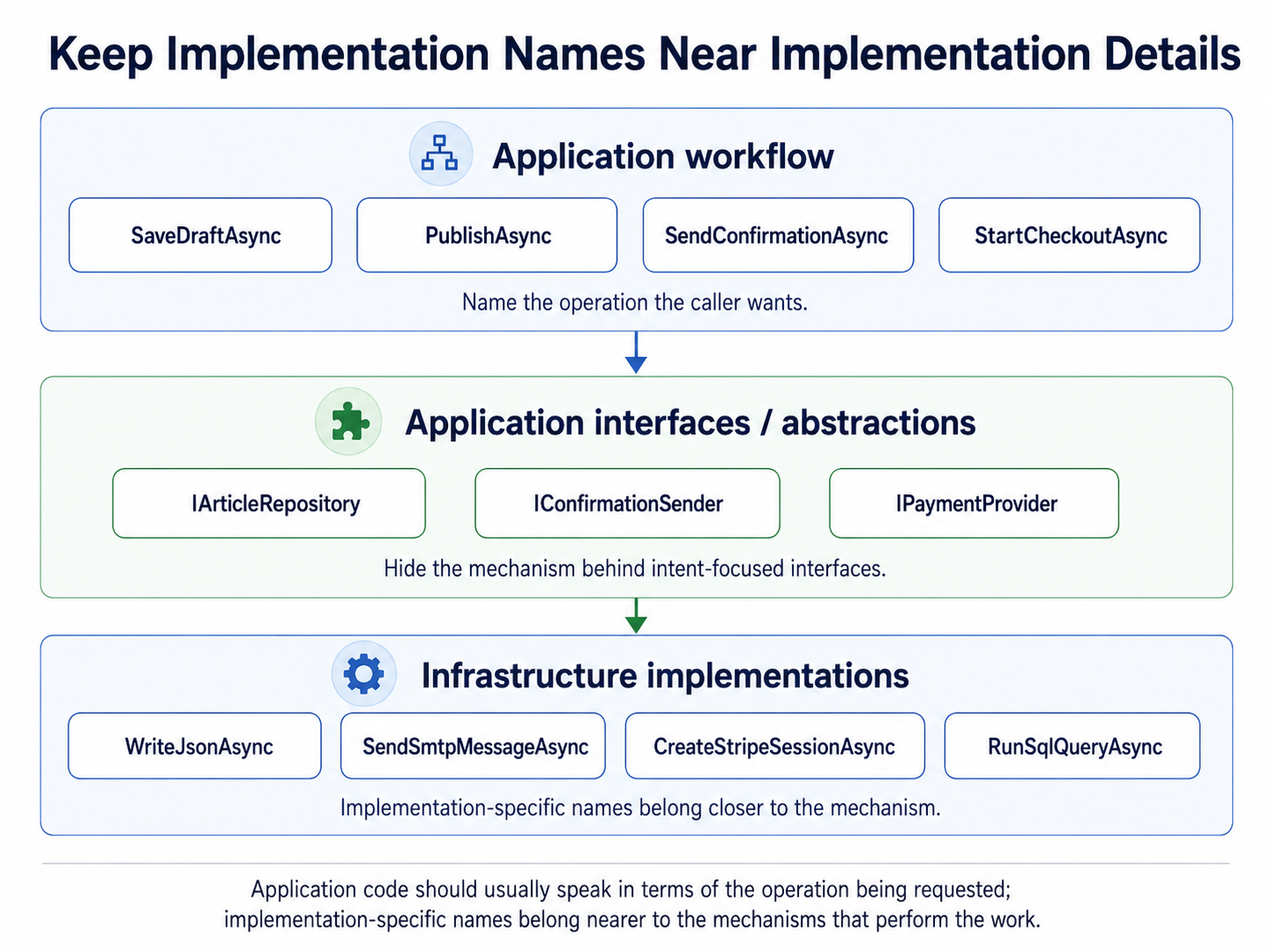
Application code should usually name the operation the caller wants; implementation-specific names belong closer to the mechanisms that perform the work.
When implementation names appear in application services, page models, controllers, or domain code, they often signal that a technical mechanism has leaked outward.
Sometimes that leak is harmless.
Sometimes it is not.
For example:
await emailService.SendSmtpMessageAsync(
    message,
    ct);
This may be appropriate inside a class that is specifically responsible for SMTP delivery.
But if the surrounding workflow is user registration, the caller probably wants something more meaningful:
await welcomeMessageSender.SendAsync(
    registeredUser,
    ct);
or:
await registrationEmailService.SendConfirmationAsync(
    request,
    ct);
The application workflow does not need to know whether the message is sent by SMTP, an HTTP API, a queue, or a local development sink.
It needs to express that a confirmation message or welcome message should be sent.
That name is more stable.
If the delivery mechanism changes later, the application-level method name can remain correct.
Implementation-oriented names are less stable because they describe how something currently works.
For example:
await reportService.GeneratePdfAsync(
    reportId,
    ct);
This may be fine if the operation is specifically to generate a PDF.
But if the real application operation is to prepare a purchased report for download, then GeneratePdfAsync may be too technical:
await reportDeliveryService.PreparePurchasedReportAsync(
    request,
    ct);
The implementation may generate a PDF, apply a cover page, write a file, record access, and create a download link.
The caller does not need all of those details in the method name.
The caller needs to know the application operation being requested.
A method name should match the level of abstraction where it appears.
At the infrastructure level, technical names are natural:
public Task SendSmtpMessageAsync(
    SmtpMessage message,
    CancellationToken ct);

public Task WriteFileAsync(
    StoragePath path,
    Stream content,
    CancellationToken ct);

public Task<IReadOnlyList<ArticleRow>> QueryPublishedRowsAsync(
    CancellationToken ct);
At the application level, operation names are usually better:
public Task SendDownloadConfirmationAsync(
    DownloadConfirmationRequest request,
    CancellationToken ct);

public Task StoreArticleImageAsync(
    StoreArticleImageRequest request,
    CancellationToken ct);

public Task<IReadOnlyList<ArticleSummary>> GetPublishedSummariesAsync(
    CancellationToken ct);
At the domain level, behavior names are usually better:
article.Publish(publishedAt);

license.ActivateOnDevice(
    deviceId,
    activatedAt);

subscription.Cancel(cancelledAt);
The same word can be good or bad depending on where it is used.
WriteFileAsync is a reasonable name in a file storage adapter.
It is a weak name in a publishing workflow if the caller is really trying to attach an image to an article.
RunQueryAsync may be reasonable in a database helper.
It is weak in a page model that wants published article summaries.
SendSmtpMessageAsync may be reasonable in an SMTP client.
It is weak in an account-registration workflow.
This is why naming should be evaluated in context.
The question is not only:
Is the name accurate?
The question is also:
Is this the right concept for this layer?
An implementation name can be accurate and still be at the wrong level.3
For example:
await jsonArticleStore.WriteJsonAsync(
    article,
    ct);
This may accurately describe what happens.
But in a page model or application service, a more useful call may be:
await articleRepository.SaveAsync(
    article,
    ct);
or, if the operation has application meaning:
await articleDraftService.SaveDraftAsync(
    request,
    ct);
The first version exposes JSON storage.
The second hides the storage mechanism behind persistence.
The third exposes the application operation.
Which name is best, depends on where the call appears.
Names can therefore be a good way to detect misplaced dependencies.
If application code contains many names such as:
SaveToDatabase
SerializeJson
SendSmtp
CallHttpEndpoint
UploadBlob
RunSql
MapDto
it may be worth asking whether infrastructure details are leaking into the application layer.
Sometimes they are.
Sometimes the code is simply in an infrastructure component, and the names are fine.
The surrounding context decides.
A useful distinction is between mechanism and meaning.
Mechanism names describe how something is done:
WriteFile
SendSmtpMessage
RunQuery
SerializeJson
PostHttpRequest
UploadBlob
MapRow
Meaning names describe what the operation is for:
PublishArticle
SaveDraft
SendConfirmation
RestoreLicense
RecordView
PrepareReportDownload
ArchiveProject
Good APIs keep mechanism names close to the mechanism and meaning names close to the application.
That separation helps the code stay flexible.
If an application workflow says this:
await confirmationEmailSender.SendConfirmationAsync(
    request,
    ct);
the underlying delivery can change.
It can use SMTP today.
It can use an API tomorrow.
It can write to a local development folder during testing.
The application operation is still the same.
But if the workflow says this:
await smtpClient.SendSmtpMessageAsync(
    message,
    ct);
then the workflow has already committed to SMTP language.
That may make later changes more invasive.
It may also make tests more technical than necessary.
For example, a test written against an application-level collaborator can focus on intent:
Assert.Single(confirmationSender.SentConfirmations);
A test written against a technical collaborator may focus on delivery details:
Assert.Equal(
    "smtp.example.com",
    smtpClient.Host);
The second assertion may be useful in an infrastructure test.
It is probably noise in a registration workflow test.
The name of the dependency affects the language of the test.
That is another reason implementation names should stay near implementation details.
This does not mean that application code should avoid all technical terms.
Some application operations are inherently technical.
For a developer-focused product, terms such as API key, webhook, repository, branch, build, package, or deployment may be part of the domain language.
In that case, the technical term may also be the business term.
The important question is whether the term belongs to the user’s or application’s understanding of the workflow, or whether it only belongs to the current implementation.
For example, in a licensing system, DeviceActivation may be an application concept.
In an email adapter, SmtpMessage is an implementation concept.
In an article publishing system, Markdown may be part of the content model.
In a storage adapter, JsonFile may be only a persistence detail.
Context decides.
A method named RenderMarkdownAsync can be perfectly reasonable if rendering Markdown is the operation the caller is requesting.
But if the user-facing operation is to show an article preview, then RenderPreviewAsync may be better.
The method name should reflect the concept the caller should be thinking about.
Another common sign of misplaced implementation naming is premature provider language.
For example:
await stripeService.CreatePaymentLinkAsync(
    request,
    ct);
This may be appropriate inside a Stripe adapter.
But at the application boundary, the operation may be:
await checkoutService.StartCheckoutAsync(
    request,
    ct);
or:
await paymentSessionService.CreatePurchaseSessionAsync(
    request,
    ct);
If the application code talks about Stripe everywhere, changing provider later becomes harder. More importantly, the workflow becomes described in provider terms rather than application terms.
Sometimes that is acceptable.
If the whole feature is explicitly a Stripe integration, the provider name may be honest.
But if Stripe is only the current implementation of checkout, the provider name should usually be contained near the adapter.
The same applies to names such as:
SendGridEmailSender
AzureBlobStorage
SqlArticleRepository
StripePaymentProvider
SmtpMailClient
These names are useful in composition and infrastructure.
They are less useful as the language of application workflows.
At the composition root, provider names are expected:
services.AddScoped<IEmailSender, SmtpEmailSender>();
services.AddScoped<IPaymentProvider, StripePaymentProvider>();
services.AddScoped<IArticleStore, JsonArticleStore>();
This is where mechanisms are wired.
But inside the application workflow, the API should usually speak in terms of the operation:
await downloadConfirmationSender.SendConfirmationAsync(
    request,
    ct);
not:
await smtpEmailSender.SendSmtpMessageAsync(
    message,
    ct);
This keeps composition concerns separate from workflow language.
It also makes the code easier to review.
A reviewer can look at the workflow and discuss whether a confirmation should be sent, not which delivery mechanism happens to send it.
Implementation names can also hide that an abstraction is too low-level.
For example:
public interface IDataStore
{
    Task SaveAsync(
        object value,
        CancellationToken ct);

    Task<object?> LoadAsync(
        string key,
        CancellationToken ct);
}
This interface is technically flexible, but it gives callers almost no application meaning.
A more useful abstraction may be narrower:
public interface IArticleRepository
{
    Task<Article?> FindBySlugAsync(
        ArticleSlug slug,
        CancellationToken ct);

    Task SaveAsync(
        Article article,
        CancellationToken ct);
}
or even more application-specific:
public interface IArticleDraftStore
{
    Task<ArticleDraft?> FindDraftAsync(
        ArticleId articleId,
        CancellationToken ct);

    Task SaveDraftAsync(
        ArticleDraft draft,
        CancellationToken ct);
}
The right level depends on the design.
But names such as IDataStore, IManager, IProcessor, and IHandler can become too generic if no other type gives the caller meaning.
Sometimes the problem is not that the method is technical. Sometimes the problem is that the abstraction has no clear responsibility.4
Renaming alone will not fix that.
A useful refactoring sequence is:
- Identify what the caller is actually trying to accomplish.
- Name that operation in application terms.
- Move technical mechanism names closer to adapters or infrastructure.
- Keep composition-specific names near composition.
- Let tests use the same application language as the workflow.
For example, this call:
await smtpClient.SendAsync(
    message,
    ct);
inside a registration workflow might become:
await registrationConfirmationSender.SendAsync(
    confirmation,
    ct);
The implementation can still use SMTP:
public sealed class SmtpRegistrationConfirmationSender : IRegistrationConfirmationSender
{
    public Task SendAsync(
        RegistrationConfirmation confirmation,
        CancellationToken ct)
    {
        // Create and send SMTP message here.
    }
}
The workflow now speaks in application terms.
The adapter speaks in technical terms.
That is a healthier boundary.
A useful question when reviewing a method name is:
Would this name still be correct if the mechanism changed?
If the answer is no, the name may be too implementation-specific for its current location.
Another useful question is:
Should the caller know this technical detail?
If the caller should know, the name may be appropriate.
If the caller should not know, the detail probably belongs behind another abstraction.
A third useful question is:
Is this term part of the application language or only part of the infrastructure?
That question often reveals whether the name belongs where it is.
Good API naming does not ban technical words.
It puts them where they belong.
Implementation names are useful near implementation details.
Application names are useful near application decisions.
Domain names are useful near domain behavior.
When those levels are mixed, the API becomes harder to understand and harder to change.
A method named SendSmtpMessageAsync is not bad.
It is bad only when the caller should be thinking, “send a confirmation,” not “send an SMTP message.”
A method named WriteJsonAsync is not bad.
It is bad only when the caller should be thinking, “save a draft,” not “write JSON.”
A method named CreateStripeSessionAsync is not bad.
It is bad only when the caller should be thinking, “start checkout,” not “create a Stripe session.”
Keeping implementation names close to implementation details helps the rest of the code speak in terms of intent.
That makes the API more stable.
It makes tests clearer.
It makes provider changes less invasive.
And it keeps the caller focused on the operation they are actually asking for.
6. Generic Names Often Hide Several Responsibilities
A generic method name is sometimes a symptom.
Not always.
Some generic names are created by framework contracts, common patterns, or deliberately narrow abstractions. A background service may have an ExecuteAsync method. A command handler may have a HandleAsync method. A pipeline step may have a ProcessAsync method.
In those cases, the surrounding type often carries the missing meaning.
For example:
public sealed class PublishArticleCommandHandler
{
    public Task HandleAsync(
        PublishArticleCommand command,
        CancellationToken ct)
    {
        // ...
    }
}
The method name is generic, but the class name and command type explain the operation.
The caller can still understand the intent.
The problem appears when the surrounding context is also generic.
For example:
public sealed class ArticleService
{
    public Task ProcessAsync(
        ArticleRequest request,
        CancellationToken ct)
    {
        // ...
    }
}
Here, the class name is broad.
The method name is broad.
The request type is broad.
The API gives the caller very little information.
The method may still work correctly, but the signature does not communicate what responsibility it owns. That makes it easier for the method to become a place where several responsibilities gather.
A name such as ProcessAsync can become a container.
- It can contain validation.
- It can contain persistence.
- It can contain rendering.
- It can contain publishing.
- It can contain notifications.
- It can contain analytics.
- It can contain provider calls.
Because the name does not define a clear responsibility, many additions can feel acceptable.
That is the danger.
Generic names often make design drift less visible.
For example:
public async Task ProcessAsync(
    ArticleRequest request,
    CancellationToken ct)
{
    ValidateMetadata(request);

    var article = await _repository.FindAsync(
        request.ArticleId,
        ct);

    article.UpdateContent(
        request.Title,
        request.ContentMarkdown);

    var html = _markdownRenderer.Render(request.ContentMarkdown);

    article.SetRenderedContent(html);

    if (request.Publish)
    {
        article.Publish(_clock.UtcNow);
    }

    await _repository.SaveAsync(
        article,
        ct);

    if (request.NotifySubscribers)
    {
        await _subscriberNotifier.NotifyArticlePublishedAsync(
            article.Id,
            ct);
    }

    await _analytics.RecordArticleChangedAsync(
        article.Id,
        ct);
}
This method may have grown one reasonable change at a time.
First it updated content.
Then it rendered Markdown.
Then it supported publishing.
Then it notified subscribers.
Then it recorded analytics.
Each addition may have seemed small.
But the method name did not resist any of them.
ProcessAsync can process anything.
That is why it is a weak boundary.
A clearer API would force the design question earlier:
public Task<UpdateArticleDraftResult> UpdateDraftAsync(
    UpdateArticleDraftRequest request,
    CancellationToken ct);

public Task<PublishArticleResult> PublishAsync(
    PublishArticleRequest request,
    CancellationToken ct);

public Task<ArticlePreview> RenderPreviewAsync(
    RenderArticlePreviewRequest request,
    CancellationToken ct);

public Task RecordArticleChangedAsync(
    ArticleId articleId,
    CancellationToken ct);
These names are not automatically better because they are longer.
They are better because they represent different responsibilities.
The caller now chooses the operation.
The implementation has clearer boundaries.
Future changes have a more obvious place to go.
If someone wants to add subscriber notification, the question becomes:
Is notification part of publishing, or is it a separate consequence of publishing?
That is a better design question than:
Should we add one more thing to ProcessAsync?
Generic names can also hide mixed levels of abstraction.
For example:
public async Task HandleAsync(
    Request request,
    CancellationToken ct)
{
    var row = await _db.QuerySingleAsync(
        "...",
        request.Id);

    var article = Map(row);

    article.Publish(_clock.UtcNow);

    var message = CreateSmtpMessage(
        article);

    await _smtpClient.SendAsync(
        message,
        ct);
}
This method performs application behavior, persistence, mapping, domain behavior, and SMTP delivery in one place.
The name HandleAsync does not tell us which level the method belongs to.
- Is it a command handler?
- A database operation?
- A publishing workflow?
- An email sender?
- A coordinator?
The method name hides the mixture.
A clearer design would usually separate the levels:
public async Task<PublishArticleResult> PublishAsync(
    PublishArticleRequest request,
    CancellationToken ct)
{
    var article = await _articles.FindByIdAsync(
        request.ArticleId,
        ct);

    if (article is null)
    {
        return PublishArticleResult.NotFound();
    }

    if (!article.CanBePublished())
    {
        return PublishArticleResult.NotReady();
    }

    article.Publish(_clock.UtcNow);

    await _articles.SaveAsync(
        article,
        ct);

    await _articlePublishedEvents.PublishAsync(
        new ArticlePublished(article.Id),
        ct);

    return PublishArticleResult.Succeeded();
}
This method still coordinates work.
It still has dependencies.
It may still call infrastructure through abstractions.
But the responsibility is clearer.
It publishes an article.
The name gives the method a center.
That center helps decide what belongs inside and what should be moved elsewhere.
Generic names are also common in helper classes.
For example:
public sealed class ArticleHelper
{
    public string Process(string value)
    {
        // ...
    }
}
This gives almost no guidance.
- What kind of article help?
- What is being processed?
- A title?
- A slug?
- Markdown?
- A summary?
- A URL?
A more useful API names the specific responsibility:
public sealed class ArticleSlugGenerator
{
    public ArticleSlug GenerateSlug(ArticleTitle title)
    {
        // ...
    }
}
or:
public sealed class ArticleSummaryBuilder
{
    public ArticleSummary BuildSummary(ArticleContent content)
    {
        // ...
    }
}
or:
public sealed class MarkdownExcerptRenderer
{
    public string RenderExcerpt(string markdown)
    {
        // ...
    }
}
Again, the goal is not to create more classes for its own sake.
The goal is to let names reveal the responsibility.
A helper named ArticleHelper can become responsible for anything related to articles. A generator, builder, renderer, formatter, validator, or normalizer gives the code a clearer direction.
Generic names make it harder to know when a class has grown too much.
For example:
ArticleManager
ArticleProcessor
ArticleHandler
ArticleHelper
ArticleUtility
ArticleService
These names may hide many unrelated reasons to change.
By contrast:
ArticlePublishingService
ArticleDraftUpdater
ArticleSlugGenerator
ArticlePreviewRenderer
ArticleReferenceResolver
ArticleViewTracker
These names are more constrained.
They can still be badly designed.
A class with a specific name can still do too much.
But the specific name gives reviewers and maintainers something to compare the implementation against.
If ArticleSlugGenerator starts sending emails, the problem is obvious.
If ArticleProcessor starts sending emails, it may feel less obviously wrong because processing is vague.
That is one reason specific names are useful.
They create resistance.
Generic names reduce resistance.
Generic names can also hide different business rules behind one operation.
For example:
public Task UpdateAsync(
    Article article,
    CancellationToken ct);
This may look reasonable.
But what does update mean?
Updating a draft may allow incomplete content.
Updating a published article may require audit logging.
Changing a slug may require redirect handling.
Changing the publication date may be forbidden after publication.
Changing metadata may have different validation rules from changing content.
If all of those operations go through UpdateAsync, the method may become a collection of conditional rules:
if (request.UpdateContent)
{
    // content rules
}

if (request.UpdateSlug)
{
    // slug rules
}

if (request.UpdatePublicationDate)
{
    // scheduling rules
}

if (request.Publish)
{
    // publishing rules
}
The generic method name hides the fact that the operations are different.
A clearer API can make those differences explicit:
public Task<UpdateArticleContentResult> UpdateContentAsync(
    UpdateArticleContentRequest request,
    CancellationToken ct);

public Task<ChangeArticleSlugResult> ChangeSlugAsync(
    ChangeArticleSlugRequest request,
    CancellationToken ct);

public Task<RescheduleArticleResult> RescheduleAsync(
    RescheduleArticleRequest request,
    CancellationToken ct);

public Task<PublishArticleResult> PublishAsync(
    PublishArticleRequest request,
    CancellationToken ct);
Each method can now express its own rules.
The caller chooses the operation directly.
The result type can describe the outcomes that matter for that operation.
This usually makes the API easier to use and easier to change.
Generic names may also encourage generic result types.
For example:
public Task<OperationResult> ExecuteAsync(
    Request request,
    CancellationToken ct);
This combination is very flexible.
It is also weak.
What operation?
What request?
What outcomes?
A more specific method often supports a more specific result:
public Task<RestoreLicenseResult> RestoreAsync(
    RestoreLicenseRequest request,
    CancellationToken ct);
Now the result can include statuses that make sense:
public enum RestoreLicenseStatus
{
    Restored,
    NotFound,
    EmailNotConfirmed,
    TooManyDevices,
    ProviderUnavailable
}
The operation name gives the result type a context.
The result type gives the caller handleable outcomes.
Together, they make the API more useful.
A generic method with a generic result often pushes interpretation into messages, flags, or documentation. A specific method with a specific result can let the compiler and caller share more meaning.
Generic names can be acceptable when the type provides strong context.
For example:
public interface IArticleSlugGenerator
{
    ArticleSlug Generate(ArticleTitle title);
}
The method name Generate is fine here because the interface name tells us what is generated.
This is also reasonable:
public interface IArticlePreviewRenderer
{
    ArticlePreview Render(Article article);
}
The method name is short because the type has a narrow responsibility.
But this is weaker:
public interface IGenerator
{
    object Generate(object input);
}
Now neither the type nor the method gives enough meaning.
The same method name can be good in one context and bad in another.
SendAsync is fine on IWelcomeMessageSender.
SendAsync is vague on IService.
Render is fine on IArticlePreviewRenderer.
Render is vague on IProcessor.
ExecuteAsync is fine on a framework-defined background task.
ExecuteAsync is vague on an application service unless something else supplies the meaning.
The narrower the surrounding type, the less the method name has to say.
The broader the surrounding type, the more the method name must say.
Generic names can also hide the difference between orchestration and behavior.
For example:
public Task RunAsync(CancellationToken ct);
- This might be a scheduled job.
- It might be a data import.
- It might be a report generator.
- It might be a cleanup task.
If the class name is ExpiredDownloadCleanupJob, then RunAsync may be clear enough:
public sealed class ExpiredDownloadCleanupJob
{
    public Task RunAsync(CancellationToken ct);
}
The class name carries the operation.
But if the class is named MaintenanceService, RunAsync is vague:
public sealed class MaintenanceService
{
    public Task RunAsync(CancellationToken ct);
}
What maintenance?
- Deleting expired downloads?
- Rebuilding indexes?
- Cleaning logs?
- Checking license activations?
- Sending reminders?
The class name and method name together should make the responsibility visible.
A useful question is:
If this method grows, what kind of behavior would still feel “in scope”?
For ProcessAsync, almost anything may feel in scope.
For PublishAsync, the scope is narrower.
For RecordViewAsync, it is narrower still.
For GenerateSlug, it is very narrow.
That does not mean the narrowest name is always best.
Sometimes the operation really is broad.
An application workflow may coordinate several steps, and that is not automatically wrong. But the name should still describe the workflow, not merely the fact that work occurs.
For example:
await checkoutWorkflow.CompletePurchaseAsync(
    request,
    ct);
This method may validate the cart, create a payment record, grant access, send confirmation, and record analytics.
It coordinates several steps.
But the name gives the workflow a meaningful purpose.
That is different from:
await checkoutService.ProcessAsync(
    request,
    ct);
The clearer name does not deny that multiple things happen. It explains why they happen together.
That is the key.
A method can coordinate several internal steps if they serve one clear operation.
A generic name often hides that this question has not been answered:
What operation unites these steps?
If there is a good answer, name it.
If there is no good answer, the method may have several responsibilities.
Generic names can therefore be useful warning signs during review.
When you see a method named ProcessAsync, HandleAsync, ExecuteAsync, ApplyAsync, or ManageAsync, ask:
What is the caller actually asking for?
Then ask:
Does the surrounding type already answer that question?
If it does, the generic method name may be fine.
If it does not, the API may need a better name or a clearer responsibility.
Another useful question is:
Would a new developer know where to add related behavior?
If the answer is, “Probably in ProcessAsync,” the method may already be too broad.
A third question is:
Would unrelated behavior look out of place in this method?
If nothing looks out of place, the name may be too generic to protect the design.
Good method names create boundaries.
They do not merely decorate code.
They help define what belongs.
They help reveal what does not belong.
They help callers choose the right operation.
They help reviewers notice when responsibilities are mixed.
A generic name can be acceptable when context supplies meaning.
But when the method name, class name, request type, and result type are all generic, the API becomes easy to misunderstand and easy to expand in the wrong direction.
That is when a naming issue becomes a design issue.
A better name should not simply be more verbose.
It should answer the question:
What responsibility does this method actually own?
Once that answer is clear, the API usually becomes clearer too.
7. Tests Become Clearer When Method Names Are Clear
Tests do more than verify behavior.
They also describe behavior.
A good test tells the reader what the code is supposed to do, under which condition, and with what expected outcome. The clearer the API is, the easier that description becomes.
Method names play a large part in that.
For example:
[Fact]
public async Task ProcessAsync_ReturnsFalse_WhenRequestIsInvalid()
{
}
This test name compiles as a sentence, but it does not explain much.
- What process?
- What request?
- What does invalid mean?
- What does
falsemean?
The test may be correct, but the language is weak because the API language is weak.
Compare that with:
[Fact]
public async Task PublishAsync_ReturnsNotReady_WhenArticleHasNoContent()
{
}
This tells a clearer story.
The operation is publishing.
The expected outcome is NotReady.
The condition is that the article has no content.
The method name, result status, and test condition work together.
That is a good sign.
A clear API gives tests better words to use.
When the method name reveals intent, the test can focus on behavior instead of explaining what the method secretly means.
For example:
[Fact]
public async Task RenderPreviewAsync_ReturnsRenderedMarkdown()
{
}
is more useful than:
[Fact]
public async Task HandleAsync_ReturnsResult()
{
}
The first test describes a behavior.
The second test describes a technical fact: a handler returns something.
The difference matters because tests are often read long after the implementation was written. A future reader may open the test file to understand how the feature is supposed to behave. If the API uses vague names, the tests often inherit that vagueness.
The test can compensate, but only to a point.
For example:
ProcessAsync_WhenRequestContainsPublishFlagAndArticleHasContent_PublishesArticleAndNotifiesSubscribers
This test name tries to explain what ProcessAsync means in this case.
The problem is not only that the test name is long.
The problem is that the API has made the test do too much explanatory work.
A clearer API may allow a simpler test name:
[Fact]
public async Task PublishAsync_PublishesArticleAndNotifiesSubscribers()
{
}
or, if the result is the important part:
[Fact]
public async Task PublishAsync_ReturnsSucceeded_WhenArticleIsReady()
{
}
The test is shorter because the method name carries more meaning.
That does not mean all test names should be short. Some behavior deserves specific test names. But a test should not need to compensate for an API that hides the operation being tested.
Clear method names also make arrange-act-assert structure easier to read.
For example:
var request = new PublishArticleRequest(articleId);

var result = await publishingService.PublishAsync(
    request,
    CancellationToken.None);

Assert.Equal(
    PublishArticleStatus.Succeeded,
    result.Status);
The act line is clear.
The test performs a publish operation.
The assertion checks the publish result.
There is little decoding required.
Compare that with:
var request = new ArticleRequest(
    articleId,
    true,
    false);

var result = await articleService.ProcessAsync(
    request,
    CancellationToken.None);

Assert.True(result.Success);
This test may verify the same behavior, but it is harder to read.
The reader has to understand what the Boolean values mean, what ArticleRequest represents, what ProcessAsync does, and what Success means in this context.
The test is not only testing behavior.
It is also carrying hidden API knowledge.
That is fragile.
If the API uses clearer names and clearer types, tests become more direct.
var request = new PublishArticleRequest(
    articleId,
    NotificationMode.NotifySubscribers);

var result = await articlePublishingService.PublishAsync(
    request,
    CancellationToken.None);

Assert.Equal(
    PublishArticleStatus.Succeeded,
    result.Status);
Now the test explains itself better.
- The request is about publishing.
- The method publishes.
- The result is a publish result.
- The notification choice is visible.
Clear method names also help tests reveal wrong responsibilities.
For example, suppose a test for article preview looks like this:
[Fact]
public async Task RenderPreviewAsync_DoesNotPublishArticle()
{
}
That test name is meaningful because RenderPreviewAsync and PublishAsync are distinct operations. The test protects the boundary between previewing and publishing.
But if the API only has a generic method:
[Fact]
public async Task ProcessAsync_DoesNotPublishArticle_WhenPreviewRequested()
{
}
the test has to explain that ProcessAsync sometimes previews and sometimes publishes.
That may be a sign that the API combines responsibilities that should be separate.
Tests often reveal this.
When tests become full of phrases such as:
WhenPublishFlagIsTrue
WhenModeIsPreview
WhenActionIsSave
WhenShouldNotifyIsFalse
WhenTypeIsUpdate
the API may be asking one method to represent too many operations.
A clearer set of method names can reduce that pressure:
SaveDraftAsync
PublishAsync
RenderPreviewAsync
ArchiveAsync
RecordViewAsync
Each method can have tests that describe its own behavior.
The tests no longer need to explain which mode a generic method is currently in.
This makes the test suite easier to navigate.
- A developer looking for publishing behavior can search for
PublishAsync. - A developer looking for preview behavior can search for
RenderPreviewAsync. - A developer looking for archive behavior can search for
ArchiveAsync.
With generic names, the search is weaker. Many unrelated tests may mention ProcessAsync, HandleAsync, or ExecuteAsync.
Clear method names therefore improve more than readability.
They improve discoverability.
This is especially valuable in large codebases, where tests are often used as documentation. A good test suite lets a developer answer questions such as:
- What happens when publishing fails?
- What happens when an article has no content?
- What happens when a license cannot be restored?
- What happens when a preview is rendered?
- What happens when a destructive action is requested?
Those questions are easier to answer when the API has meaningful operation names.
For example:
[Fact]
public async Task RestoreAsync_ReturnsNotFound_WhenLicenseDoesNotExist()
{
}

[Fact]
public async Task RestoreAsync_ReturnsTooManyDevices_WhenActivationLimitIsReached()
{
}

[Fact]
public async Task RestoreAsync_SendsRestoreEmail_WhenLicenseCanBeRestored()
{
}
These tests form a readable group because the operation is clear: restore.
If the method were called HandleAsync, the test names would need more surrounding context to be equally useful.
Clear method names also make test doubles simpler.
For example, a fake dependency with an intentional API is easy to inspect:
public sealed class FakeArticlePublisher : IArticlePublisher
{
    public List<PublishArticleRequest> PublishedRequests { get; } = [];
    public PublishArticleResult Result { get; set; } = PublishArticleResult.Succeeded();
    public Task<PublishArticleResult> PublishAsync(
        PublishArticleRequest request,
        CancellationToken ct)
    {
        PublishedRequests.Add(request);

        return Task.FromResult(Result);
    }
}
The fake speaks the same language as the production API.
It publishes.
It stores published requests.
It returns a publish result.
The test using it can remain clear.
A more generic dependency often creates weaker test doubles:
public sealed class FakeProcessor : IProcessor
{
    public List<Request> Requests { get; } = [];
    public OperationResult Result { get; set; } = OperationResult.Success();
    public Task<OperationResult> ProcessAsync(
        Request request,
        CancellationToken ct)
    {
        Requests.Add(request);

        return Task.FromResult(Result);
    }
}
This fake may be reusable, but it says very little.
The test has to know what kind of processing is being represented.
That knowledge sits outside the type.
The more generic the API is, the more hidden context the test must carry.
This can also affect mock setup.
For example:
publisher.Setup(x => x.PublishAsync(
        It.IsAny<PublishArticleRequest>(),
        It.IsAny<CancellationToken>()))
    .ReturnsAsync(PublishArticleResult.Succeeded());
This setup is fairly readable.
The dependency publishes.
The request is a publish request.
The result is a publish result.
Compare that with:
processor.Setup(x => x.ProcessAsync(
        It.Is<Request>(r => r.Type == "publish"),
        It.IsAny<CancellationToken>()))
    .ReturnsAsync(OperationResult.Success());
Here, the test has to encode the operation inside the request. The method name does not help. The result type does not help much either.
The setup becomes more fragile because the operation is represented by data values rather than by the API shape.
Sometimes that is the right design. Not every variation deserves a separate method. But if tests repeatedly need to filter generic requests by operation type, action name, mode, flag, or string value, that is a signal worth noticing.
The API may be hiding operations that deserve names.
Clear method names also make negative tests easier to express.
For example:
[Fact]
public async Task PermanentlyDeleteAsync_ReturnsNotAllowed_ForPublishedArticle()
{
}
This test immediately communicates that a destructive operation is being protected.
The method name is doing useful work.
With a generic name, the same test becomes less direct:
[Fact]
public async Task UpdateAsync_ReturnsNotAllowed_WhenDeleteModeIsPermanentAndArticleIsPublished()
{
}
This test name may still be accurate, but it reveals that the API expresses a destructive operation as a mode of update. That might be a reasonable design in some systems, but it should be a conscious choice.
Tests help expose such choices.
A useful question when reading tests is:
Does the test name have to explain what the method name failed to say?
If yes, the method name may be too vague.
Another useful question is:
Are many tests for the same method really testing different operations?
For example:
ProcessAsync_CreatesDraft_WhenRequestIsNew
ProcessAsync_UpdatesDraft_WhenArticleExists
ProcessAsync_PublishesArticle_WhenPublishFlagIsTrue
ProcessAsync_RendersPreview_WhenPreviewModeIsSelected
ProcessAsync_SendsNotification_WhenNotifyFlagIsTrue
ProcessAsync_ArchivesArticle_WhenArchiveModeIsSelected
This group may be a warning sign.
The method may be doing too much, or the API may be exposing too many behaviors through one generic entry point.
A clearer API might produce test groups like:
CreateDraftAsync_...
UpdateDraftAsync_...
PublishAsync_...
RenderPreviewAsync_...
ArchiveAsync_...
Now the test suite reflects the application operations more clearly.
That makes it easier to find the right tests, understand the feature, and add new behavior in the right place.
Clear method names also make test failure messages easier to interpret.
If a test named PublishAsync_ReturnsNotReady_WhenArticleHasNoContent fails, the failure already tells the reader a lot. The problem is probably related to publishing readiness.
If a test named ProcessAsync_ReturnsFalse_WhenRequestIsInvalid fails, the reader has less context. They must inspect the test to understand what process, what invalid request, and what false outcome is involved.
This may seem small.
But in a real test suite, small clarity improvements matter.
They reduce the time between seeing a failing test and understanding the affected behavior.
That is part of maintainability.
Method names also affect how tests are grouped.
A test class named:
public sealed class ArticlePublishingServiceTests
{
}
with tests for PublishAsync is easy to navigate.
A test class named:
public sealed class ArticleServiceTests
{
}
with many tests for ProcessAsync, UpdateAsync, ApplyAsync, and HandleAsync may become harder to scan.
Again, the problem is not the word Service.
The problem is when the names do not reveal the responsibilities.
A narrower class name and clearer method names give the test suite a stronger structure.
For example:
ArticlePublishingServiceTests
ArticlePreviewRendererTests
ArticleDraftUpdaterTests
ArticleSlugGeneratorTests
LicenseRestoreServiceTests
DownloadConfirmationSenderTests
These test class names explain the system in pieces.
They become a map of the design.
That map is only useful if the names are meaningful.
Tests can therefore be used as feedback on API naming.
When writing a test, notice where the wording becomes awkward.
If the test name becomes vague, ask whether the method name is vague.
If the arrange step needs several flags and generic request values, ask whether the operation is explicit enough.
If the assertion checks a result whose meaning is unclear, ask whether the method and result type belong together.
If the test double has no domain language, ask whether the dependency abstraction is too generic.
These are not automatic errors.
They are design signals.
A good test suite often reflects a good API.
The language used in tests should resemble the language of the application.
For example:
await articlePublishingService.PublishAsync(
    request,
    ct);

await licenseRestoreService.RestoreAsync(
    request,
    ct);

await articlePreviewRenderer.RenderPreviewAsync(
    request,
    ct);

await downloadConfirmationSender.SendConfirmationAsync(
    request,
    ct);
These calls are easy to describe.
That makes the tests easier to write and easier to read.
The opposite is also true.
If tests repeatedly use names such as:
Process
Handle
Execute
Run
Apply
Manage
without strong surrounding context, they may be telling you that the API is not speaking clearly enough.
A method name is therefore not only part of the production API.
- It is part of the test API.
- It shapes how behavior is described.
- It shapes how failures are understood.
- It shapes how design intent is preserved.
Clear names make tests more expressive because they give tests better language.
And when tests become clearer, the design becomes easier to maintain.
8. Conclusion
Method names are easy to underestimate.
They look small.
They are often written quickly.
They are easy to treat as a matter of style, preference, or naming convention.
But method names are part of the API. They shape how callers understand the code, how reviewers discuss changes, how tests describe behavior, and how future developers decide where new behavior belongs.
A good method name does not need to explain every implementation detail.
It should explain the caller’s intent.
That is the central point.
A caller should not have to inspect the implementation just to understand whether a method publishes an article, saves a draft, restores a license, renders a preview, records a view, or sends a confirmation message.
The method name should help.
For example:
await articleService.ProcessAsync(
    request,
    ct);
may be technically correct.
But it leaves the reader with questions.
- What process?
- What kind of request?
- What operation is being performed?
- What state might change?
- What result should the caller expect?
A more intentional call gives the reader more information at the surface:
var result = await articlePublishingService.PublishAsync(
    request,
    ct);
This does not explain everything.
But it explains enough.
- The caller knows that the operation is publishing.
- The reviewer knows which behavior is being requested.
- The test can use publishing language.
- The result type can describe publishing outcomes.
- The implementation has a clearer responsibility.
That is what good method names do.
They bring meaning closer to the call site.
Vague names such as Process, Handle, Execute, Run, Apply, and Manage are not always wrong. They may be appropriate when a framework, pattern, or narrow type supplies the missing meaning.
For example:
public Task HandleAsync(
    PublishArticleCommand command,
    CancellationToken ct);
can be clear enough because the command type carries the intent.
But when the class name, method name, request type, and result type are all vague, the API becomes hard to trust:
public Task<OperationResult> ProcessAsync(
    Request request,
    CancellationToken ct);
This kind of signature may be flexible.
It is also weak.
- The caller must know too much outside the API.
- The method name does not reveal the operation.
- The request type does not reveal the input.
- The result type does not reveal the outcomes.
That makes the API easier to misuse and harder to review.
A clearer API usually names the operation directly:
public Task<RestoreLicenseResult> RestoreAsync(
    RestoreLicenseRequest request,
    CancellationToken ct);
or:
public Task<ArticlePreview> RenderPreviewAsync(
    RenderArticlePreviewRequest request,
    CancellationToken ct);
or:
public Task<PublishArticleResult> PublishAsync(
    PublishArticleRequest request,
    CancellationToken ct);
These names do not only improve readability.
They improve design feedback.
- A method named
PublishAsyncmakes it easier to notice behavior that does not belong in publishing. - A method named
RenderPreviewAsyncmakes it easier to notice accidental publishing. - A method named
RecordViewAsyncmakes the side effect visible. - A method named
PermanentlyDeleteAsyncmakes the risk visible.
The name creates useful friction.
That friction helps protect the design.
Good method names also help separate application meaning from implementation detail.
Technical names such as SendSmtpMessageAsync, WriteJsonAsync, RunQueryAsync, and CreateStripeSessionAsync can be perfectly reasonable near infrastructure code.
But they should not automatically become the language of the application workflow.
At the application level, names such as these are usually more useful:
SendConfirmation
SaveDraft
GetPublishedSummaries
StartCheckout
PrepareReportDownload
RestoreLicense
The mechanism still exists.
It just stays closer to the implementation.
That makes the application code more stable when mechanisms change.
It also makes the workflow easier to understand because the code speaks in terms of what the application is doing, not only how it currently does it.
Method names are especially important around commands and queries.
A method named Get, Find, Read, or Calculate creates an expectation that the caller is asking a question.
If the method also changes important state, creates records, sends messages, publishes events, or updates workflow data, the name may be misleading.
Sometimes the combined operation is intentional.
But the name should be honest about it.
For example:
var article = await articleReadingService.OpenForReadingAsync(
    articleId,
    ct);
signals more than a simple lookup.
And this makes the side effect explicit:
var article = await articleQueries.GetDetailsAsync(
    articleId,
    ct);

await articleViewTracker.RecordViewAsync(
    articleId,
    ct);
The right choice depends on the application.
The important part is that the API should not hide commands behind query names.
Callers should know whether they are only inspecting information or asking the system to change something.
Tests make these naming choices visible.
When method names are clear, tests become easier to name:
[Fact]
public async Task PublishAsync_ReturnsNotReady_WhenArticleHasNoContent()
{
}
When method names are vague, tests often have to compensate:
[Fact]
public async Task ProcessAsync_ReturnsFalse_WhenRequestContainsPublishFlagAndArticleHasNoContent()
{
}
The second test may still be correct.
But it shows that the test name is doing work the API did not do.
That is a useful signal.
If tests are hard to name, if they repeatedly explain modes and flags, or if many unrelated behaviors are tested through the same generic method, the API may be hiding responsibilities that deserve clearer names.
This is one of the practical benefits of writing tests.
They do not only verify the design.
They reveal where the design is unclear.
A good method name should answer a few simple questions:
- What is the caller asking for?
- Is this a query or a command?
- What responsibility does this method own?
- Does the name fit the level of the code?
- Would wrong use look suspicious at the call site?
- Would the name still make sense if the implementation changed?
These questions are more useful than trying to follow a rigid naming rule.
There is no universal rule that says HandleAsync is bad, or ProcessAsync is always wrong, or every method name must be long and specific.
Context matters.
A generic method name can be fine on a narrow type.
A short method name can be excellent when the receiver gives enough meaning.
For example:
article.Publish(now);
is clear because article supplies the context.
But:
service.Process(value);
is weak because neither the receiver nor the method name explains the operation.
The broader the type, the more the method name usually needs to say.
The narrower the type, the less the method name has to carry alone.
That balance is important.
The goal is not to make every name longer.
The goal is to make the API clearer.
Sometimes that means renaming a method.
Sometimes it means splitting one method into several operations.
Sometimes it means introducing a request type, a result type, or a narrower collaborator.
Sometimes it means moving technical names closer to infrastructure.
Sometimes it means accepting a generic name because the surrounding convention already makes the intent clear.
The practical question is always:
Does this name help the caller use the API correctly?
If the answer is yes, the name is doing useful work.
If the answer is no, the API may be relying on hidden knowledge.
And hidden knowledge is where misuse begins.
Clear method names do not guarantee good design.
But unclear method names often make weak design easier to hide.
- They allow responsibilities to blur.
- They let commands look like queries.
- They let implementation details leak into application code.
- They make tests less expressive.
- They make reviews spend time decoding intent instead of discussing behavior.
A better name can make those problems visible.
That is why method naming belongs in API design.
Not because names are cosmetic.
Because names are how the API teaches callers what the code means.
A method name should not merely say that code runs.
It should say what operation the caller is asking for.
When method names reveal intent, the API becomes easier to read, easier to test, easier to review, and harder to misuse.
Want occasional updates?
Subscribe to receive occasional practical notes on .NET architecture, maintainable software, project progress, and new articles.