Writing Tests That Explain the Design
Practice · 2026-11-20
A practical look at writing tests that communicate behavior, reveal design intent, avoid hidden setup, and make future changes safer by explaining what the code is meant to protect.
Writing Tests That Explain the Design
1. Introduction: Tests Should Describe More Than Outcomes
Tests are often described as a safety net.
That is true.
A good test can catch a broken change before it reaches production. It can protect important behavior. It can make refactoring safer. It can give confidence that the system still does what it is supposed to do.
But tests can do more than that.
Tests can also explain the design.
They can show what the code is responsible for, what behavior matters, which rules are important, and how the surrounding API is intended to be used. A well-written test does not only say that a method returns a value. It shows why that value matters.
For example, this test verifies an outcome:
[Fact]
public async Task PublishAsync_ReturnsNotReady()
{
    // ...
}
That may be useful, but it does not explain much.
Not ready for what?
Why is it not ready?
Which rule is being protected?
What would a future change accidentally break?
A clearer test gives the reader more context:
[Fact]
public async Task PublishAsync_ReturnsNotReady_WhenArticleHasNoContent()
{
    // ...
}
This test name explains more of the design.
It tells us that publishing has a readiness rule.
It tells us that an article without content should not be published.
It tells us that NotReady is not just a generic failure; it is a meaningful outcome in the publishing workflow.
The test is still verifying behavior.
But it is also documenting a design decision.
That distinction matters.
A test that only checks values can become hard to understand later. A test that explains behavior can help future developers understand why the code works the way it does.
This is especially important in application code, where the behavior often matters more than the implementation.
For example:
var result = await articlePublishingService.PublishAsync(
    request,
    CancellationToken.None);

Assert.Equal(
    PublishArticleStatus.NotReady,
    result.Status);
This assertion is useful.
But the surrounding test should make the scenario clear:
var article = ArticleDraftBuilder
    .Create()
    .WithoutContent()
    .Build();
Now the test tells a better story.
An article without content is not ready to publish.
The rule is visible.
The expected outcome is visible.
The design is easier to understand.
A good test should help answer questions such as:
- What behavior is being protected?
- Which rule would be broken if this test failed?
- What does the system promise in this situation?
- Which part of the design is this test describing?
- What should a future developer avoid changing accidentally?
Those questions are different from simply asking whether the test passes.
A passing test is useful.
A passing test that explains the design is more useful.
Consider this example:
[Fact]
public async Task Test1()
{
    var service = CreateService();
    var result = await service.ExecuteAsync(
        CreateRequest(),
        CancellationToken.None);

    Assert.True(result.Success);
}
This test may verify something real.
But it gives the reader very little help.
- The method name
ExecuteAsyncis vague. - The request setup is hidden.
- The assertion checks a generic success flag.
- The test name says nothing about the scenario.
The reader must inspect the helper methods and the implementation to understand what behavior is actually being tested.
A better test makes the behavior visible:
[Fact]
public async Task RestoreAsync_ReturnsRestored_WhenLicenseExistsForConfirmedEmail()
{
    var license = LicenseBuilder
        .Create()
        .WithConfirmedEmail()
        .Build();

    var service = CreateServiceWith(license);
    var result = await service.RestoreAsync(
        new RestoreLicenseRequest(license.Email),

    CancellationToken.None);
    Assert.Equal(RestoreLicenseStatus.Restored, result.Status);
}
This test is not only more descriptive.
It uses the language of the application.
The operation is restoring a license.
The condition is that the license exists for a confirmed email.
The expected outcome is Restored.
A reader can understand the design decision without reading the production implementation first.
That is the goal.
Tests should not require the reader to reverse-engineer intent.
They should make intent visible.
This does not mean that every test name must be long.
It does not mean that every test must explain the whole feature.
It does not mean that tests should become documentation essays.
A test should be as clear as it needs to be for the behavior it protects.
Sometimes a short test name is enough:
[Fact]
public void GenerateSlug_RemovesUnsupportedCharacters()
{
    // ...
}
This is clear because the operation is narrow.
The behavior is specific.
The expected rule is visible.
In other cases, the scenario needs more context:
[Fact]
public async Task PublishAsync_ReturnsAlreadyPublished_WhenArticleWasPublishedEarlier()
{
    // ...
}
The test name is longer because the workflow has a meaningful state.
That is acceptable.
The point is not to make test names short.
The point is to make them useful.
A useful test name tells the reader what behavior matters.
The same principle applies to the body of the test.
The setup should show the relevant scenario.
The action should show the operation being tested.
The assertion should show the meaningful outcome.
For example:
[Fact]
public async Task PublishAsync_ReturnsNotReady_WhenArticleHasNoContent()
{
    var article = ArticleDraftBuilder
        .Create()
        .WithoutContent()
        .Build();

    var service = CreatePublishingServiceWith(article);
    var result = await service.PublishAsync(
        new PublishArticleRequest(article.Id),
        CancellationToken.None);

    Assert.Equal(
        PublishArticleStatus.NotReady,
        result.Status);
}
This test has a simple story:
An article without content exists.
The caller tries to publish it.
The publishing service returns NotReady.
That story is the design.
The implementation may change.
The repository may change.
The validation code may move.
The service may be refactored.
The result type may gain more fields.
But the design rule should remain:
An article without content should not be published.
A good test protects that rule.
It does not need to know every internal step used to enforce it.
That is why tests should describe behavior more than implementation.
A test that explains the design usually tests from the outside of the behavior.
It asks what the code promises, not how the code currently fulfills that promise.
For example, this test is focused on behavior:
[Fact]
public async Task PublishAsync_SavesPublishedArticle_WhenArticleIsReady()
{
    // ...
}
This test is more implementation-focused:
[Fact]
public async Task PublishAsync_CallsValidateThenSetPublishedThenSave()
{
    // ...
}
The second test may be useful in rare cases, but it is more fragile.
It knows the sequence of internal steps.
If the implementation changes while preserving the same behavior, the test may fail even though the design is still correct.
That kind of test can make refactoring harder.
A behavior-focused test gives the implementation more freedom.
It protects the promise, not the current path.
This does not mean implementation details should never be tested.
Some code is implementation detail by nature. A slug generator, parser, mapper, serializer, SQL query, or formatting function may have detailed behavior that deserves direct tests.
The distinction is not between “behavior” and “details” as if details never matter.
The distinction is whether the test is protecting something the design actually promises.
For a slug generator, removing unsupported characters is behavior.
For a publishing workflow, the exact private method sequence is usually an implementation detail.
The test should match the level of the code.
- At the application level, tests should usually speak in application behavior.
- At the domain level, tests should usually speak in domain rules.
- At the infrastructure level, tests may need to speak in technical details.
- At the helper level, tests may need to speak in transformation rules.
The clearer the level, the clearer the test.
This is why test quality often reflects API quality.
If a production API has vague names, vague inputs, and vague results, the tests often become vague too.
For example:
var result = await service.ProcessAsync(
    request,
    CancellationToken.None);

Assert.True(result.Success);
The test has little language to work with.
But if the production API speaks clearly, the test can also speak clearly:
var result = await articlePublishingService.PublishAsync(
    request,
    CancellationToken.None);

Assert.Equal(
    PublishArticleStatus.Succeeded,
    result.Status);
Clear production code gives tests better vocabulary.
Clear tests then give the design feedback.
If a test is difficult to name, difficult to set up, or difficult to assert without reaching into internals, that may be a signal. The design may not be exposing the behavior clearly enough.
Sometimes the test is the problem.
Sometimes the production design is the problem.
Good tests help reveal the difference.
For example, if many tests require setup like this:
var request = new ArticleRequest(
    articleId,
    true,
    false,
    "publish",
    3);
the test may be awkward because the API is awkward.
The design may be hiding decisions in flags, strings, and positional parameters.
A clearer API can make the tests easier to understand:
var request = new PublishArticleRequest(
    articleId,
    NotificationMode.DoNotNotifySubscribers);
The test did not merely become prettier.
It became clearer because the design became clearer.
This is one of the most useful feedback loops in software development:
Good design makes tests easier to write.
Good tests make design problems easier to see.
That feedback loop is easy to miss if tests are treated only as verification. When tests are written only to reach coverage targets, they often become mechanical. They check lines of code, but they do not explain why the behavior matters.
A test that explains the design has a different purpose.
It says:
- This behavior is intentional.
- This rule matters.
- This outcome is part of the contract.
- This use case should continue to work.
- This mistake should remain prevented.
That kind of test is valuable even when the implementation changes.
Especially when the implementation changes.
For example, suppose a publishing service is refactored. Validation moves into a domain method. Rendering moves into a separate collaborator. Notifications become event-driven. Persistence changes from JSON files to a database.
A good test should not fail merely because those internal steps moved.
It should fail if the design promise is broken:
- ready articles are no longer published
- empty articles can now be published
- already published articles are no longer reported correctly
- subscribers are notified when they should not be
- destructive actions no longer require the right permission
Those are meaningful failures.
They tell the team that behavior has changed.
That is much more useful than a test failing because a private method was renamed or a collaborator was called in a slightly different order.
The purpose of a test is not to freeze the implementation.
The purpose is to protect behavior that matters.
When tests explain the design, they become a form of living documentation.
Not documentation in the sense of replacing articles, diagrams, or comments.
But documentation in the sense that they show how the system is meant to behave in concrete examples.
A future developer can read the tests and learn:
- which states are allowed
- which states are rejected
- which operations are commands
- which results should be handled
- which rules are important
- which dependencies are part of the workflow
- which details should remain hidden
That is a strong reason to care about test clarity.
A test suite can become a map of the design.
But only if the tests use the language of the design.
If the tests mostly say Execute_ReturnsTrue, Process_Fails, or Handle_Works, the map is weak.
If the tests say PublishAsync_ReturnsNotReady_WhenArticleHasNoContent, RestoreAsync_ReturnsTooManyDevices_WhenActivationLimitIsReached, or RenderPreviewAsync_DoesNotPublishArticle, the map is much stronger.
The rest of this article looks at how to write tests that do more than check outcomes. It looks at test names, setup, assertions, test doubles, and design feedback — and how each of them can help tests explain what the code is supposed to mean.
2. A Good Test Explains the Behavior Being Protected
A test should protect behavior.
But for that to be useful, the test should also make the behavior visible.
A reader should be able to understand what rule, workflow, or design decision the test is protecting. If the reader has to inspect the implementation before understanding the test, the test is not explaining enough.
For example:
[Fact]
public async Task PublishAsync_ReturnsNotReady()
{
    // ...
}
This test may be correct.
But it leaves too much unsaid.
Why is publishing not ready?
What condition caused that result?
Is NotReady caused by missing content, missing title, invalid publication date, missing permission, or something else?
The test verifies an outcome, but it does not explain the behavior being protected.
A clearer test makes the condition visible:
[Fact]
public async Task PublishAsync_ReturnsNotReady_WhenArticleHasNoContent()
{
    // ...
}
Now the behavior is easier to understand.
The test protects a specific rule:
An article without content should not be published.
That is more useful than merely knowing that PublishAsync can return NotReady.
The same applies to many ordinary tests.
This test checks a result:
[Fact]
public async Task RestoreAsync_ReturnsNotFound()
{
    // ...
}
But this test explains the scenario:
[Fact]
public async Task RestoreAsync_ReturnsNotFound_WhenNoLicenseExistsForEmail()
{
    // ...
}
The difference is small, but important.
The second test tells the reader which condition matters. It also makes the expected behavior easier to review. If a future change accidentally creates a restore record for an unknown email, this test name explains why that would be wrong.
A good test should usually answer three questions:
- What operation is being tested?
- Under which condition?
- What behavior or outcome should be preserved?
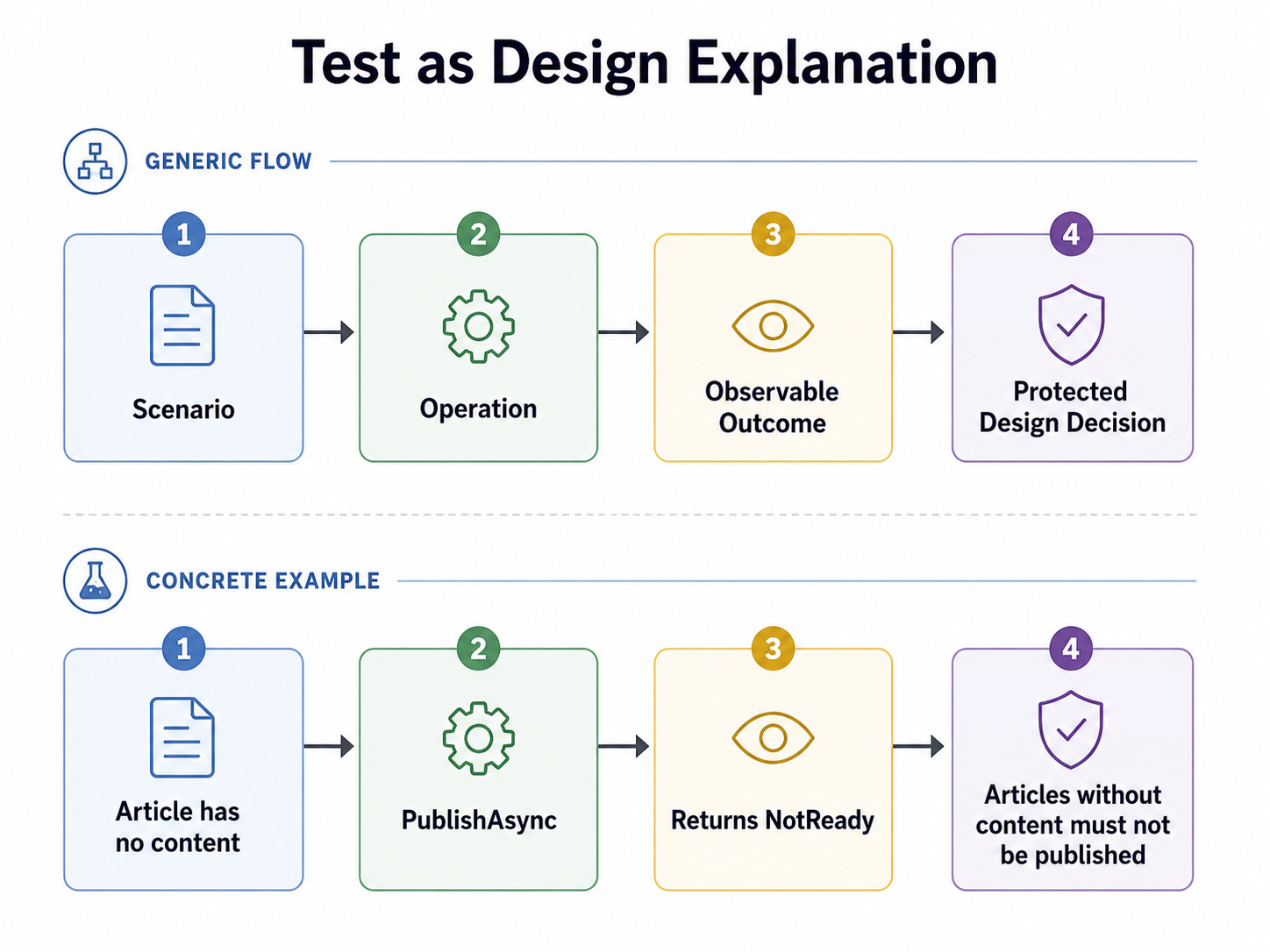
Good tests connect a meaningful scenario to an observable outcome, making the protected design decision visible to future readers.
For example:
[Fact]
public async Task PublishAsync_ReturnsNotReady_WhenArticleHasNoContent()
{
}
answers those questions:
Operation:
PublishAsync

Condition:
The article has no content

Protected behavior:
Publishing returns NotReady
This format is not a rule that every test must follow exactly.
But it is a useful habit.
It keeps the test focused on behavior instead of implementation.
Consider this test:
[Fact]
public async Task PublishAsync_CallsValidator()
{
    // ...
}
This test may pass.
But what behavior does it protect?
It protects the fact that a validator is called. That may be useful if the validator call is part of the public design of the component. Usually, though, it is an implementation detail.
The more important behavior may be this:
[Fact]
public async Task PublishAsync_ReturnsNotReady_WhenArticleHasNoContent()
{
    // ...
}
or:
[Fact]
public async Task PublishAsync_DoesNotSaveArticle_WhenArticleIsNotReady()
{
    // ...
}
These tests protect observable behavior.
They do not care whether the code uses a validator class, a domain method, a private helper, or inline checks.
The implementation can change.
The behavior should remain.
That is the difference between testing a design promise and testing a design path.
A design promise says:
This condition should produce this outcome.
A design path says:
This method should call these collaborators in this order.
Sometimes the path matters.
Usually, the promise matters more.
For example, in an article publishing workflow, the important rules may be:
- An article without content cannot be published.
- A missing article returns NotFound.
- An already published article returns AlreadyPublished.
- A ready article becomes published.
- A successful publish stores the changed article.
- Subscribers are notified only when notification is requested.
Those are behaviors worth protecting.
They describe what the system promises.
Tests for those rules might look like this:
[Fact]
public async Task PublishAsync_ReturnsNotFound_WhenArticleDoesNotExist()
{
}

[Fact]
public async Task PublishAsync_ReturnsAlreadyPublished_WhenArticleWasPublishedEarlier()
{
}

[Fact]
public async Task PublishAsync_SavesPublishedArticle_WhenArticleIsReady()
{
}

[Fact]
public async Task PublishAsync_DoesNotNotifySubscribers_WhenNotificationIsDisabled()
{
}
Each test describes a meaningful behavior.
Together, they explain the design of publishing.
They show what the operation is allowed to do, what it must reject, and which outcomes callers should handle.
This is much stronger than a group of tests like:
PublishAsync_ReturnsFalse
PublishAsync_CallsRepository
PublishAsync_CallsValidator
PublishAsync_CallsNotifier
PublishAsync_DoesNotThrow
Those tests may verify some facts, but they do not explain the design as clearly.
They focus more on mechanics than behavior.
A test that protects behavior should make the scenario clear in the setup.
For example:
[Fact]
public async Task PublishAsync_ReturnsNotReady_WhenArticleHasNoContent()
{
    var article = ArticleDraftBuilder
        .Create()
        .WithoutContent()
        .Build();

    var service = CreatePublishingServiceWith(article);
    var result = await service.PublishAsync(
        new PublishArticleRequest(article.Id),
        CancellationToken.None);

    Assert.Equal(
        PublishArticleStatus.NotReady,
        result.Status);
}
The setup is not just preparation.
It is part of the explanation.
The article is a draft.
It has no content.
The publishing service is created with that article.
The caller tries to publish it.
The result is NotReady.
A reader can follow the story without needing to know how the service is implemented.
That is the kind of clarity worth aiming for.
The same test can become weaker if the setup hides the important condition:
[Fact]
public async Task PublishAsync_ReturnsNotReady_WhenArticleHasNoContent()
{
    var article = CreateInvalidArticle();
    var service = CreateService(article);
    var result = await service.PublishAsync(
        new PublishArticleRequest(article.Id),
        CancellationToken.None);

    Assert.Equal(
        PublishArticleStatus.NotReady,
        result.Status);
}
This test name says the article has no content, but the setup does not show it.
The reader has to inspect CreateInvalidArticle to know whether the scenario matches the name.
That may be acceptable if the helper is very clear and local. But in many cases, the helper hides the behavior the test is supposed to explain.
A better helper name would expose the relevant condition:
var article = CreateArticleWithoutContent();
or:
var article = ArticleDraftBuilder
    .Create()
    .WithoutContent()
    .Build();
The setup should reveal what matters.
It should hide only what does not matter.
That distinction is important.
Good test helpers remove noise.
Bad test helpers hide the scenario.
For example, this setup hides too much:
var service = CreateDefaultService();
var request = CreateDefaultRequest();
The reader cannot see what is relevant.
A more explanatory setup might say:
var article = ArticleDraftBuilder
    .Create()
    .WithTitle("A useful title")
    .WithoutContent()
    .Build();

var service = CreatePublishingServiceWith(article);
var request = new PublishArticleRequest(article.Id);
This setup shows the relevant condition: no content.
It does not need to show every irrelevant dependency.
That is a good balance.
A test should protect one behavior clearly.
That does not always mean one assertion.
Sometimes one behavior needs several assertions.
For example:
[Fact]
public async Task PublishAsync_PublishesAndSavesArticle_WhenArticleIsReady()
{
    var article = ArticleDraftBuilder
        .Create()
        .WithContent("Content")
        .Build();
    var repository = new FakeArticleRepository(article);
    var service = CreatePublishingServiceWith(repository);
    var result = await service.PublishAsync(
        new PublishArticleRequest(article.Id),
        CancellationToken.None);

    Assert.Equal(
        PublishArticleStatus.Succeeded,
        result.Status);
    Assert.True(repository.SavedArticle!.IsPublished);
}
This test has two assertions, but they belong to one behavior: a ready article is successfully published and saved.
That can be reasonable.
The issue is not the number of assertions alone.
The issue is whether the assertions describe one coherent behavior or several unrelated concerns.
This test is less focused:
[Fact]
public async Task PublishAsync_Works()
{
    // setup
    var result = await service.PublishAsync(
        request,
        CancellationToken.None);

    Assert.Equal(
        PublishArticleStatus.Succeeded,
        result.Status);
    Assert.True(repository.SavedArticle!.IsPublished);
    Assert.Single(notifier.Notifications);
    Assert.Equal(
        1,
        analytics.Events.Count);
    Assert.Equal(
        "Published",
        logger.LastMessage);
}
This may be testing too much at once.
Publishing, notification, analytics, and logging may all be related, but they may not all belong in the same test. If this test fails, it may be harder to see which behavior was broken.
Splitting tests can make the design clearer:
[Fact]
public async Task PublishAsync_SavesPublishedArticle_WhenArticleIsReady()
{
}

[Fact]
public async Task PublishAsync_NotifiesSubscribers_WhenNotificationIsRequested()
{
}

[Fact]
public async Task PublishAsync_RecordsPublishingEvent_WhenArticleIsPublished()
{
}
Now each test protects one design decision.
The test names form a readable list of behavior.
That list is valuable.
A test suite should not only be executable.
It should be skimmable.
A developer should be able to scan the test names and understand what the feature promises.
This is where behavior-focused tests become useful documentation.
For example, a set of tests for license restoration might include:
RestoreAsync_ReturnsNotFound_WhenNoLicenseExistsForEmail
RestoreAsync_ReturnsEmailNotConfirmed_WhenEmailHasNotBeenConfirmed
RestoreAsync_ReturnsTooManyDevices_WhenActivationLimitIsReached
RestoreAsync_ReturnsRestored_WhenLicenseCanBeRestored
RestoreAsync_SendsRestoreEmail_WhenLicenseCanBeRestored
Even without reading the test bodies, the reader learns the restoration rules.
That is a good test suite.
It explains the design.
A poor test suite may have the same coverage but less explanatory value:
RestoreAsync_ReturnsFalse
RestoreAsync_ReturnsTrue
RestoreAsync_CallsRepository
RestoreAsync_CallsEmailService
RestoreAsync_Throws
These tests may catch some regressions, but they do not explain the workflow as clearly.
They tell us that the code does things.
They do not tell us enough about what the behavior means.
A good behavior test also uses meaningful assertions.
For example:
Assert.False(result.Success);
may be technically correct, but it is not very expressive.
This is usually clearer:
Assert.Equal(
    PublishArticleStatus.NotReady,
    result.Status);
The assertion now uses the language of the operation.
It explains which outcome matters.
Similarly, this assertion is vague:
Assert.NotNull(result);
This may be useful as a guard, but it rarely explains the design by itself.
A more meaningful assertion might be:
Assert.Equal(
    RestoreLicenseStatus.Restored,
    result.Status);
or:
Assert.Equal(
    ArticlePublicationState.Published,
    article.State);
or:
Assert.Contains(
    notifier.SentNotifications,
    n => n.ArticleId == article.Id);
The assertion should express the behavior the test is protecting.
A test can also explain the design by choosing the right level of observation.
For example, suppose publishing an article should record an event.
A test could verify a specific event dispatcher call:
eventDispatcher.Verify(
    x => x.PublishAsync(
        It.IsAny<ArticlePublished>(),
        It.IsAny<CancellationToken>()),
    Times.Once);
That may be acceptable.
But if the event itself is what matters, a fake can sometimes make the test clearer:
Assert.Contains(
    publishedEvents.Events,
    e => e is ArticlePublished published &&
    published.ArticleId == article.Id);
This focuses on the observable event, not the mocking framework.
The test is easier to read as a behavior example.
The same principle applies to persistence.
Instead of verifying that SaveAsync was called with any article, the test may be more useful if it verifies the saved state:
Assert.True(repository.SavedArticle!.IsPublished);
The implementation detail is not that a repository was called.
The behavior is that a published article was saved.
The right choice depends on the design.
If calling a collaborator is the behavior being coordinated, verifying the call may be appropriate.
If the state or outcome is what matters, assert the state or outcome.
A good test chooses observations that match the behavior being protected.
This helps avoid tests that are too closely tied to implementation.
For example:
validator.Verify(
    x => x.Validate(article),
    Times.Once);
may fail if validation moves into the Article domain object, even though publishing still correctly rejects invalid articles.
A behavior-focused test would still pass:
Assert.Equal(
    PublishArticleStatus.NotReady,
    result.Status);
That gives the design more room to improve.
A test should fail when behavior breaks.
It should not fail merely because the implementation became cleaner.
This does not mean collaborator verification is always wrong.
If the design promise is that an external message is sent, a collaborator observation may be the right assertion.
For example:
Assert.Single(confirmationSender.SentConfirmations);
This is not merely checking an implementation detail if sending the confirmation is part of the behavior.
The important question is:
What is the behavior the test protects?
- If the behavior is “invalid articles cannot be published,” assert the result.
- If the behavior is “a confirmation email is sent,” observe the sent confirmation.
- If the behavior is “the article is saved as published,” inspect the saved article.
- If the behavior is “a cached value is reused,” observe the cache behavior.
The test should observe the system at the level where the design promise appears.
A good behavior test also makes future failures useful.
When this test fails:
[Fact]
public async Task PublishAsync_ReturnsNotReady_WhenArticleHasNoContent()
{
}
the failure tells the developer what design rule may have changed.
When this test fails:
[Fact]
public async Task PublishAsync_CallsValidator()
{
}
the failure tells the developer only that the internal path changed.
The first failure is usually more useful.
It points to behavior.
The second failure may or may not matter.
That is why behavior-focused tests are often better refactoring companions. They allow the internals to move while still protecting the rules.
A practical way to evaluate a test is to ask:
If this test fails, what does the failure tell me?
If the answer is, “A meaningful behavior may be broken,” the test is probably useful.
If the answer is, “Some internal call changed,” the test may be too implementation-focused.
Another useful question is:
Could I change the implementation while preserving the behavior and still keep this test green?
If yes, the test probably protects behavior.
If no, the test may be freezing implementation details.
A third useful question is:
Would a new developer understand the feature better after reading this test?
If yes, the test explains the design.
These questions are not strict rules.
They are review tools.
Sometimes a test must be technical.
Sometimes a test must verify a specific call.
Sometimes the implementation detail is the behavior, especially in infrastructure code.
But in application and domain code, the most valuable tests usually describe behavior in the language of the system.
They protect rules, outcomes, and workflows.
They make the design easier to understand.
They also make the design easier to change safely.
A good test is not just a tripwire.
It is an example of intended behavior.
It tells the future reader:
In this situation, the system should behave like this.
That is why a good test should explain the behavior being protected.
The more clearly it does that, the more useful the test becomes.
3. Test Names Should Speak in Application Language
A test name is often the first thing a reader sees.
Before they read the setup, before they inspect the assertions, and before they open the production code, the test name gives them a first impression of what behavior is being protected.
That makes the test name important.
A good test name should speak in the language of the application, not only in the language of the implementation.
For example:
[Fact]
public async Task ExecuteAsync_ReturnsFalse()
{
}
This name says very little.
Something executes.
It returns false.
But what operation is being tested?
What does false mean?
What scenario caused it?
The name may match the method and result type, but it does not explain the behavior.
A better test name uses application language:
[Fact]
public async Task PublishAsync_ReturnsNotReady_WhenArticleHasNoContent()
{
}
This name explains the operation, the outcome, and the condition.
It tells the reader that publishing has a readiness rule, and that missing content prevents publication.
The test name becomes a small design statement.
That is what application language does.
It lets tests describe behavior in terms that matter to the system.
For example:
[Fact]
public async Task RestoreAsync_ReturnsNotFound_WhenNoLicenseExistsForEmail()
{
}
This is clearer than:
[Fact]
public async Task HandleAsync_ReturnsError()
{
}
The first name tells us about license restoration.
The second name tells us about a handler returning an error.
Both may point to the same code path.
Only one explains the application behavior.
Application language is not necessarily business language in a narrow sense. In developer-facing software, terms such as license, activation, article, preview, API key, report, download, slug, subscription, checkout, and publication may all be part of the application language.
The important point is that the test should use the words the system uses to describe meaningful behavior.
It should avoid hiding that behavior behind generic implementation words.
Names such as these often make tests weaker:
ExecuteAsync_ReturnsTrue
HandleAsync_ReturnsResult
ProcessAsync_Fails
UpdateAsync_Works
RunAsync_DoesNotThrow
Service_ReturnsSuccess
They may be accurate.
But they are usually not very helpful.
They describe activity, technical structure, or a generic result. They do not explain much about the design.
Names like these are stronger:
PublishAsync_ReturnsNotReady_WhenArticleHasNoContent
RestoreAsync_ReturnsTooManyDevices_WhenActivationLimitIsReached
RenderPreviewAsync_DoesNotPublishArticle
ConfirmDownloadAsync_ReturnsExpired_WhenTokenHasExpired
StartCheckoutAsync_ReturnsUnavailable_WhenPaymentProviderIsDown
GenerateSlug_RemovesUnsupportedCharacters
These names use the language of the feature.
They tell the reader what behavior matters.
They also make the test suite easier to scan.
A developer looking at a list of tests can quickly understand which scenarios are covered.
That is valuable because test names often become the table of contents for a feature.
For example, a test class for publishing might contain:
PublishAsync_ReturnsNotFound_WhenArticleDoesNotExist
PublishAsync_ReturnsNotReady_WhenArticleHasNoContent
PublishAsync_ReturnsAlreadyPublished_WhenArticleWasPublishedEarlier
PublishAsync_SavesPublishedArticle_WhenArticleIsReady
PublishAsync_NotifiesSubscribers_WhenNotificationIsRequested
PublishAsync_DoesNotNotifySubscribers_WhenNotificationIsDisabled
This list tells a story.
It describes the publishing workflow better than a list like this:
PublishAsync_ReturnsFalse
PublishAsync_ReturnsTrue
PublishAsync_CallsRepository
PublishAsync_CallsValidator
PublishAsync_CallsNotifier
PublishAsync_DoesNotThrow
The second list may still represent useful tests.
But it does not explain the design as well.
It describes implementation facts and generic outcomes.
The first list describes application behavior.
That difference matters when the test suite grows.
A test name should usually include the operation being tested.
For example:
[Fact]
public async Task PublishAsync_ReturnsNotReady_WhenArticleHasNoContent()
{
}
The operation is PublishAsync.
That is useful because it lets the reader connect the test to the API.
But the operation name is not enough.
This test is incomplete as an explanation:
[Fact]
public async Task PublishAsync_ReturnsNotReady()
{
}
It names the operation and outcome, but not the condition.
The reader still has to ask why.
Adding the condition makes the design visible:
[Fact]
public async Task PublishAsync_ReturnsNotReady_WhenArticleHasNoContent()
{
}
A useful pattern is:
Operation_ExpectedOutcome_WhenCondition
For example:
RestoreAsync_ReturnsNotFound_WhenNoLicenseExistsForEmail
PublishAsync_ReturnsAlreadyPublished_WhenArticleWasPublishedEarlier
RenderPreviewAsync_DoesNotSaveArticle_WhenPreviewIsGenerated
ConfirmDownloadAsync_ReturnsExpired_WhenTokenHasExpired
This pattern is not mandatory.
It is just useful.
It keeps the test focused on the behavior being protected.
The operation identifies what is being exercised.
The expected outcome identifies what matters.
The condition identifies why that outcome should happen.
Some teams prefer other naming styles, such as sentence-style names:
[Fact]
public async Task Publishing_an_article_without_content_returns_not_ready()
{
}
That can also work.
The exact naming convention matters less than the clarity.
The test name should make the behavior understandable.
For C# codebases, I often prefer method-like names because they are easy to search and group:
[Fact]
public async Task PublishAsync_ReturnsNotReady_WhenArticleHasNoContent()
{
}
But this is a style choice.
The principle is more important than the format.
A test name should use words from the design.
It should avoid words that only describe the test mechanics.
For example:
[Fact]
public async Task MockReturnsNull_ThrowsException()
{
}
This name describes the setup, not the behavior.
A better name might be:
[Fact]
public async Task PublishAsync_ReturnsNotFound_WhenArticleDoesNotExist()
{
}
The fact that a mock returns null may be how the scenario is created.
It is not the scenario itself.
The scenario is that the article does not exist.
That is what the test name should say.
Similarly, this name is too focused on a helper:
[Fact]
public async Task CreateServiceWithInvalidData_ReturnsError()
{
}
A clearer name says what the invalid data represents:
[Fact]
public async Task RestoreAsync_ReturnsEmailNotConfirmed_WhenEmailHasNotBeenConfirmed()
{
}
The test name should not make the reader translate from test setup to application meaning.
It should use application meaning directly.
This also applies to Boolean flags and modes.
For example:
[Fact]
public async Task ProcessAsync_ReturnsSuccess_WhenFlagIsTrue()
{
}
This name is weak.
Which flag?
What does the flag mean?
What operation is being selected?
A stronger name reveals the decision:
[Fact]
public async Task PublishAsync_NotifiesSubscribers_WhenNotificationIsRequested()
{
}
or:
[Fact]
public async Task PublishAsync_DoesNotNotifySubscribers_WhenNotificationIsDisabled()
{
}
The test no longer talks about a flag.
It talks about the behavior the flag represents.
That is better application language.
If a test name contains words such as flag, mode, type, code, or value, it may be worth asking whether the name should describe what that value means.
Sometimes those words are appropriate.
But often they are signs that the test is using implementation language instead of design language.
For example:
[Fact]
public async Task HandleAsync_ReturnsError_WhenModeIs3()
{
}
is hard to understand.
This is better:
[Fact]
public async Task RestoreAsync_ReturnsTooManyDevices_WhenActivationLimitIsReached()
{
}
The second name tells the reader what the scenario means.
The first name requires hidden knowledge.
Good test names reduce hidden knowledge.
They make the behavior visible at the point where the reader needs it.
This is especially useful when tests fail.
A failing test named:
PublishAsync_ReturnsNotReady_WhenArticleHasNoContent
immediately points to a rule.
A failing test named:
ExecuteAsync_ReturnsFalse
does not.
The developer has to open the test to learn what was broken.
That may not seem like much, but in a large test suite, it matters. Clear test names reduce the time between seeing a failure and understanding the affected behavior.
They also make it easier to decide whether a failure is important.
If a test fails because a meaningful rule changed, that deserves attention.
If a test fails because an internal method was called differently, that may or may not matter.
The test name should help make that distinction.
Application language also helps reviews.
A reviewer can understand this test quickly:
[Fact]
public async Task ConfirmDownloadAsync_ReturnsExpired_WhenTokenHasExpired()
{
}
The reviewer can ask useful questions:
- Is expiration the right outcome?
- Should expired tokens be deleted?
- Should a new confirmation be allowed?
- Should the user see a different message?
Those are design questions.
A weaker test name pushes the reviewer toward decoding:
[Fact]
public async Task ValidateAsync_ReturnsFalse_WhenDateIsOld()
{
}
What date?
Old in what sense?
What is being validated?
What does false mean?
The reviewer must first reconstruct the scenario before discussing the design.
That is not ideal.
Good test names make review conversations more productive because they present behavior in meaningful terms.
They also help reveal gaps.
When a test class is well named, missing scenarios become easier to see.
For example:
PublishAsync_ReturnsNotFound_WhenArticleDoesNotExist
PublishAsync_ReturnsNotReady_WhenArticleHasNoContent
PublishAsync_SavesPublishedArticle_WhenArticleIsReady
PublishAsync_NotifiesSubscribers_WhenNotificationIsRequested
A reader may ask:
- What happens if the article is already published?
- What happens if notification is disabled?
- What happens if the caller has no permission?
The test names form a map.
Gaps in the map become visible.
That is harder when the tests have generic names.
Application language also helps keep test classes focused.
For example:
public sealed class ArticlePublishingServiceTests
{
}
sets an expectation.
The tests inside should probably discuss publishing behavior.
If the class contains tests named:
PublishAsync_ReturnsNotReady_WhenArticleHasNoContent
PublishAsync_ReturnsAlreadyPublished_WhenArticleWasPublishedEarlier
PublishAsync_NotifiesSubscribers_WhenNotificationIsRequested
the class feels coherent.
But if it contains tests named:
ProcessAsync_UpdatesSlug
ProcessAsync_RendersPreview
ProcessAsync_SendsEmail
ProcessAsync_DeletesOldImages
the test names may reveal that the production type has too many responsibilities, or that the test class is covering too broad a surface.
This is another way test names can explain the design.
They can also expose where the design is unclear.
If it is hard to name the test in application language, the production API may not be using application language either.
For example:
[Fact]
public async Task ProcessAsync_ReturnsFailed_WhenRequestTypeIsPublishAndStateIsInvalid()
{
}
This test name may be awkward because the API is awkward.
The operation may be hidden behind ProcessAsync.
The specific action may be hidden behind RequestType.
The state may be represented too generally.
A clearer API may lead to a clearer test:
[Fact]
public async Task PublishAsync_ReturnsNotReady_WhenArticleHasNoContent()
{
}
The test name improved because the design gave it better words.
This is a useful feedback loop.
When you struggle to name a test, do not only ask how to phrase it.
Ask whether the behavior itself is clearly expressed by the API.
- Maybe the method name is too vague.
- Maybe the request type is too generic.
- Maybe the result type does not distinguish outcomes.
- Maybe one method is doing several operations.
- Maybe the test is reaching into the wrong level of the design.
The awkward test name may be a symptom.
It may be telling you something.
Test names should also avoid repeating irrelevant implementation details.
For example:
[Fact]
public async Task PublishAsync_UsesArticleRepositoryToSaveArticle_WhenArticleIsReady()
{
}
This may be too focused on the repository.
If the behavior being protected is that the published article is persisted, a better name is:
[Fact]
public async Task PublishAsync_SavesPublishedArticle_WhenArticleIsReady()
{
}
The test can still use a fake repository internally.
But the name focuses on the behavior, not the collaborator.
Likewise:
[Fact]
public async Task RestoreAsync_CallsEmailSender_WhenLicenseExists()
{
}
may be better as:
[Fact]
public async Task RestoreAsync_SendsRestoreEmail_WhenLicenseCanBeRestored()
{
}
The second name uses application language.
It says what the user-visible or workflow-visible effect is.
It does not focus on which dependency happened to perform it.
This distinction matters because collaborators can change.
An email sender might become a queue publisher.
A repository might become an event store.
A validator might become a domain method.
If the design promise stays the same, the test name should not become misleading.
Application-language names are usually more stable than implementation-language names.
A test named:
RestoreAsync_SendsRestoreEmail_WhenLicenseCanBeRestored
can remain valid even if the email is later queued.
The test body may change.
The behavior remains.
A test named:
RestoreAsync_CallsSmtpSender_WhenLicenseExists
becomes tied to a mechanism.
That may be appropriate for an SMTP adapter test.
It is usually too technical for an application workflow test.
The level of the test matters.
At the infrastructure level, implementation language may be correct.
For example:
[Fact]
public async Task SendAsync_SetsExpectedSmtpSubject()
{
}
could be a useful SMTP sender test.
At the application level, the same behavior may be named differently:
[Fact]
public async Task SendConfirmationAsync_IncludesDownloadLink()
{
}
The first test talks about SMTP details.
The second talks about confirmation behavior.
Both can be useful.
They belong at different levels.
This is why test names should match the level of the code they test.
- Domain tests should use domain language.
- Application tests should use workflow language.
- Infrastructure tests may use technical language.
- Helper tests may use transformation language.
For example:
[Fact]
public void GenerateSlug_RemovesUnsupportedCharacters()
{
}
is not business workflow language, but it is still clear. It names the transformation being tested.
A parser test may say:
[Fact]
public void Parse_ReturnsInvalid_WhenInputContainsUnknownToken()
{
}
A repository test may say:
[Fact]
public async Task FindBySlugAsync_ReturnsPublishedArticle()
{
}
A domain test may say:
[Fact]
public void Publish_Throws_WhenArticleHasNoContent()
{
}
or, if the domain uses results:
[Fact]
public void Publish_ReturnsNotReady_WhenArticleHasNoContent()
{
}
The right language depends on the design level.
The wrong language often points to a misplaced concern.
A practical review question is:
Does this test name describe the behavior at the same level as the code being tested?
If an application test talks mostly about SQL, SMTP, JSON, HTTP status codes, mocks, or internal method names, it may be testing at the wrong level.
If an infrastructure test avoids technical details entirely, it may be too vague.
The test name should tell the truth about the level.
Application language also makes tests easier to search.
A developer trying to understand article publishing can search for PublishAsync.
A developer trying to understand license restoration can search for RestoreAsync.
A developer trying to understand preview rendering can search for RenderPreviewAsync.
If the tests all use HandleAsync, ExecuteAsync, or ProcessAsync, searching becomes less useful.
This is another practical reason to use meaningful operation names.
Clear test names make the test suite navigable.
They also make it easier to spot duplicated or overlapping tests.
For example:
PublishAsync_ReturnsNotReady_WhenArticleHasNoContent
PublishAsync_DoesNotPublish_WhenContentIsMissing
PublishAsync_Fails_WhenArticleBodyIsEmpty
These may all be testing the same rule with different words.
That may be useful if they cover meaningfully different cases.
But the names make the overlap visible.
Generic names often hide duplication.
Application language therefore helps maintain the test suite, not only the production code.
A useful habit is to read the test names without the bodies.
Ask whether they explain the feature.
For example:
RestoreAsync_ReturnsNotFound_WhenNoLicenseExistsForEmail
RestoreAsync_ReturnsEmailNotConfirmed_WhenEmailHasNotBeenConfirmed
RestoreAsync_ReturnsTooManyDevices_WhenActivationLimitIsReached
RestoreAsync_SendsRestoreEmail_WhenLicenseCanBeRestored
This list explains license restoration.
Now compare:
RestoreAsync_ReturnsFalse
RestoreAsync_ReturnsError
RestoreAsync_ReturnsTrue
RestoreAsync_CallsRepository
RestoreAsync_CallsEmailService
This list is weaker.
The tests may pass.
They may even cover similar code.
But they do not teach the reader as much.
That is the difference.
A good test name should make the test suite read like a set of examples.1
Not examples of implementation.
Examples of intended behavior.
This is especially useful when the production code has to change.
A developer refactoring the implementation can use the tests to understand what must remain true.
If the tests speak in application language, the protected behavior is clear.
If the tests speak in implementation language, the developer may be less certain which failures matter.
That uncertainty can make refactoring slower and riskier.
Test names do not need to be perfect.
They only need to be useful.
A useful test name is specific enough to explain the behavior, but not so detailed that it repeats the whole implementation.
- It names the operation.
- It names the meaningful condition.
- It names the expected outcome or effect.
- It uses the language of the system.
And when a future reader sees it, they should understand why the test exists.
That is the standard.
Not clever naming.
Not rigid naming.
Not maximum detail.
Just enough application language to make the design visible.
4. Arrange-Act-Assert Should Reveal the Design
The structure of a test matters.
A test may have a good name, but if the body is hard to read, the design can still be hidden. The reader should be able to move through the test and understand the scenario, the operation, and the expected outcome without unnecessary investigation.
This is where the Arrange-Act-Assert structure is useful.
It gives the test a simple shape:
Arrange:
Create the situation.

Act:
Perform the operation.

Assert:
Check the meaningful outcome.
That structure is not valuable because it is a ritual.
It is valuable because it helps the test tell a story.
For example:
[Fact]
public async Task PublishAsync_ReturnsNotReady_WhenArticleHasNoContent()
{
    var article = ArticleDraftBuilder
        .Create()
        .WithoutContent()
        .Build();
    var service = CreatePublishingServiceWith(article);
    var result = await service.PublishAsync(
        new PublishArticleRequest(article.Id),
        CancellationToken.None);

    Assert.Equal(
        PublishArticleStatus.NotReady,
        result.Status);
}
This test is easy to follow.
The arrange section creates an article without content.
The act section tries to publish it.
The assert section verifies that publishing returns NotReady.
The structure reinforces the design rule:
An article without content is not ready to publish.
That is the value of Arrange-Act-Assert.
It makes the test read like an example of intended behavior.
The arrange section should expose the relevant scenario.
It should not hide the important condition behind generic setup.
For example:
var article = CreateInvalidArticle();
may be too vague.
- Invalid how?
- Missing title?
- Missing content?
- Invalid slug?
- Wrong state?
- Expired publication date?
The test name may say the article has no content, but the setup does not show it. The reader has to inspect the helper to confirm that the setup matches the scenario.
This is clearer:
var article = ArticleDraftBuilder
    .Create()
    .WithoutContent()
    .Build();
or:
var article = CreateArticleWithoutContent();
Now the arrange section supports the test name.
It tells the same story.
Good setup hides irrelevant details and reveals relevant ones.
That balance is important.
This setup may contain too much noise:
var repository = new FakeArticleRepository();
var clock = new FakeClock(
    new DateTimeOffset(2026, 7, 1, 10, 0, 0, TimeSpan.Zero));
var markdownRenderer = new FakeMarkdownRenderer();
var notifier = new FakeSubscriberNotifier();
var analytics = new FakeAnalyticsRecorder();
var permissionService = new FakePermissionService();
var logger = new FakeLogger<ArticlePublishingService>();
var service = new ArticlePublishingService(
    repository,
    clock,
    markdownRenderer,
    notifier,
    analytics,
    permissionService,
    logger);
Some of this may be necessary.
But if most dependencies are irrelevant to the behavior being tested, the setup distracts from the scenario. The reader has to scan infrastructure before reaching the design rule.
A helper can improve this:
var article = ArticleDraftBuilder
    .Create()
    .WithoutContent()
    .Build();
var service = CreatePublishingServiceWith(article);
This is better if the hidden dependencies are not relevant to the test.
But helpers can also hide too much.
For example:
var service = CreateDefaultPublishingService();
may be too vague if the default setup decides important behavior.
- Does it contain an article?
- Is the article ready?
- Are notifications enabled?
- Is the current user allowed to publish?
- Is the clock fixed?
The helper name should tell the reader what matters.
For example:
var service = CreatePublishingServiceWith(article);
or:
var service = CreatePublishingServiceWithReadyArticle();
or:
var service = CreatePublishingServiceWithoutPermission();
The helper should support the scenario, not obscure it.
The act section should usually be small and obvious.
It should show the operation being tested.
For example:
var result = await service.PublishAsync(
    new PublishArticleRequest(article.Id),
    CancellationToken.None);
This is clear.
The test performs one operation: publish.
A weaker act section mixes several operations:
await service.ValidateAsync(
    request,
    CancellationToken.None);

await service.SaveAsync(
    request,
    CancellationToken.None);

var result = await service.PublishAsync(
    request,
    CancellationToken.None);
This may be appropriate for an integration-style test.
But in a focused behavior test, it can make the purpose less clear.
Which operation is being tested?
- Validation?
- Saving?
- Publishing?
The act section should usually have one main action. If several actions are necessary to prepare the scenario, they may belong in arrange. If several actions are the behavior being tested, the test may be describing a larger workflow and should be named accordingly.
For example:
[Fact]
public async Task CompletePurchaseAsync_GrantsAccessAndSendsConfirmation_WhenPaymentIsAccepted()
{
    // Arrange

    // Act
    var result = await checkoutWorkflow.CompletePurchaseAsync(
        request,
        CancellationToken.None);

    // Assert
}
Here, one application operation coordinates several internal effects.
That is fine.
The act section is still clear because the workflow has a meaningful name.
The assert section should check the outcome that matters.
For example:
Assert.Equal(
    PublishArticleStatus.NotReady,
    result.Status);
This assertion uses the language of the operation.
It tells the reader which outcome is important.
This is weaker:
Assert.False(result.Success);
It may be correct, but it does not explain the outcome as clearly.
False could mean many things.
NotReady has meaning in the publishing workflow.
The assertion should preserve that meaning.
Assertions should also avoid making the test more technical than necessary.
For example:
repository.Verify(
    x => x.SaveAsync(
        It.IsAny<Article>(),
        It.IsAny<CancellationToken>()),
    Times.Once);
may be useful in some tests.
But if the behavior is that a published article is saved, this can be clearer:
Assert.True(repository.SavedArticle!.IsPublished);
The first assertion checks that a collaborator was called.
The second checks the meaningful saved state.
The better choice depends on the behavior being protected.
Arrange-Act-Assert should make that behavior obvious.
A common problem is that arrange and assert become much larger than the behavior itself.
For example:
[Fact]
public async Task PublishAsync_ReturnsSucceeded_WhenArticleIsReady()
{
    var options = new Options();
    options.Mode = "publish";
    options.Level = 3;
    options.UseCache = false;

    var context = new TestContext();
    context.Values["articleId"] = Guid.NewGuid().ToString();
    context.Values["title"] = "Title";
    context.Values["content"] = "Content";
    context.Values["state"] = "draft";
    context.Values["notify"] = "true";

    var service = CreateService(
        options,
        context);
    var result = await service.ExecuteAsync(
        context,
        CancellationToken.None);

    Assert.True(result.Success);
}
This test is difficult to read because the design is not visible.
The operation is hidden behind ExecuteAsync.
The scenario is hidden in strings and values.
The assertion is generic.
The test may reflect a real API, but it does not explain the design well.
A clearer API gives the test a clearer structure:
[Fact]
public async Task PublishAsync_ReturnsSucceeded_WhenArticleIsReady()
{
    var article = ArticleDraftBuilder
        .Create()
        .WithTitle("Title")
        .WithContent("Content")
        .Build();

    var service = CreatePublishingServiceWith(article);
    var result = await service.PublishAsync(
        new PublishArticleRequest(
            article.Id,
            NotificationMode.NotifySubscribers),
        CancellationToken.None);

    Assert.Equal(
        PublishArticleStatus.Succeeded,
        result.Status);
}
The test now explains the design through its structure.
The arrange section shows the article is ready.
The act section publishes it.
The assert section verifies success.
This is not just a test cleanup.
It is design feedback.
When Arrange-Act-Assert is hard to write clearly, the production API may be hiding meaning.
- Maybe setup requires too many unrelated dependencies.
- Maybe the operation is too generic.
- Maybe the request type has too many flags.
- Maybe the result type does not express outcomes.
- Maybe the test has to reach into internals to observe behavior.
The test body often reveals those problems.
For example, if many tests need arrange code like this:
var request = new Request(
    "publish",
    true,
    false,
    3,
    null);
the design may be forcing important decisions into positional values.
The test would be clearer if those decisions were named:
var request = new PublishArticleRequest(
    article.Id,
    NotificationMode.DoNotNotifySubscribers);
Similarly, if assertions repeatedly look like this:
Assert.Equal(
    "ERR_42",
    result.Code);
the API may be hiding meaningful outcomes behind technical codes.
The test would be clearer if the outcome had a name:
Assert.Equal(
    PublishArticleStatus.NotReady,
    result.Status);
Test structure and API structure influence each other.
A clear API makes Arrange-Act-Assert easier.
A clear Arrange-Act-Assert test makes API problems easier to see.
The arrange section can also reveal whether the design has too many required details.
For example:
var article = new Article(
    id,
    title,
    slug,
    content,
    html,
    createdAt,
    updatedAt,
    publishedAt,
    authorId,
    section,
    category,
    isPublished,
    isArchived,
    viewCount,
    version);
If every test has to construct an object like this, the tests will become noisy.
Maybe the object is too broad.
Maybe construction rules are unclear.
Maybe tests need a builder.
Maybe the design should expose named factories for meaningful states:
var article = Article.CreateDraft(
    title,
    content);
or test builders:
var article = ArticleDraftBuilder
    .Create()
    .WithContent("Content")
    .Build();
The test setup should not be so noisy that it hides the behavior.
But it also should not be so abstract that it hides the scenario.
The best setup usually makes the relevant state explicit and hides the irrelevant plumbing.
For example:
var article = ArticleDraftBuilder
    .Create()
    .WithContent("Content")
    .Build();
is useful because content matters to the scenario.
This is less useful:
var article = TestData.Article1;
unless Article1 has a very clear shared meaning.
Generic test data often hides the scenario.
When the test says Article1, the reader has to remember or inspect what Article1 represents. When the test says .WithContent("Content") or .WithoutContent(), the scenario is visible.
Arrange-Act-Assert also helps keep tests from mixing multiple stories.
For example:
[Fact]
public async Task PublishAsync_Works()
{
    // Arrange article without content

    // Act publish

    // Assert NotReady

    // Arrange article with content

    // Act publish again

    // Assert Succeeded

    // Arrange already published article

    // Act publish again

    // Assert AlreadyPublished
}
This test covers several behaviors.
It may be efficient, but it is not easy to read as a design explanation.
Splitting the cases makes the design clearer:
PublishAsync_ReturnsNotReady_WhenArticleHasNoContent
PublishAsync_ReturnsSucceeded_WhenArticleIsReady
PublishAsync_ReturnsAlreadyPublished_WhenArticleWasPublishedEarlier
Each test has one story.
Each Arrange-Act-Assert block protects one behavior.
Parameterized tests can still be useful, especially for similar input/output rules.
For example:
[Theory]
[InlineData("Hello World", "hello-world")]
[InlineData("Hello, World!", "hello-world")]
[InlineData(" Multiple Spaces ", "multiple-spaces")]
public void GenerateSlug_ReturnsExpectedSlug(
    string title,
    string expectedSlug)
{
    var slug = slugGenerator.GenerateSlug(title);

    Assert.Equal(
        expectedSlug,
        slug.Value);
}
This works because each case follows the same rule.
The behavior is a transformation.
The table makes the rule clearer.
But parameterized tests can become harder to read when each row represents a different scenario with different meaning.
For example:
[Theory]
[InlineData("missing", false, 1)]
[InlineData("empty", false, 2)]
[InlineData("published", true, 3)]
public async Task PublishAsync_ReturnsExpectedResult(
    string state,
    bool flag,
    int code)
{
}
This hides too much meaning.
The reader has to decode what the rows represent.
Separate tests may explain the design better.
The question is whether the table makes the behavior clearer or more cryptic.
Arrange-Act-Assert should serve clarity, not compactness.
A test suite with slightly more lines can be better than a shorter test suite that hides meaning.
Tests are read many more times than they are written.
That is why the structure should favor the reader.
A practical way to review a test body is to read only the first meaningful line of each section.
For example:
Arrange:
var article = ArticleDraftBuilder.Create().WithoutContent().Build();

Act:
var result = await service.PublishAsync(...);

Assert:
Assert.Equal(PublishArticleStatus.NotReady, result.Status);
This summary explains the behavior.
That is a good sign.
If the summary looks like this:
Arrange:
var context = CreateDefaultContext();

Act:
var result = await service.ExecuteAsync(context);

Assert:
Assert.False(result.Success);
the test may pass, but it does not explain much.
The structure does not reveal the design.
Good Arrange-Act-Assert tests often have a visible line of intent in each section:
Arrange:
Create the state that matters.

Act:
Call the operation being tested.

Assert:
Check the outcome the design promises.
That simple shape helps the test remain useful over time.
It also helps future refactoring.
If the implementation changes, the arrange and assert sections can often stay stable because they describe the behavior, not the internals.
For example, validation may move from an application service into a domain method. The test can still arrange an invalid article, act by publishing, and assert NotReady.
The internal path changed.
The design promise did not.
That is exactly the kind of test that makes refactoring safer.
Arrange-Act-Assert is therefore not just a formatting convention.
It is a way to expose design intent.
The arrange section shows the meaningful state.
The act section shows the operation.
The assert section shows the promised outcome.
When those three parts are clear, the test becomes more than a check.
It becomes an example of how the design is supposed to behave.
5. Test Setup Should Not Hide the Scenario
Test setup has two jobs.
- It must create the conditions needed for the test to run.
- It must also help the reader understand the scenario being tested.
The first job is obvious. The second is easier to forget.
A test can be technically correct while still hiding the most important part of the scenario. When that happens, the test may pass, but it becomes harder to understand what behavior is being protected.
For example:
[Fact]
public async Task PublishAsync_ReturnsNotReady_WhenArticleHasNoContent()
{
    var article = CreateInvalidArticle();
    var service = CreatePublishingServiceWith(article);
    var result = await service.PublishAsync(
        new PublishArticleRequest(article.Id),
        CancellationToken.None);

    Assert.Equal(
        PublishArticleStatus.NotReady,
        result.Status);
}
The test name says the article has no content.
But the setup says only that the article is invalid.
The reader has to inspect CreateInvalidArticle to confirm that the setup matches the test name.
That is a small problem.
It may become a larger problem when the test suite grows, when helper methods are reused in several contexts, or when “invalid” begins to mean several different things.
A clearer setup exposes the relevant condition:
[Fact]
public async Task PublishAsync_ReturnsNotReady_WhenArticleHasNoContent()
{
    var article = ArticleDraftBuilder
        .Create()
        .WithoutContent()
        .Build();

    var service = CreatePublishingServiceWith(article);
    var result = await service.PublishAsync(
        new PublishArticleRequest(article.Id),
        CancellationToken.None);

    Assert.Equal(
        PublishArticleStatus.NotReady,
        result.Status);
}
Now the scenario is visible.
The article has no content.
That is the condition the test protects.
The setup supports the test name instead of making the reader verify it somewhere else.
This is the main rule for test setup:
Hide irrelevant plumbing. Reveal meaningful scenario details.
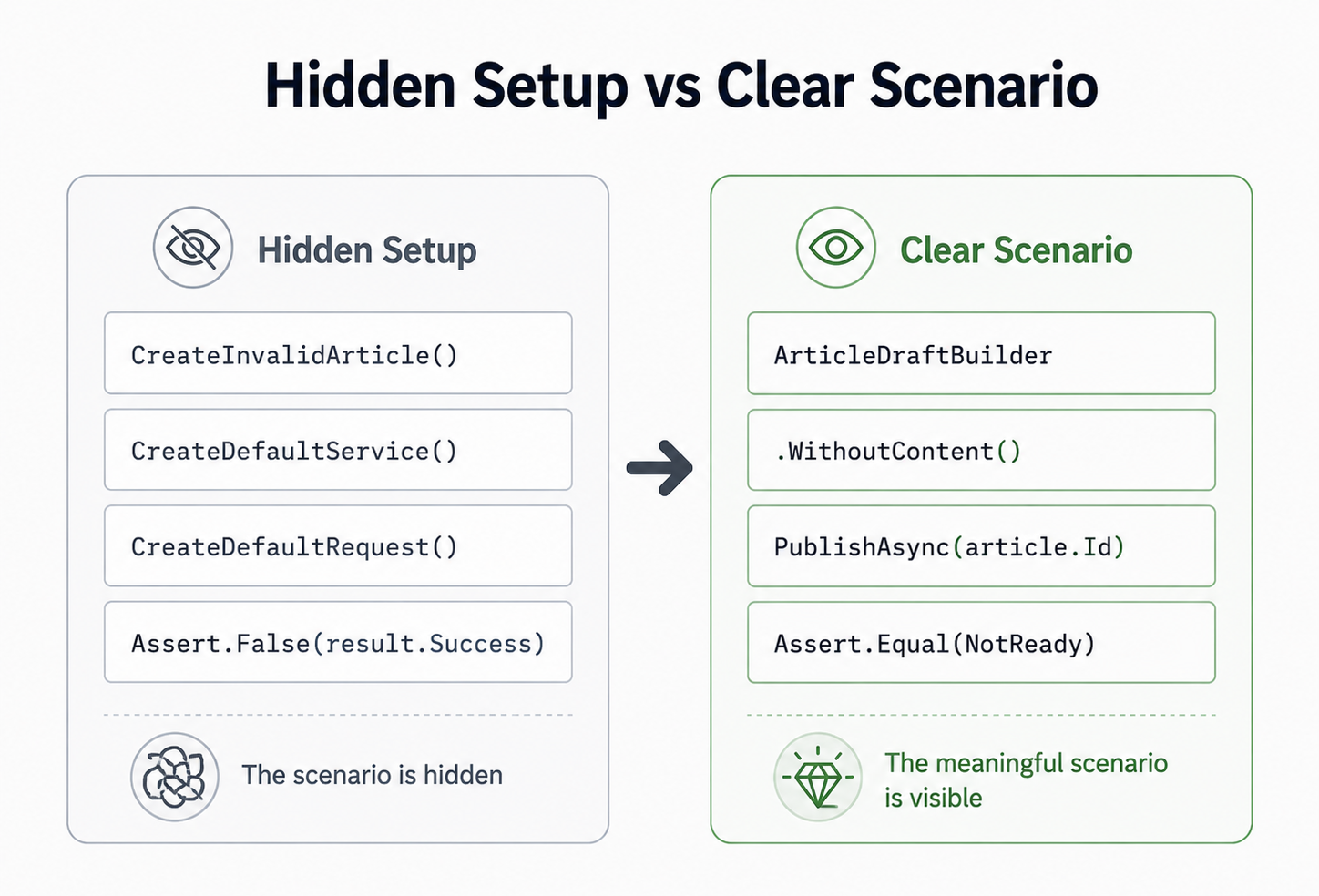
Good test setup hides irrelevant plumbing while keeping the meaningful scenario visible.
That balance matters.
If setup exposes everything, the test becomes noisy.
If setup hides everything, the test becomes vague.
The best setup usually hides dependencies that do not matter and shows the state that does.
For example, this setup may be too noisy:
var repository = new FakeArticleRepository();
var clock = new FakeClock(
    new DateTimeOffset(2026, 7, 1, 10, 0, 0, TimeSpan.Zero));
var markdownRenderer = new FakeMarkdownRenderer();
var notifier = new FakeSubscriberNotifier();
var analytics = new FakeAnalyticsRecorder();
var permissionService = new FakePermissionService();
var logger = new FakeLogger<ArticlePublishingService>();
var service = new ArticlePublishingService(
    repository,
    clock,
    markdownRenderer,
    notifier,
    analytics,
    permissionService,
    logger);
If the test is about missing article content, most of this setup is not part of the story.
It may be necessary to construct the service.
But it should not dominate the test.
A helper can remove that noise:
var article = ArticleDraftBuilder
    .Create()
    .WithoutContent()
    .Build();

var service = CreatePublishingServiceWith(article);
This is easier to read.
The test shows what matters: the article has no content.
The service construction details are hidden because they are not relevant to this test.
But helpers should be used carefully.
A helper can remove noise, but it can also hide the scenario.
For example:
var service = CreateDefaultPublishingService();
var request = CreateDefaultPublishRequest();
This setup is short.
But it does not explain much.
- Does the default service contain an article?
- Is the article ready?
- Is the caller allowed to publish?
- Are notifications enabled?
- Is the article already published?
- Does the request target a real article?
The setup is compact, but the reader has to guess.
That is not a good trade-off.
A better helper name reveals the relevant condition:
var service = CreatePublishingServiceWithReadyArticle();
var result = await service.PublishAsync(
    CreatePublishRequestForReadyArticle(),
    CancellationToken.None);
This is more descriptive, but it still has a weakness: the article and request are hidden inside helpers. The reader cannot easily see whether the request refers to the article.
A clearer setup may keep the article visible:
var article = ArticleDraftBuilder
    .Create()
    .WithContent("Content")
    .Build();

var service = CreatePublishingServiceWith(article);
var result = await service.PublishAsync(
    new PublishArticleRequest(article.Id),
    CancellationToken.None);
This is slightly longer, but it tells a clearer story.
- The article is ready.
- The service contains that article.
- The request publishes that article.
- The relationships are visible.
That is often worth the extra lines.
Test setup should make important relationships obvious.
For example, in a license restore test:
[Fact]
public async Task RestoreAsync_ReturnsRestored_WhenLicenseExistsForConfirmedEmail()
{
    var license = LicenseBuilder
        .Create()
        .WithConfirmedEmail("user@example.com")
        .Build();

    var service = CreateRestoreServiceWith(license);
    var result = await service.RestoreAsync(
        new RestoreLicenseRequest("user@example.com"),
        CancellationToken.None);

    Assert.Equal(
        RestoreLicenseStatus.Restored,
        result.Status);
}
The email appears twice.
That may look repetitive.
But it makes the relationship clear: the request uses the same email as the license.
You could reduce duplication:
var email = "user@example.com";
var license = LicenseBuilder
    .Create()
    .WithConfirmedEmail(email)
    .Build();

var result = await service.RestoreAsync(
    new RestoreLicenseRequest(email),
    CancellationToken.None);
Now the relationship is even clearer.
This kind of setup helps the reader understand the scenario.
The goal is not to remove every repeated value.
The goal is to make meaningful relationships visible.
Generic test data often works against that.
For example:
var license = TestLicenses.ConfirmedLicense;
var request = TestRequests.ValidRestoreRequest;
This may be convenient.
But the reader has to know whether the confirmed license and valid restore request match. If those shared objects change, several tests may change meaning without the test bodies showing why.
Shared test data can be useful for simple constants or well-known examples.
But it should not hide the scenario.
A test named:
RestoreAsync_ReturnsRestored_WhenLicenseExistsForConfirmedEmail
should make it easy to see:
- Which license exists?
- Which email is confirmed?
- Which email is used in the request?
If those details are hidden behind generic fixtures, the test loses explanatory value.
Builders are often a good middle ground.
They let the test show the meaningful state while hiding irrelevant construction details.
For example:
var license = LicenseBuilder
    .Create()
    .WithConfirmedEmail(email)
    .WithActivationLimit(3)
    .Build();
This setup shows the parts of the license that matter.
The builder can fill in the rest.
The same applies to article tests:
var article = ArticleDraftBuilder
    .Create()
    .WithTitle("A useful title")
    .WithoutContent()
    .Build();
The test does not need to specify every property.
It only specifies what matters to the behavior.
That makes builders useful for design-focused tests.
But builders can also become too clever.
For example:
var article = ArticleDraftBuilder
    .Create()
    .InvalidForPublishing()
    .Build();
This may be too vague.
Invalid for publishing could mean many things.
- No content?
- No title?
- Missing slug?
- Publication date in the past?
- No permission?
A better builder method names the specific condition:
.WithoutContent()
or:
.WithoutTitle()
or:
.AlreadyPublished()
or:
.ScheduledForPastDate()
The builder should help the test speak in application language.
It should not replace one vague setup method with another.
The same problem appears with “valid” and “invalid” helpers.
var request = CreateValidRequest();
may be useful in a test where the exact request details do not matter.
But this is often better when the request condition is important:
var request = new PublishArticleRequest(
    article.Id,
    NotificationMode.NotifySubscribers);
or:
var request = PublishArticleRequestBuilder
    .Create()
    .ForArticle(article.Id)
    .WithoutSubscriberNotification()
    .Build();
The setup should reveal the choice being tested.
If the test is about notification behavior, the notification choice should be visible.
If the test is not about notification behavior, a default may be acceptable.
That is the distinction.
Test setup should also avoid making the reader understand irrelevant infrastructure.
For example:
var services = new ServiceCollection();
services.AddLogging();
services.AddOptions();
services.Configure<ArticleOptions>(
    options =>
    {
        options.DefaultSection = "development";
        options.MaximumTitleLength = 120;
    });

services.AddScoped<IArticleRepository, FakeArticleRepository>();
services.AddScoped<IArticlePublishingService, ArticlePublishingService>();

var provider = services.BuildServiceProvider();
var service = provider.GetRequiredService<IArticlePublishingService>();
This setup may be useful in an integration test for dependency wiring.
But it is probably too much for a focused publishing behavior test.
If the behavior being protected is that articles without content cannot be published, dependency injection setup is noise.
A helper can keep the test focused:
var service = CreatePublishingServiceWith(article);
The full container setup can have its own tests if needed.
A behavior test should usually construct only the relevant slice of the system.
This keeps the scenario visible.
It also makes the test less fragile.
When tests rely on broad application wiring, they can fail for reasons unrelated to the behavior being tested. That may be acceptable for integration tests, but it is costly for focused unit or component tests.
Different test types need different setup.
- A unit test may construct the service directly.
- A component test may use real collaborators and fake boundaries.
- An integration test may use dependency injection, configuration, persistence, or HTTP endpoints.
Those tests can all be valuable.
But each test should still make its scenario clear at the level it operates.
For example, an integration test might still have a clear scenario:
[Fact]
public async Task PostPublish_ReturnsNotReady_WhenArticleHasNoContent()
{
    var article = await articles.CreateDraftAsync(content: "");
    var response = await client.PostAsJsonAsync(
        $"/admin/articles/{article.Id}/publish",
        new PublishArticleRequest());

    response.StatusCode.Should().Be(HttpStatusCode.BadRequest);
}
This test has more infrastructure than a unit test.
But the scenario remains visible.
- The article has no content.
- The caller posts a publish request.
- The endpoint returns a bad request.
- The setup matches the level of the test.
That is what matters.
Setup should also avoid hidden defaults that change behavior unexpectedly.
For example:
var article = ArticleDraftBuilder
    .Create()
    .Build();
- Is this article ready to publish?
- Does it have content?
- Does it have a title?
- Is it scheduled?
- Is it owned by the current user?
If the default builder creates a ready article, that may be fine. But the test should not rely on that silently when readiness is central to the scenario.
This is clearer:
var article = ArticleDraftBuilder
    .Create()
    .WithTitle("Title")
    .WithContent("Content")
    .Build();
If the test depends on the article being ready, say so.
If the details are irrelevant, defaults are acceptable.
A useful rule is:
Make defaults boring, but make scenario-specific choices explicit.
This prevents tests from becoming brittle when default test data changes.
For example, suppose the builder default changes from “article with content” to “article without content.” Many tests could start failing or, worse, changing meaning.
If a test explicitly says .WithContent("Content"), it is protected from that change.
The setup communicates the design condition directly.
Another common setup problem is shared mutable state.
For example:
private readonly Article _article = ArticleDraftBuilder
    .Create()
    .WithContent("Content")
    .Build();
If several tests modify _article, the test class can become hard to reason about. One test may accidentally influence another, or the reader may need to understand the whole class to understand one test.
Local setup is often clearer:
var article = ArticleDraftBuilder
    .Create()
    .WithContent("Content")
    .Build();
The scenario is contained in the test.
The reader does not have to inspect class fields or shared initialization.
Shared setup can be useful when it is truly common and immutable.
But behavior-specific state should usually be local to the test.
This makes each test a self-contained example.
It also reduces the risk that a change made for one test changes another test’s meaning.
The same applies to constructor setup in test classes.
For example:
public ArticlePublishingServiceTests()
{
    _article = ArticleDraftBuilder
        .Create()
        .WithContent("Content")
        .Build();

    _repository = new FakeArticleRepository(_article);
    _service = CreatePublishingServiceWith(_repository);
}
This may reduce repetition.
But it may also hide the scenario from each test.
A reader looking at one test must inspect the constructor to know which article exists. If different tests need different article states, shared setup can become awkward or misleading.
Prefer local setup when the state is important to the test story.
Use shared setup for stable plumbing, not scenario meaning.
For example:
private readonly FakeClock _clock = new(
    new DateTimeOffset(2026, 7, 1, 10, 0, 0, TimeSpan.Zero));
This may be fine if every test uses the same fixed clock and the specific time is not central.
But if a test is about expiration, scheduling, or time-based rules, the relevant time should probably be visible in that test:
var now = new DateTimeOffset(
    2026,
    7,
    1,
    10,
    0,
    0,
    TimeSpan.Zero);

var token = DownloadTokenBuilder
    .Create()
    .ExpiredBefore(now)
    .Build();
The time is part of the scenario, so the setup shows it.
Test setup should also avoid irrelevant realism.
Sometimes tests become hard to read because they include data that looks realistic but does not matter.
For example:
var article = ArticleDraftBuilder
    .Create()
    .WithTitle("A Comprehensive Review of Application-Level Naming Conventions in Distributed Systems")
    .WithContent("Long realistic content...")
    .WithAuthor("L. Hummel")
    .WithSection("Development")
    .WithCategory("Practice")
    .WithSlug("a-comprehensive-review-of-application-level-naming-conventions-in-distributed-systems")
    .Build();
This may be useful for a rendering or slug-generation test.
But for a publishing test where only “has content” matters, it is noisy.
This is enough:
var article = ArticleDraftBuilder
    .Create()
    .WithContent("Content")
    .Build();
Realistic data can distract from the rule.
Use realistic data when the realism matters.
Use minimal meaningful data when it does not.
The phrase “minimal meaningful data” is important.
The setup should not be minimal in a way that hides meaning.
It should include the smallest amount of information needed to explain the behavior.
For example:
.WithContent("Content")
is minimal and meaningful.
.WithContent("x")
may be technically enough, but less expressive.
.WithContent("This article explains why method names should reveal intent.")
may be too much if the actual content does not matter.
A simple value like "Content" is often a good balance.
The same applies to names and emails:
var email = "confirmed@example.com";
is clearer than:
var email = "a@b.c";
because it helps the scenario read naturally.
But the test probably does not need a fully realistic customer profile unless that data matters.
Good setup choices reduce cognitive load.
They help the reader focus on the design decision being protected.
A useful way to review test setup is to ask:
Which lines explain the scenario, and which lines are just plumbing?
Scenario lines should be visible.
Plumbing lines can often be hidden.
Another useful question is:
Could the reader understand this test without opening helper methods?
If not, the helpers may be hiding too much.
A third question is:
If this setup changed, would the test still mean the same thing?
If a hidden default changes the scenario, the test is too dependent on invisible behavior.
A fourth question is:
Does the setup use the same language as the test name?
If the test name says “when the article has no content,” the setup should say .WithoutContent() or something equally clear.
That alignment matters.
The test name, setup, action, and assertion should all tell the same story.
For example:
[Fact]
public async Task PublishAsync_ReturnsNotReady_WhenArticleHasNoContent()
{
    var article = ArticleDraftBuilder
        .Create()
        .WithoutContent()
        .Build();

    var service = CreatePublishingServiceWith(article);
    var result = await service.PublishAsync(
        new PublishArticleRequest(article.Id),
        CancellationToken.None);

    Assert.Equal(
        PublishArticleStatus.NotReady,
        result.Status);
}
Every part of the test supports the same design rule.
That is what good setup does.
It does not merely make the test run.
It helps the test explain why it exists.
Test setup is therefore not just preparation.
It is part of the communication.
When setup reveals the scenario, tests become easier to read, easier to review, and easier to maintain.
When setup hides the scenario, tests may still pass, but they stop explaining the design clearly.
A good test should leave the reader with as little hidden context as possible.
The important state should be visible.
The irrelevant plumbing should be quiet.
And the scenario should be clear enough that the behavior being protected can be understood directly from the test.
6. Assertions Should Describe Meaningful Outcomes
Assertions are where the test says what matters.
The setup creates the scenario.
The action performs the operation.
The assertion explains which outcome the design promises.
That makes assertions more than technical checks. They are part of how the test communicates intent.
For example:
Assert.True(result.Success);
This may be correct.
But it does not say much.
- Success at what?
- What kind of success?
- Which outcome should the caller handle?
- What would failure mean?
A more meaningful assertion uses the language of the operation:
Assert.Equal(
    PublishArticleStatus.Succeeded,
    result.Status);
Now the test is clearer.
The result is not merely successful.
The publish operation succeeded.
The assertion says something specific about the behavior being protected.
The same applies to failure outcomes.
This assertion is vague:
Assert.False(result.Success);
This one explains more:
Assert.Equal(
    PublishArticleStatus.NotReady,
    result.Status);
The second assertion tells the reader that the article was not ready for publication. That is more useful than knowing only that the operation did not succeed.
A good assertion should answer the question:
What outcome is meaningful in this scenario?
For example, in a publishing workflow:
Assert.Equal(
    PublishArticleStatus.NotFound,
    result.Status);
means something different from:
Assert.Equal(
    PublishArticleStatus.NotReady,
    result.Status);
and different again from:
Assert.Equal(
    PublishArticleStatus.AlreadyPublished,
    result.Status);
Those distinctions matter to the design.
The caller may handle each outcome differently.
The test should preserve that meaning.
A generic assertion may hide it.
For example:
Assert.NotNull(result);
This is rarely enough by itself.
It may protect against a null result, but it does not explain the behavior. A non-null result could still contain the wrong status, the wrong data, or the wrong message.
A stronger assertion checks the outcome that matters:
Assert.Equal(
    RestoreLicenseStatus.Restored,
    result.Status);
or:
Assert.Equal(
    DownloadConfirmationStatus.Expired,
    result.Status);
or:
Assert.Equal(
    ArticlePublicationState.Published,
    article.State);
The assertion should not merely prove that something exists.
It should show what the system promised in that scenario.
Assertions also help distinguish behavior from implementation.
Consider this test:
[Fact]
public async Task PublishAsync_ReturnsNotReady_WhenArticleHasNoContent()
{
    var article = ArticleDraftBuilder
        .Create()
        .WithoutContent()
        .Build();

    var service = CreatePublishingServiceWith(article);
    var result = await service.PublishAsync(
        new PublishArticleRequest(article.Id),
        CancellationToken.None);

    Assert.Equal(
        PublishArticleStatus.NotReady,
        result.Status);
}
The assertion protects a design rule:
An article without content is not ready to publish.
The implementation can change.
The service may call a validator.
The article may validate itself.
The rule may move into a policy object.
The result may be created by a factory.
The important behavior remains the same.
The assertion does not care about the path. It cares about the outcome.
That is usually what application-level tests should do.
Compare that with:
validator.Verify(
    x => x.ValidateForPublishing(article),
    Times.Once);
This assertion may be useful in some cases.
But it protects a different thing.
It protects that a specific collaborator was called.
If the validation rule later moves into the Article domain object, the behavior may still be correct, but this test will fail.
The assertion has frozen the implementation path.
That may be too strict.
A test should fail when meaningful behavior changes.
It should not fail merely because the internal design improved.
This does not mean collaborator assertions are always wrong.
Sometimes a collaborator call is the meaningful outcome.
For example, if the behavior is that a confirmation email is sent, then observing the sender may be appropriate:
Assert.Single(confirmationSender.SentConfirmations);
or more specifically:
Assert.Contains(
    confirmationSender.SentConfirmations,
    confirmation => confirmation.Email == email);
Here, the sent confirmation is part of the behavior.
The test is not merely checking an internal detail. It is verifying an observable effect of the workflow.
The question is not whether the assertion mentions a collaborator.
The question is whether the collaborator observation represents behavior the design promises.
For example:
Assert.True(repository.SavedArticle!.IsPublished);
may be a good assertion if the behavior is that a successful publish stores the article as published.
This is more meaningful than:
repository.Verify(
    x => x.SaveAsync(
        It.IsAny<Article>(),
        It.IsAny<CancellationToken>()),
    Times.Once);
The first assertion checks what was saved.
The second only checks that saving was attempted.
Both can be useful in different contexts.
But the saved state usually explains the behavior better.
Assertions should describe the result the caller or system cares about.
In some cases, that result is a returned status.
In other cases, it is changed state.
In other cases, it is a sent message, a recorded event, a generated value, or the absence of an effect.
For example:
Assert.Equal(
    PublishArticleStatus.Succeeded,
    result.Status);
checks a returned outcome.
Assert.True(repository.SavedArticle!.IsPublished);
checks persisted state.
Assert.Single(subscriberNotifier.SentNotifications);
checks an external workflow effect.
Assert.Empty(subscriberNotifier.SentNotifications);
checks that an effect did not happen.
Each assertion expresses a different design promise.
That promise should be clear.
Negative assertions are especially useful when they protect boundaries.
For example:
Assert.Empty(subscriberNotifier.SentNotifications);
may protect the rule that subscribers are not notified when notification is disabled.
A test name might make that explicit:
[Fact]
public async Task PublishAsync_DoesNotNotifySubscribers_WhenNotificationIsDisabled()
{
}
The assertion then supports the story:
Assert.Empty(subscriberNotifier.SentNotifications);
This is meaningful.
It is not just checking that a list is empty.
It is protecting a workflow decision.
Similarly:
Assert.Null(repository.SavedArticle);
may be meaningful if the rule is that an invalid article should not be saved.
But it should be named and arranged clearly:
[Fact]
public async Task PublishAsync_DoesNotSaveArticle_WhenArticleHasNoContent()
{
    var article = ArticleDraftBuilder
        .Create()
        .WithoutContent()
        .Build();

    var repository = new FakeArticleRepository(article);
    var service = CreatePublishingServiceWith(repository);

    await service.PublishAsync(
        new PublishArticleRequest(article.Id),
        CancellationToken.None);

    Assert.Null(repository.SavedArticle);
}
The assertion protects the behavior that failed publication should not persist a published state.
That is useful.
But if the same test also checks status, logging, notification, analytics, and several repository calls, the behavior may become blurred.
Assertions should be grouped around one coherent design promise.
One test may have several assertions if they all support the same behavior.
For example:
[Fact]
public async Task PublishAsync_SavesPublishedArticle_WhenArticleIsReady()
{
    var article = ArticleDraftBuilder
        .Create()
        .WithContent("Content")
        .Build();

    var repository = new FakeArticleRepository(article);
    var service = CreatePublishingServiceWith(repository);
    var result = await service.PublishAsync(
        new PublishArticleRequest(article.Id),
        CancellationToken.None);

    Assert.Equal(
        PublishArticleStatus.Succeeded,
        result.Status);
    Assert.True(repository.SavedArticle!.IsPublished);
}
This test has two assertions.
That is not automatically a problem.
Both assertions support one behavior: a ready article is successfully published and saved.
The assertions are related.
But this test may be doing too much:
[Fact]
public async Task PublishAsync_Works()
{
    // Arrange
    var result = await service.PublishAsync(
        request,
        CancellationToken.None);

    Assert.Equal(
        PublishArticleStatus.Succeeded,
        result.Status);
    Assert.True(repository.SavedArticle!.IsPublished);
    Assert.Single(subscriberNotifier.SentNotifications);
    Assert.Single(analytics.Events);
    Assert.Equal(
        "Article published",
        logger.LastMessage);
    Assert.Equal(
        1,
        cache.InvalidationCount);
}
This may verify many true facts.
But it is less clear which design promise the test protects.
If it fails, the developer must inspect which assertion failed and decide what behavior is affected.
That may be acceptable in a broad integration test.
But for focused design-explaining tests, separate tests often communicate better:
PublishAsync_SavesPublishedArticle_WhenArticleIsReady
PublishAsync_NotifiesSubscribers_WhenNotificationIsRequested
PublishAsync_RecordsPublishingEvent_WhenArticleIsPublished
PublishAsync_InvalidatesArticleCache_WhenArticleIsPublished
The test names and assertions now form a clearer map.
Each test protects one design decision.
Assertions should also avoid becoming too broad.
For example:
Assert.Equal(
    expectedArticle,
    repository.SavedArticle);
This can be useful if every property matters.
But often it checks more than the behavior requires.
If the test is about publishing, it may be enough to assert:
Assert.True(repository.SavedArticle!.IsPublished);
or:
Assert.Equal(
    publishedAt,
    repository.SavedArticle!.PublishedAt);
Checking the whole object may make the test fail when unrelated fields change.
That can make refactoring harder.
Assertions should be precise about what matters.
Not weaker than necessary.
Not broader than necessary.
For example, this is too weak:
Assert.NotNull(repository.SavedArticle);
This is often better:
Assert.True(repository.SavedArticle!.IsPublished);
This may be too broad:
Assert.Equal(
    expectedArticle,
    repository.SavedArticle);
unless the entire article state is the behavior being tested.
A useful question is:
What exact fact would make this behavior wrong if it changed?
Assert that.
- If publishing must set the state to published, assert the state.
- If publishing must preserve the slug, assert the slug.
- If publishing must record a publication time, assert the publication time.
- If publishing must not notify subscribers, assert no notifications.
The assertion should match the rule.
Meaningful assertions also make failure messages more useful.
If this fails:
Assert.True(result.Success);
the failure message says that Success was false.
The developer still has to determine what outcome was returned and why it matters.
If this fails:
Assert.Equal(
    PublishArticleStatus.Succeeded,
    result.Status);
the failure message can show the expected and actual status.
That gives immediate design context.
Maybe the result was NotReady.
Maybe it was AlreadyPublished.
Maybe it was NotFound.
Each actual value points to a different rule.
That is more helpful than a failed Boolean assertion.
This is one reason result types with meaningful statuses often produce better tests.
The API gives the assertion better vocabulary.
The assertion gives the failure better meaning.
The same applies to domain state.
A failed assertion such as:
Assert.Equal(
    ArticlePublicationState.Published,
    article.State);
is more informative than:
Assert.True(article.IsValid);
The first assertion tells us what state was expected.
The second only tells us that some validity condition failed.
A good assertion makes failure easier to diagnose because it expresses the intended behavior clearly.
Assertions should also avoid checking implementation order unless order is part of the behavior.
For example:
mockSequence.Verify(
    validator,
    repository,
    notifier);
or an equivalent strict sequence setup may be too fragile if the order is not part of the contract.
If publishing must validate before saving to avoid invalid state, then order may matter.
If notification must happen only after successful persistence, order may matter.
But if the implementation can be safely reorganized without changing behavior, the test should not freeze the order.
A behavior-focused alternative might assert outcomes:
Assert.Equal(
    PublishArticleStatus.Succeeded,
    result.Status);
Assert.True(repository.SavedArticle!.IsPublished);
Assert.Single(notifier.SentNotifications);
This does not guarantee order.
That may be fine.
If order is part of the design, name the test accordingly:
[Fact]
public async Task PublishAsync_DoesNotNotifySubscribers_WhenSavingFails()
{
}
Then the assertion can check that no notification was sent if persistence failed:
Assert.Empty(notifier.SentNotifications);
This protects the behavior without necessarily verifying every internal step.
It says what matters: subscribers are not notified when the article was not saved.
That is usually more stable than asserting a specific call sequence.
Assertions should also be careful with exceptions.
For example:
await Assert.ThrowsAsync<InvalidOperationException>(
    () => service.PublishAsync(
        request,
        CancellationToken.None));
This may be appropriate if the design says the method throws for that condition.
But in application workflows, expected outcomes are often better represented as results.
If the design returns statuses, the test should assert the status:
var result = await service.PublishAsync(
    request,
    CancellationToken.None);

Assert.Equal(
    PublishArticleStatus.NotReady,
    result.Status);
The assertion should match the error-handling model of the API.
If invalid programmer usage throws, assert the exception.
If expected workflow failure returns a result, assert the result.
The important part is consistency.
A test should not assert exceptions merely because it is easy, if the design expects callers to handle outcomes.
Likewise, a test should not assert generic failure results when the design should reject invalid construction immediately.
The assertion should reflect the contract.
For example, a value object might throw or return a validation result when constructed incorrectly. That may be the correct behavior for that level.
An application workflow might return NotReady, NotFound, or NotAllowed because those are handleable outcomes.
The tests should preserve those distinctions.
Assertions are one of the places where the design becomes visible.
They show what the code considers important.
They show what the caller can rely on.
They show what future changes must preserve.
A useful review question is:
Does this assertion use the language of the behavior?
If the assertion says Success == false, but the behavior is really NotReady, the assertion may be too generic.
Another useful question is:
Is this assertion observing the right level?
If an application test verifies a private method call, it may be too low-level.
If an infrastructure test only checks a generic success flag, it may be too high-level.
A third question is:
Would this assertion still be valid if the implementation changed but the behavior stayed the same?
If not, the assertion may be too tightly coupled to the current implementation.
A fourth question is:
If this assertion fails, will the failure tell me which design promise was broken?
That is a high standard, but it is a useful one.
Good assertions make tests more than executable checks.
- They make the expected behavior concrete.
- They tell the reader what matters.
- They make failures easier to understand.
- They give the implementation room to change without losing the protection that matters.
A test with a clear name and clear setup can still become weak if the assertion is vague.
A test with a clear assertion can still become brittle if it observes the wrong thing.
The best tests align all three:
Name:
PublishAsync_ReturnsNotReady_WhenArticleHasNoContent

Setup:
An article draft without content exists.

Action:
Publish is requested.

Assertion:
The result status is NotReady.
That alignment is what makes the test explain the design.
The assertion is the final sentence of the test story.
It should say the thing the design promises.
7. Avoid Testing Implementation Details Too Early
Implementation details are not unimportant.
They are how the behavior is produced.
At some level, code has to call collaborators, update state, run queries, map data, send messages, render output, and handle technical concerns. Those details matter.
The problem is not that implementation details exist.
The problem is testing them too early, before the behavior has been expressed clearly.
When tests focus on implementation details too early, they can become fragile. They may fail when the code is refactored, even though the behavior still works. They can also make the design harder to improve, because the tests have accidentally locked the current structure in place.
For example:
[Fact]
public async Task PublishAsync_CallsValidator()
{
    // ...
}
This test checks that a validator is called.
But what behavior does that protect?
If the real rule is that an article without content should not be published, this test is probably too focused on the current implementation. The design promise is not “a validator is called.” The design promise is closer to this:
[Fact]
public async Task PublishAsync_ReturnsNotReady_WhenArticleHasNoContent()
{
    // ...
}
This test protects the behavior.
It does not care whether the rule is enforced by a validator, a domain method, a policy object, or inline code. The implementation can change as long as the behavior remains correct.
That gives the design room to improve.
This distinction matters during refactoring.
Suppose the first implementation of publishing uses a validator service:
if (!_validator.CanPublish(article))
{
    return PublishArticleResult.NotReady();
}
A test verifies that the validator is called.
Later, the design is improved. The readiness rule moves into the Article domain object:
if (!article.CanBePublished())
{
    return PublishArticleResult.NotReady();
}
The behavior is still correct.
An article without content still cannot be published.
But the implementation-detail test fails because the validator is no longer used.
The test is now resisting an improvement.
That is a warning sign.
A behavior-focused test would still pass:
var article = ArticleDraftBuilder
    .Create()
    .WithoutContent()
    .Build();

var service = CreatePublishingServiceWith(article);
var result = await service.PublishAsync(
    new PublishArticleRequest(article.Id),
    CancellationToken.None);

Assert.Equal(
    PublishArticleStatus.NotReady,
    result.Status);
This test says what matters.
The rule remains protected.
The implementation is free to change.
That freedom is valuable.
Tests should protect design promises, not every current design path.2
A design promise says:
In this situation, the system should behave like this.
A design path says:
To produce that behavior, the current implementation calls these objects in this order.
The path may be interesting.
The promise is usually more important.
Testing the path too early can make the tests brittle.
For example:
repository.Verify(
    x => x.FindByIdAsync(
        articleId,
        It.IsAny<CancellationToken>()),
    Times.Once);

validator.Verify(
    x => x.CanPublish(article),
    Times.Once);

repository.Verify(
    x => x.SaveAsync(
        article,
        It.IsAny<CancellationToken>()),
    Times.Once);

notifier.Verify(
    x => x.NotifyArticlePublishedAsync(
        article.Id,
        It.IsAny<CancellationToken>()),
    Times.Once);
This may verify the current sequence of collaborators.
But it also couples the test tightly to the implementation.
- If validation moves into the domain object, the test fails.
- If saving is wrapped in a unit of work, the test fails.
- If notification becomes event-driven, the test fails.
- If the repository method is renamed or split, the test fails.
Some of those changes may be real behavior changes.
Some may be harmless design improvements.
A test that verifies too many collaborator calls makes it harder to tell the difference.
A behavior-focused test asks different questions:
- Was the result Succeeded?
- Was the article saved as published?
- Was the expected notification produced?
- Was notification skipped when it should be skipped?
- Was an invalid article rejected?
Those questions are closer to the behavior the design promises.
For example:
Assert.Equal(
    PublishArticleStatus.Succeeded,
    result.Status);
Assert.True(repository.SavedArticle!.IsPublished);
Assert.Single(notifier.SentNotifications);
This still observes effects.
It does not pretend the implementation does not exist.
But it observes the effects at a level that has meaning in the workflow.
That is usually more stable than verifying every internal call.
This does not mean mocks are bad.
It does not mean interaction tests are always wrong.
It does not mean implementation details should never be tested.
It means that implementation-detail tests should be used deliberately.
They should protect something that really belongs to the design at that level.
For example, if the behavior is that a confirmation message must be sent, observing the confirmation sender can be appropriate:
Assert.Single(confirmationSender.SentConfirmations);
That is not merely an implementation detail if sending the confirmation is part of the workflow.
But this is different:
emailFormatter.Verify(
    x => x.Format(
        It.IsAny<ConfirmationEmail>()),
    Times.Once);
The formatter call may be a current implementation detail.
The more meaningful behavior may be:
Assert.Contains(
    confirmationSender.SentConfirmations,
    confirmation => confirmation.Email == email &&
    confirmation.ContainsDownloadLink);
This assertion checks the effect the workflow promises.
It gives the implementation more room.
- The formatting can change.
- The message can be built differently.
- The behavior remains protected.
- The level of the test matters.
At the application level, implementation details should usually be hidden behind behavior.3
At the domain level, tests may focus directly on rules and state transitions.
At the infrastructure level, implementation details may be the behavior being tested.
For example, this is a reasonable infrastructure test:
[Fact]
public async Task SendAsync_UsesConfiguredSmtpHost()
{
    // ...
}
If the class under test is an SMTP mail sender, the SMTP host is not an accidental detail. It is part of what the component is responsible for.
Similarly, a JSON store test may reasonably verify that a file is written to a configured path:
[Fact]
public async Task SaveAsync_WritesArticleJsonFile()
{
    // ...
}
At that level, writing JSON is the behavior.
But if an application workflow test is checking JSON file paths, it may be testing too low.
For example:
[Fact]
public async Task PublishAsync_WritesArticleToExpectedJsonFile()
{
    // ...
}
This may be too technical for a publishing service test.
The publishing workflow probably promises that a published article is saved, not that it is written to a specific JSON file.
A better application-level test might be:
[Fact]
public async Task PublishAsync_SavesPublishedArticle_WhenArticleIsReady()
{
    // ...
}
The JSON file path can be tested in the JSON store.
The publishing behavior can be tested in the publishing service.
That separation keeps each test at the right level.
This is one reason implementation-detail testing often appears when boundaries are unclear.
If application code depends directly on infrastructure details, tests may have no choice but to know about them.
For example:
await publishingService.PublishAsync(
    request,
    CancellationToken.None);

Assert.True(
    File.Exists(Path.Combine(dataPath, "articles", $"{article.Id}.json")));
This test checks a file.
Maybe that is intentional.
But if the publishing service is supposed to speak in application terms, the test may be revealing that persistence details have leaked into the workflow.
A clearer boundary allows clearer tests:
Assert.True(articleRepository.SavedArticle!.IsPublished);
or, in a higher-level integration test:
var publishedArticle = await articleQueries.GetDetailsAsync(
    article.Id,
    CancellationToken.None);

Assert.Equal(
    ArticlePublicationState.Published,
    publishedArticle!.State);
Now the test observes behavior through an application-facing API.
The persistence mechanism is not the focus.
Implementation-detail tests can also make tests harder to read.
For example:
[Fact]
public async Task PublishAsync_CallsRepository_SaveAsync_AfterCallingValidator_CanPublish()
{
}
This name describes a path.
It does not clearly explain the behavior.
A behavior-focused name is easier to understand:
[Fact]
public async Task PublishAsync_SavesPublishedArticle_WhenArticleIsReady()
{
}
The second name tells the reader what matters.
The first name tells the reader how the current implementation happens to work.
The implementation detail may change.
The design promise should remain.
One practical rule is:
Start by testing the behavior. Add implementation-detail tests only when the detail is itself part of the contract at that level.
This helps avoid premature coupling.
For example, begin with tests like:
PublishAsync_ReturnsNotReady_WhenArticleHasNoContent
PublishAsync_SavesPublishedArticle_WhenArticleIsReady
PublishAsync_DoesNotNotifySubscribers_WhenNotificationIsDisabled
Then add more technical tests only where needed:
SmtpConfirmationSender_SetsExpectedSubject
JsonArticleStore_WritesFileToConfiguredFolder
SlugGenerator_RemovesUnsupportedCharacters
Each test now belongs to the level where its details matter.
This makes the suite easier to understand.
It also makes failures easier to interpret.
- If a publishing test fails, the publishing behavior may be broken.
- If an SMTP sender test fails, the SMTP implementation may be broken.
- If a JSON store test fails, persistence formatting or paths may be broken.
The failure points to the right part of the design.
Testing implementation details too early often produces tests that fail for the wrong reasons.
For example, a test may fail because:
- a collaborator was replaced
- a helper method was removed
- a validation rule moved into a domain object
- an event replaced a direct notification call
- a repository was split
- a private method was renamed
- a cache was introduced
None of these changes necessarily means behavior is broken.
If the test fails anyway, it may be protecting the wrong thing.
That does not mean the test is useless.
It means the test may be at the wrong level or too tightly coupled to the current implementation.
A good test failure should be informative.
It should say, or at least strongly suggest:
This behavior no longer holds.
Not merely:
This internal structure changed.
This is especially important when refactoring.
Refactoring is supposed to change structure without changing behavior.
If many tests are tied to internal structure, refactoring becomes painful. The tests fail even when the behavior remains correct. Developers may then avoid improving the design because the tests make every change expensive.
That is the opposite of what a good test suite should do.
Tests should make safe change easier.
They should not freeze weak structure in place.
To do that, tests need to leave room for implementation change.
A behavior-focused test says:
You may change how this works, but this behavior must remain.
An overly implementation-focused test says:
You must keep doing it this way.
Sometimes that is exactly what you want.
Usually, it is not.
For example, in security-sensitive code, exact ordering may matter.
A test might need to protect that permissions are checked before an operation is performed:
[Fact]
public async Task PermanentlyDeleteAsync_DoesNotDeleteArticle_WhenUserIsNotAllowed()
{
    // ...
}
This behavior-focused name still avoids asserting a private call sequence.
It protects the meaningful rule: no deletion without permission.
The test could assert:
Assert.Null(repository.DeletedArticleId);
That is more useful than verifying that a specific CheckPermissionAsync method was called, unless that call itself is the contract.
If order is truly part of the behavior, make the behavior visible in the test name and assertion.
For example:
[Fact]
public async Task PublishAsync_DoesNotNotifySubscribers_WhenSavingFails()
{
    // ...
}
This protects an ordering-related promise: notification must not happen if saving fails.
The test does not need to assert every internal call order.
It asserts the outcome that matters.
That is often more robust.
Implementation details are sometimes best tested in smaller units.
For example, suppose publishing uses a slug generator. The publishing test should not usually verify every slug transformation rule. Those belong in slug generator tests:
[Theory]
[InlineData("Hello World", "hello-world")]
[InlineData("Hello, World!", "hello-world")]
[InlineData(" Multiple Spaces ", "multiple-spaces")]
public void GenerateSlug_ReturnsExpectedSlug(
    string title,
    string expectedSlug)
{
}
Then publishing tests can focus on publishing behavior:
[Fact]
public async Task PublishAsync_AssignsSlug_WhenArticleIsPublished()
{
}
or, if slug assignment is not part of publishing, publishing tests do not mention it at all.
Each test protects the behavior of the component at the right level.
This avoids large tests that verify everything at once.
It also prevents application tests from becoming brittle because of low-level formatting details.
Another warning sign is when tests need to access private members.
For example:
var state = service.GetPrivateField<ArticleState>("_state");
or reflection-based assertions against internal data.
This often indicates that the behavior is not observable through the public API, or that the test is reaching too deeply.
Sometimes internal visibility is acceptable for testing specific lower-level components.
But it should be questioned.
A better design might expose meaningful behavior through public methods, returned results, events, or observable state.
For example:
Assert.Equal(
    PublishArticleStatus.Succeeded,
    result.Status);
or:
Assert.True(repository.SavedArticle!.IsPublished);
or:
Assert.Contains(
    publishedEvents.Events,
    e => e is ArticlePublished);
These observations are closer to behavior.
They avoid coupling tests to private structure.
Testing private methods directly has a similar problem.
A private method is usually an implementation detail of a public behavior. If the private method has important behavior that deserves direct tests, it may be a sign that the behavior deserves its own type.
For example, instead of testing a private slug-building method inside an article service, extract a ArticleSlugGenerator and test it directly:
[Fact]
public void GenerateSlug_RemovesUnsupportedCharacters()
{
}
Now the behavior has a public surface at the right level.
The test no longer needs to reach inside another class.
This is design feedback from the test.
When the only way to test something is to break encapsulation, ask whether the design is hiding a responsibility that should be named.
That does not mean every private method should become a class.
It means that testing pressure can reveal misplaced responsibility.
A useful review question is:
Am I testing what the caller can rely on, or how the implementation currently works?
If the test observes behavior the caller can rely on, it is usually more stable.
If it observes internal structure, ask whether that structure is part of the contract at this level.
Another useful question is:
Would this test fail if I refactored the implementation without changing behavior?
If yes, the test may be too tightly coupled.
A third question is:
Is this detail tested better at a lower level?
For example, formatting, parsing, serialization, mapping, query construction, and provider-specific delivery may deserve focused tests of their own. Application workflow tests do not need to duplicate all of that detail.
A fourth question is:
Does this test make future design improvement easier or harder?
A good test should give confidence during change.
If it makes every structural improvement painful, it may be protecting the wrong thing.
Avoiding implementation-detail tests too early does not mean writing vague tests.
It means writing tests that are specific about behavior.
There is a difference.
This is vague:
Assert.True(result.Success);
This is behavior-specific:
Assert.Equal(
PublishArticleStatus.NotReady,
result.Status);
This is implementation-specific:
validator.Verify(
x => x.CanPublish(article),
Times.Once);
The behavior-specific assertion is the target.
It is precise without freezing the internal path.
That is the balance.
Tests should explain what the design promises.
They should be careful about freezing how the design currently achieves it.
Implementation details matter, but they should be tested at the level where they are meaningful.
- Application tests should usually protect application behavior.
- Domain tests should protect domain rules.
- Infrastructure tests should protect technical mechanisms.
- Helper tests should protect transformations.
When each test stays near the right level, the suite becomes clearer and less fragile.
And when the design changes internally, the tests can keep doing what they are supposed to do:
protect the behavior that still matters.
8. Test Doubles Should Support the Story, Not Become the Story
Test doubles are useful.
- A fake repository can provide known data.
- A fake clock can make time predictable.
- A fake sender can record messages without sending real email.
- A stubbed provider can simulate an external system being unavailable.
- A mock can verify that an important collaboration happened.
Used well, test doubles make tests simpler, faster, and more focused.
But test doubles can also take over the test.
When that happens, the test becomes less about the behavior being protected and more about the mechanics of configuring mocks, matching calls, returning values, and verifying interactions.
The test still passes.
But the design story becomes harder to see.
For example:
[Fact]
public async Task PublishAsync_ReturnsSucceeded_WhenArticleIsReady()
{
var repository = new Mock<IArticleRepository>();
var validator = new Mock<IArticlePublishingValidator>();
var notifier = new Mock<ISubscriberNotifier>();
var article = new Article(
articleId,
"Title",
"Content");
repository
.Setup(x => x.FindByIdAsync(
articleId,
It.IsAny<CancellationToken>()))
.ReturnsAsync(article);
validator
.Setup(x => x.CanPublish(article))
.Returns(true);
repository
.Setup(x => x.SaveAsync(
article,
It.IsAny<CancellationToken>()))
.Returns(Task.CompletedTask);
notifier
.Setup(x => x.NotifyArticlePublishedAsync(
articleId,
It.IsAny<CancellationToken>()))
.Returns(Task.CompletedTask);
var service = new ArticlePublishingService(
repository.Object,
validator.Object,
notifier.Object);
var result = await service.PublishAsync(
new PublishArticleRequest(articleId),
CancellationToken.None);
Assert.Equal(
PublishArticleStatus.Succeeded,
result.Status);
repository.Verify(
x => x.SaveAsync(
article,
It.IsAny<CancellationToken>()),
Times.Once);
notifier.Verify(
x => x.NotifyArticlePublishedAsync(
articleId,
It.IsAny<CancellationToken>()),
Times.Once);
}
This test may be correct.
But it is dominated by mock setup.
The behavior is somewhere in the middle, surrounded by configuration and verification. The reader has to work through the mock mechanics to understand the scenario.
A simpler test double can make the story clearer:
[Fact]
public async Task PublishAsync_SavesPublishedArticle_WhenArticleIsReady()
{
var article = ArticleDraftBuilder
.Create()
.WithContent("Content")
.Build();
var repository = new FakeArticleRepository(article);
var notifier = new FakeSubscriberNotifier();
var service = CreatePublishingServiceWith(
repository,
notifier);
var result = await service.PublishAsync(
new PublishArticleRequest(article.Id),
CancellationToken.None);
Assert.Equal(
PublishArticleStatus.Succeeded,
result.Status);
Assert.True(repository.SavedArticle!.IsPublished);
}
This version is not automatically better because it uses fakes instead of mocks.
It is better because the behavior is easier to read.
An article with content exists.
Publishing is requested.
The result is succeeded.
The saved article is published.
The test double supports the story.
It does not become the story.
That is the goal.
A test double should help the test say:
Given this situation,
when this operation happens,
then this meaningful outcome should be visible.
It should not force the reader to think primarily about mock setup, argument matchers, call counts, or framework syntax.
Those things may be necessary sometimes.
But they should not drown out the design.
A fake is often useful when the test needs simple observable state.
For example:
public sealed class FakeArticleRepository : IArticleRepository
{
private readonly Dictionary<ArticleId, Article> _articles = [];
public Article? SavedArticle { get; private set; }
public FakeArticleRepository(params Article[] articles)
{
foreach (var article in articles)
{
_articles[article.Id] = article;
}
}
public Task<Article?> FindByIdAsync(
ArticleId articleId,
CancellationToken ct)
{
_articles.TryGetValue(
articleId,
out var article);
return Task.FromResult(article);
}
public Task SaveAsync(
Article article,
CancellationToken ct)
{
SavedArticle = article;
return Task.CompletedTask;
}
}
This fake is boring.
That is a strength.
It stores known articles.
It returns them by id.
It records the saved article.
A test using this fake can observe meaningful behavior:
Assert.True(repository.SavedArticle!.IsPublished);
The fake does not need to be clever.
It does not need to simulate every repository feature.
It only needs to support the behavior being tested.
A fake notifier can be equally simple:
public sealed class FakeSubscriberNotifier : ISubscriberNotifier
{
public List<ArticleId> NotifiedArticles { get; } = [];
public Task NotifyArticlePublishedAsync(
ArticleId articleId,
CancellationToken ct)
{
NotifiedArticles.Add(articleId);
return Task.CompletedTask;
}
}
Now a test can say:
Assert.Contains(
article.Id,
notifier.NotifiedArticles);
or:
Assert.Empty(notifier.NotifiedArticles);
Those assertions are readable.
They describe workflow effects.
A mock can also do this, but a small fake often makes the test easier to understand.
The choice is not about ideology.
It is about clarity.
Use the kind of test double that makes the behavior easiest to see.
Mocks are useful when the interaction itself is the behavior, or when building a fake would add unnecessary work.
For example, if a workflow must call a payment provider to start checkout, verifying that the provider was asked to create a purchase session may be meaningful:
paymentProvider.Verify(
x => x.CreatePurchaseSessionAsync(
It.Is<CreatePurchaseSessionRequest>(
request => request.ProductId == productId &&
request.CustomerEmail == email),
It.IsAny<CancellationToken>()),
Times.Once);
This may be acceptable.
The interaction with the external provider is part of the workflow.
But even here, the test should try to express the behavior, not only the mechanism.
A fake provider might make the test clearer:
Assert.Single(paymentProvider.CreatedSessions);
Assert.Equal(
productId,
paymentProvider.CreatedSessions[0].ProductId);
Assert.Equal(
email,
paymentProvider.CreatedSessions[0].CustomerEmail);
The fake records created sessions.
The assertions describe what the workflow asked for.
That can be easier to read than a complex mock expression.
Again, the point is not that fakes are always better.
The point is that the test double should keep the behavior visible.
A warning sign is when the setup for the test double is longer than the behavior being tested.
For example:
repository
.Setup(x => x.FindByIdAsync(
It.Is<ArticleId>(id => id == articleId),
It.Is<CancellationToken>(token => token == CancellationToken.None)))
.ReturnsAsync(article);
repository
.Setup(x => x.SaveAsync(
It.Is<Article>(a => a.Id == articleId),
It.IsAny<CancellationToken>()))
.Returns(Task.CompletedTask);
notifier
.Setup(x => x.NotifyArticlePublishedAsync(
It.Is<ArticleId>(id => id == articleId),
It.IsAny<CancellationToken>()))
.Returns(Task.CompletedTask);
This may be necessary in some cases.
But if many tests look like this, the test suite may be spending too much energy describing mock plumbing.
A fake can reduce that:
var repository = new FakeArticleRepository(article);
var notifier = new FakeSubscriberNotifier();
Now the setup shows the scenario more directly.
The repository contains the article.
The notifier starts empty.
The behavior can be observed afterward.
Another warning sign is when the test double knows too much about the implementation sequence.
For example:
var sequence = new MockSequence();
validator
.InSequence(sequence)
.Setup(x => x.CanPublish(article))
.Returns(true);
repository
.InSequence(sequence)
.Setup(x => x.SaveAsync(article, It.IsAny<CancellationToken>()))
.Returns(Task.CompletedTask);
notifier
.InSequence(sequence)
.Setup(x => x.NotifyArticlePublishedAsync(
article.Id,
It.IsAny<CancellationToken>()))
.Returns(Task.CompletedTask);
This freezes the order.
Sometimes order matters.
Often it does not.
If the real behavior is that subscribers must not be notified before saving succeeds, the test can express that behavior more directly:
[Fact]
public async Task PublishAsync_DoesNotNotifySubscribers_WhenSavingFails()
{
var article = ArticleDraftBuilder
.Create()
.WithContent("Content")
.Build();
var repository = new FailingArticleRepository(article);
var notifier = new FakeSubscriberNotifier();
var service = CreatePublishingServiceWith(
repository,
notifier);
await Assert.ThrowsAsync<ArticleSaveException>(
() => service.PublishAsync(
new PublishArticleRequest(article.Id),
CancellationToken.None));
Assert.Empty(notifier.NotifiedArticles);
}
This test still protects an ordering-related rule.
But it does so through behavior:
If saving fails, no notification is sent.
The implementation is free to use events, a unit of work, or a different internal structure, as long as the promise holds.
That is usually more useful than asserting a full call sequence.
Test doubles should also avoid becoming mini-implementations of production code.
For example:
public sealed class FakeArticleRepository : IArticleRepository
{
// Hundreds of lines of filtering, sorting, validation,
// concurrency simulation, caching, and persistence behavior.
}
A fake like this may start out helpful.
Over time, it can become its own system.
Then tests may be testing the fake as much as the production code.
That is dangerous.
- The fake may not behave exactly like the real implementation.
- It may contain its own bugs.
- It may require maintenance when the production interface changes.
- It may hide whether a test is really exercising meaningful behavior.
A boring fake is usually better than a clever fake.
For focused tests, a fake should do the minimum needed to support the scenario.
If a fake starts needing many branches, flags, modes, and internal rules, ask whether the tests are too broad or whether a different test level would be better.
For example, instead of building a complex fake repository that simulates many query behaviors, it may be better to have:
- small focused fakes for application tests
- real repository tests for persistence behavior
- component or integration tests for important end-to-end flows
Each test level then carries the right responsibility.
Test doubles should also make failure behavior clear.
For example, this is explicit:
public sealed class UnavailablePaymentProvider : IPaymentProvider
{
public Task<CreatePurchaseSessionResult> CreatePurchaseSessionAsync(
CreatePurchaseSessionRequest request,
CancellationToken ct)
{
return Task.FromResult(
CreatePurchaseSessionResult.ProviderUnavailable());
}
}
A test using this fake reads naturally:
[Fact]
public async Task StartCheckoutAsync_ReturnsUnavailable_WhenPaymentProviderIsDown()
{
var paymentProvider = new UnavailablePaymentProvider();
var service = CreateCheckoutServiceWith(paymentProvider);
var result = await service.StartCheckoutAsync(
request,
CancellationToken.None);
Assert.Equal(
CheckoutStatus.Unavailable,
result.Status);
}
The fake name supports the scenario.
The test does not need to inspect mock setup to understand that the provider is unavailable.
A mock can express the same thing:
paymentProvider
.Setup(x => x.CreatePurchaseSessionAsync(
It.IsAny<CreatePurchaseSessionRequest>(),
It.IsAny<CancellationToken>()))
.ReturnsAsync(CreatePurchaseSessionResult.ProviderUnavailable());
This is fine.
But when a failure scenario appears often, a named fake can make the test suite easier to read.
For example:
UnavailablePaymentProvider
DecliningPaymentProvider
SlowPaymentProvider
FailingArticleRepository
FakeClock
FakeSubscriberNotifier
RecordingPublishedEventSink
These names become part of the test language.
They help tests explain the design.
Test doubles should use application language when they support application tests.
For example:
public sealed class FakeSubscriberNotifier : ISubscriberNotifier
{
public List<ArticleId> NotifiedArticles { get; } = [];
}
This is better than:
public sealed class MockService : IService
{
public List<object> Calls { get; } = [];
}
The first fake speaks the language of the workflow.
The second fake is technically flexible but vague.
A test using the first fake can assert:
Assert.Empty(notifier.NotifiedArticles);
A test using the second fake may have to assert:
Assert.DoesNotContain(
service.Calls,
call => call.Type == "Notify");
That is harder to read.
The test double language affects the test language.
This is another reason to avoid overly generic test doubles.
Generic doubles can hide the behavior the test is supposed to explain.
For example:
public sealed class FakeProcessor : IProcessor
{
public List<Request> Requests { get; } = [];
public OperationResult Result { get; set; } = OperationResult.Success();
}
This fake may support many tests.
But it does not describe any particular workflow.
A more specific fake is often clearer:
public sealed class FakeLicenseRestoreSender : ILicenseRestoreSender
{
public List<LicenseRestoreMessage> SentMessages { get; } = [];
}
Now the test can speak directly about license restore messages.
That is more useful when the test is about license restoration.
Test doubles should also avoid hiding important decisions behind configuration flags.
For example:
var repository = new FakeArticleRepository(
mode: 2,
shouldFail: false,
returnNull: true);
This is difficult to understand.
A named fake or factory method may be clearer:
var repository = FakeArticleRepository.Empty();
or:
var repository = FakeArticleRepository.FailingOnSave(article);
or:
var repository = new FakeArticleRepository(article);
The setup should describe the scenario in meaningful terms.
Flags inside test doubles can become the same problem as flags inside production APIs: they hide intent.
A test double should make the scenario more explicit, not less.
Another problem appears when test doubles are too strict by default.
For example, a mock may fail because an unrelated method was called, even though the behavior being tested still holds. Strict mocks can be useful when unexpected calls are dangerous. But they can also make tests brittle.
If a test only cares that publishing returns NotReady, it may not need to fail because a logging method was called.
The test should be strict about behavior, not necessarily strict about every internal interaction.
For example:
Assert.Equal(
PublishArticleStatus.NotReady,
result.Status);
is strict about the outcome.
It does not need to verify every collaborator that was or was not used unless those interactions are part of the behavior.
This helps keep tests focused.
A practical question is:
What should this test double make visible?
For a fake repository, perhaps it should make visible which article was saved.
For a fake notifier, perhaps it should make visible which notifications were sent.
For a fake clock, perhaps it should make visible the current time.
For a fake payment provider, perhaps it should make visible created sessions or returned provider failures.
If the double makes too much visible, tests may become noisy.
If it makes too little visible, tests may need to reach into internals or verify irrelevant calls.
The double should expose observations that match the behavior being tested.
For example:
public sealed class FakeClock : IClock
{
public DateTimeOffset UtcNow { get; set; }
}
This is simple and useful.
A test can arrange time clearly:
var clock = new FakeClock
{
UtcNow = now
};
Then test expiration, scheduling, or publication time behavior.
A clock fake should not need to simulate time zones, timers, and scheduled callbacks unless those details are actually being tested.
- Keep it boring.
- Keep it explicit.
- Keep it close to the test’s story.
Test doubles can also reveal design problems.
If a test requires five mocks, many setup expressions, several callback captures, and strict ordering, the production API may be too hard to use or too tightly coupled to implementation details.
The problem may not be the test framework.
The problem may be the design.
For example:
var validator = new Mock<IValidator>();
var mapper = new Mock<IMapper>();
var repository = new Mock<IRepository>();
var eventFactory = new Mock<IEventFactory>();
var eventPublisher = new Mock<IEventPublisher>();
var notifier = new Mock<INotifier>();
var logger = new Mock<ILogger>();
var cache = new Mock<ICache>();
This setup might be justified for a broad workflow.
But it should raise a question:
Is this operation doing too much?
Maybe the workflow needs to be split.
Maybe some collaborators should be grouped behind a more meaningful abstraction.
Maybe the test should be at a higher level with fewer direct mocks.
Maybe the behavior would be clearer with fakes.
A painful test setup is often design feedback.4
It may be telling you that the class has too many dependencies, that responsibilities are mixed, or that the API exposes too much internal coordination.
Do not ignore that signal.
A good design usually produces tests that are easier to arrange.
Not always.
But often enough that awkward tests are worth investigating.
The same applies when mock setup repeats across many tests.
For example, if every test needs to configure the same three collaborators before anything can happen, maybe those collaborators represent one concept that deserves a name.
Instead of this:
var renderer = new Mock<IMarkdownRenderer>();
var sanitizer = new Mock<IHtmlSanitizer>();
var imageResolver = new Mock<IImageReferenceResolver>();
the application workflow may only need this:
var previewRenderer = new FakeArticlePreviewRenderer();
The lower-level collaborators can be tested separately.
The publishing or preview workflow can depend on the concept it needs: preview rendering.
That can make both the design and the tests clearer.
Test doubles should not be used to hide poor boundaries.
They can make poor boundaries tolerable for a while.
But if the test double setup is consistently painful, it may be worth improving the production API.
A useful review question is:
Is this test mostly about behavior, or mostly about configuring doubles?
If the doubles dominate the test, the behavior may be hidden.
Another useful question is:
Would a named fake make the scenario clearer than a mock setup?
If yes, a fake may be worth creating.
A third question is:
Is this mock verifying a design promise or an implementation path?
If it verifies a design promise, it may be appropriate.
If it verifies a path, ask whether the path really needs to be frozen.
A fourth question is:
Does the double speak the same language as the test?
If the test is about license restoration, the double should probably speak about restore messages, licenses, or activations — not only generic calls.
Test doubles are part of the test API.
- They shape how tests are written.
- They can either clarify the behavior or bury it under mechanics.
The best test doubles are usually boring.
- They are explicit.
- They use the language of the feature.
- They expose the observations the test needs.
- They avoid simulating more than necessary.
- They support the test story without becoming the main subject.
When test doubles do that, they make tests easier to read, easier to maintain, and more useful as design feedback.
9. When Tests Are Hard to Write, the Design May Be Speaking
Some tests are hard to write because the behavior is complex.
That is normal.
Not every feature can be tested with three lines of setup and one assertion. Some workflows involve permissions, time, persistence, external providers, retries, validation rules, or several possible outcomes. Those tests may require careful setup.
But sometimes a test is hard to write for a different reason.
Sometimes the test is difficult because the design is difficult to use.
That distinction matters.
A painful test can be useful feedback. It may be telling you that the production API has vague operations, too many dependencies, hidden state, unclear outcomes, or responsibilities that have not been separated.
For example:
[Fact]
public async Task PublishAsync_ReturnsNotReady_WhenArticleHasNoContent()
{
var validator = new Mock<IValidator>();
var mapper = new Mock<IMapper>();
var repository = new Mock<IRepository>();
var renderer = new Mock<IRenderer>();
var notifier = new Mock<INotifier>();
var analytics = new Mock<IAnalytics>();
var cache = new Mock<ICache>();
var logger = new Mock<ILogger<ArticleService>>();
var request = new Request(
"publish",
articleId,
true,
false,
null,
3);
// more setup...
var service = new ArticleService(
validator.Object,
mapper.Object,
repository.Object,
renderer.Object,
notifier.Object,
analytics.Object,
cache.Object,
logger.Object);
var result = await service.ExecuteAsync(
request,
CancellationToken.None);
Assert.Equal(
"ERR_NOT_READY",
result.Code);
}
This test may be testing a real rule.
But the rule is difficult to see.
The setup is dominated by infrastructure-like collaborators.
The operation is hidden behind ExecuteAsync.
The request hides decisions in strings, flags, and positional values.
The result hides meaning in an error code.
The test is not only hard to write.
It is hard to understand.
That may be a design signal.
A clearer design gives the test better language:
[Fact]
public async Task PublishAsync_ReturnsNotReady_WhenArticleHasNoContent()
{
var article = ArticleDraftBuilder
.Create()
.WithoutContent()
.Build();
var service = CreatePublishingServiceWith(article);
var result = await service.PublishAsync(
new PublishArticleRequest(article.Id),
CancellationToken.None);
Assert.Equal(
PublishArticleStatus.NotReady,
result.Status);
}
This test is easier because the design is easier to talk about.
- There is a publishing operation.
- There is a publish request.
- There is a publish result.
- There is a meaningful status.
- The article state is visible.
- The test is not fighting the API.
That is often what good design feels like in tests.
Not always short.
Not always simple.
But understandable.
A useful question is:
Is the test difficult because the scenario is complex, or because the API hides the scenario?
Those are different problems.
If the scenario is genuinely complex, the test may need careful setup. The solution may be better test builders, clearer fakes, or a slightly higher-level test.
If the API hides the scenario, the solution may be design improvement.
For example, suppose many tests need setup like this:
var request = new Request(
action: "publish",
id: articleId,
flag1: true,
flag2: false,
mode: 3);
The problem may not be the tests.
The problem may be that the production API does not expose the operation clearly.
A more specific request can improve both the design and the tests:
var request = new PublishArticleRequest(
articleId,
NotificationMode.DoNotNotifySubscribers);
Now the test says what the caller is asking for.
The design decision is visible.
The compiler can help.
The test no longer depends on remembering what "publish", true, false, and 3 mean.
Tests often reveal this kind of hidden meaning.
They expose where the production API relies on knowledge that is not present in the signature.
Another common signal is excessive dependency setup.
For example:
var service = new ArticleService(
validator,
renderer,
sanitizer,
imageResolver,
repository,
notifier,
eventPublisher,
analytics,
permissionChecker,
cache,
clock,
logger);
A long constructor is not automatically wrong.
Some workflows genuinely coordinate several things.
But if every test has to provide many collaborators, and most of them are irrelevant to the behavior being tested, the design may be too broad.
The test may be asking:
Why does this operation need to know all of these things?
- Maybe the class has too many responsibilities.
- Maybe some collaborators belong behind a narrower abstraction.
- Maybe the operation should be split.
- Maybe the test should target a smaller component.
For example, instead of one broad ArticleService, the design may become clearer with focused collaborators:
ArticlePublishingService
ArticlePreviewRenderer
ArticleDraftUpdater
ArticleSlugGenerator
ArticleReferenceResolver
Then tests can be arranged around the behavior they actually protect.
A publishing test does not need preview-rendering setup.
A slug-generator test does not need a repository.
A preview-renderer test does not need subscriber notification.
The test pain points toward responsibility boundaries.
Another signal is when tests need to know too much about internal sequencing.
For example:
validator.Verify(
x => x.CanPublish(article),
Times.Once);
renderer.Verify(
x => x.Render(article.Content),
Times.Once);
repository.Verify(
x => x.SaveAsync(article, It.IsAny<CancellationToken>()),
Times.Once);
notifier.Verify(
x => x.NotifyArticlePublishedAsync(article.Id, It.IsAny<CancellationToken>()),
Times.Once);
This may be appropriate if the test is specifically about orchestration.
But if most tests look like this, the suite may be too tied to the current implementation path.
The design may not expose meaningful outcomes clearly enough.
A better test may assert behavior:
Assert.Equal(
PublishArticleStatus.Succeeded,
result.Status);
Assert.True(repository.SavedArticle!.IsPublished);
Assert.Single(notifier.NotifiedArticles);
This still observes effects.
It does not pretend collaborators do not exist.
But it focuses on the workflow outcomes instead of every internal call.
If those outcomes are hard to observe, that may also be design feedback.
- Maybe the API returns too little information.
- Maybe fakes need clearer observation points.
- Maybe the operation does too much behind a generic success flag.
- Maybe important behavior is hidden behind side effects that are hard to inspect.
Tests help reveal that.
A design that is easy to test usually exposes meaningful seams.
It does not expose every private detail.
It exposes enough that behavior can be arranged and observed clearly.
For example, a result type like this gives tests little language:
public sealed record OperationResult(
bool Success,
string? Message);
A test may end up with assertions like:
Assert.False(result.Success);
Assert.Equal(
"Article is not ready",
result.Message);
This works, but it may be too vague or too text-dependent.
A more specific result gives the test better vocabulary:
public sealed record PublishArticleResult(PublishArticleStatus Status);
Then the test can assert:
Assert.Equal(
PublishArticleStatus.NotReady,
result.Status);
The test became clearer because the design became clearer.
That is the feedback loop.
Hard-to-write tests often appear where the design has weak names, weak types, weak results, or weak boundaries.
This does not mean every awkward test should trigger a refactoring.
Sometimes the test can be improved directly.
For example, this setup may be noisy:
var article = new Article(
id,
title,
slug,
content,
createdAt,
updatedAt,
publishedAt,
authorId,
section,
category,
isPublished,
isArchived,
viewCount,
version);
The production design may be acceptable, but the tests need a builder:
var article = ArticleDraftBuilder
.Create()
.WithContent("Content")
.Build();
This is a test design improvement.
Not necessarily a production design change.
But if the builder becomes complicated, with many modes and flags, the production design may still deserve attention.
For example:
var article = ArticleBuilder
.Create()
.WithMode(3)
.WithFlag(true)
.WithState("X")
.Build();
The builder is now reflecting unclear production concepts.
The test did not create the problem.
It exposed it.
Another signal is when test names become difficult to write.
For example:
[Fact]
public async Task ProcessAsync_ReturnsFailure_WhenModeIsPublishAndFlagIsFalseAndStateIsInvalid()
{
}
This name is awkward because the behavior is awkwardly exposed.
The operation is hidden behind ProcessAsync.
The scenario is hidden behind mode and flag values.
The state is described generically.
A clearer design may produce a clearer test name:
[Fact]
public async Task PublishAsync_ReturnsNotReady_WhenArticleHasNoContent()
{
}
When a test name needs to explain too much hidden context, ask whether the API could carry more of that meaning.
- Maybe the method should be more specific.
- Maybe the request type should be more explicit.
- Maybe a Boolean should be replaced by an enum or named operation.
- Maybe several behaviors should not be tested through one method.
The awkward name is not just a writing problem.
It may be design feedback.
Assertions can also reveal design problems.
For example:
Assert.Equal(
7,
result.Code);
or:
Assert.Equal(
"ERR_0042",
result.ErrorCode);
These may be necessary if the API uses numeric or string codes.
But if the code represents a meaningful outcome, a named status may communicate better:
Assert.Equal(
RestoreLicenseStatus.TooManyDevices,
result.Status);
Tests expose whether callers are forced to understand technical codes instead of meaningful outcomes.
If tests are hard to read, real callers may have the same problem.
Another common pain point is hidden time.
For example:
var token = CreateToken();
Thread.Sleep(1000);
var result = service.ValidateToken(token);
This test is slow and fragile.
It may reveal that the design depends directly on system time.
Introducing a clock abstraction can make both the design and tests clearer:
var now = new DateTimeOffset(
2026,
7,
1,
10,
0,
0,
TimeSpan.Zero);
var clock = new FakeClock
{
UtcNow = now
};
var token = DownloadTokenBuilder
.Create()
.ExpiredBefore(now)
.Build();
var result = service.ValidateToken(token);
Assert.Equal(
DownloadTokenStatus.Expired,
result.Status);
The test now explains the time-based rule.
The design no longer relies on sleeping or the real clock.
This is a clear example of test pain producing a design improvement.
The same applies to randomness, IDs, environment variables, current users, file paths, and external services.
If tests require unpredictable or global state, the design may need better seams.
For example:
var idGenerator = new FakeIdGenerator(
expectedArticleId);
var service = CreateServiceWith(idGenerator);
or:
var currentUser = new FakeCurrentUser(userId);
These seams are not only for tests.
They make the design more explicit about what the operation depends on.
That can improve production code too.
However, there is a balance.
Do not introduce abstractions only to satisfy a test framework.
Introduce seams when they represent real dependencies that the design should control: time, IDs, users, external systems, configuration, persistence, and side effects.
Tests can reveal the need for those seams.
They should not create unnecessary abstraction noise.
A useful question is:
Is this hard to test because the code depends on something real and unstable?
If yes, a seam may be appropriate.
Another useful question is:
Is this hard to test because the behavior has no clear public outcome?
If yes, the API may need a better result, clearer state transition, or observable event.
A third question is:
Is this hard to test because one class owns too many decisions?
If yes, responsibilities may need to be separated.
A fourth question is:
Is this hard to test because the test is at the wrong level?
Sometimes the design is fine, but the test is too low-level or too high-level.
For example, an application workflow may be difficult to unit test if it is mostly wiring together components. A component test using fakes at the boundaries may explain the behavior better.
Likewise, a parser should not need a full web application test.
The test level should match the behavior.
Choosing the wrong level can make tests unnecessarily painful.
For example, testing article publishing through a full HTTP endpoint may be useful for one or two end-to-end checks:
var response = await client.PostAsJsonAsync(
$"/adm/articles/{article.Id}/publish",
request);
But if every publishing rule is tested through HTTP, setup may become heavy and failures may become harder to diagnose.
Some rules may be better tested directly on ArticlePublishingService.
Some lower-level rules may be better tested on Article.
Some rendering rules may belong in ArticlePreviewRenderer.
The test suite can have layers, just like the application.
Hard tests may be telling you that a behavior is being tested at the wrong layer.
Another useful signal is duplication in setup.
If many tests repeat the same long arrangement, something may deserve a name.
For example:
var article = ArticleDraftBuilder
.Create()
.WithTitle("Title")
.WithContent("Content")
.Build();
var repository = new FakeArticleRepository(article);
var notifier = new FakeSubscriberNotifier();
var service = new ArticlePublishingService(
repository,
notifier,
clock,
permissions,
logger);
If this appears in many tests, a helper may be appropriate:
var scenario = PublishingScenario.WithReadyArticle();
or:
var service = CreatePublishingServiceWith(
article,
notifier);
But be careful.
The helper should not hide the scenario.
A helper named PublishingScenario.WithReadyArticle() can be useful.
A helper named CreateEverything() is not.
Repeated setup may indicate that tests need better language. It may also indicate that production concepts need better boundaries.
The key is to decide whether the repeated setup is plumbing or meaning.
Plumbing can be hidden.
Meaning should remain visible.
Hard-to-write tests can also reveal missing domain concepts.
For example, suppose many tests use raw strings for slugs:
var slug = "my-article";
and then repeat validation rules for allowed characters, case, uniqueness, and formatting.
Maybe ArticleSlug deserves to be a value object.
Then tests can speak more clearly:
var slug = ArticleSlug.From("my-article");
or:
var article = ArticleDraftBuilder
.Create()
.WithSlug(ArticleSlug.From("my-article"))
.Build();
The tests become clearer because the design has named a concept.
The same can happen with email addresses, license keys, activation limits, publication dates, date ranges, file paths, and money amounts.
If tests repeatedly explain the same rules around primitive values, the design may be missing a type.
This is one reason tests are useful design feedback.
They show where concepts are repeated without being named.
Hard-to-write tests can also reveal missing operations.
For example, if many tests have to arrange an article by setting several properties manually:
article.IsPublished = true;
article.PublishedAt = now;
article.State = "Published";
maybe the domain needs an operation:
article.Publish(now);
Then both production code and tests become clearer.
The test can say:
var article = ArticleDraftBuilder
.Create()
.WithContent("Content")
.Build();
article.Publish(now);
or the builder can express the state:
var article = ArticleDraftBuilder
.Create()
.WithContent("Content")
.AlreadyPublishedAt(now)
.Build();
When tests need to manipulate internal state awkwardly, ask whether the design has provided the right operations.
A good API should make meaningful states easy to create correctly.
This helps both production callers and tests.
The same applies to results.
If tests repeatedly assert combinations like:
Assert.False(result.Success);
Assert.Equal("not_ready", result.Reason);
Assert.Null(result.Article);
Assert.NotNull(result.Message);
maybe the result type should express the outcome more directly:
Assert.Equal(
PublishArticleStatus.NotReady,
result.Status);
or:
Assert.True(result.IsNotReady);
depending on the design.
The test pain may reveal that the result model is doing too little.
A useful habit is to treat awkward tests as design conversations.
When a test feels painful, do not immediately hide the pain behind a helper.
First ask what the pain is telling you.
- Is the setup noisy because of irrelevant dependencies?
- Is the scenario hidden because the domain concepts are missing?
- Is the assertion vague because the result type is vague?
- Is the test using mocks heavily because behavior is not observable?
- Is the method hard to name because the operation is unclear?
- Is the test reaching into internals because the public API does not expose the right outcome?
Then decide whether to improve the test, improve the design, or both.
Sometimes the right answer is only a test helper.
Sometimes the right answer is a production refactoring.
Sometimes the right answer is a different test level.
For example:
Problem:
The test requires many unrelated dependencies.
Possible responses:
- Add a focused test helper.
- Split the production service.
- Introduce a meaningful collaborator.
- Move the test to a component level.
Problem:
The assertion checks a generic success flag.
Possible responses:
- Assert a more specific field.
- Improve the result type.
- Add named statuses.
- Clarify the operation being tested.
Problem:
The test needs private state.
Possible responses:
- Test through public behavior.
- Expose a meaningful result.
- Extract a concept with its own public API.
- Reconsider whether the test is at the right level.
Tests are not only consumers of design.
They are reviewers of design.
They use the API in practical situations, often before other callers do. If the API is awkward, the tests will usually feel that awkwardness first.
That makes test friction useful.
It should not be ignored.
Of course, not all test friction means the production design is wrong.
- Sometimes the test is simply overreaching.
- Sometimes the test is trying to verify too much.
- Sometimes it is testing a detail that belongs elsewhere.
- Sometimes the test data is poorly organized.
- Sometimes the test double is too clever.
- Sometimes the test name is just badly chosen.
The point is not to blame the design automatically.
The point is to listen.
A hard test is information.
Use it.
A practical review checklist is:
When a test is hard to write, ask:
- Is the behavior clearly named?
- Is the scenario easy to create?
- Are the important states represented directly?
- Are the outcomes meaningful?
- Are there too many irrelevant dependencies?
- Are we testing at the right level?
- Are test doubles supporting the story or hiding it?
- Are we asserting behavior or internal mechanics?
- Is the test difficulty accidental or inherent?
Those questions can turn test pain into design feedback.
The goal is not to make every test effortless.
The goal is to make the difficulty meaningful.
A complex rule may require a careful test.
A vague API should not.
A workflow with several outcomes may need several examples.
A missing domain concept should not force every test to repeat hidden rules.
An external dependency may need a fake.
A broad service should not force every test to configure unrelated collaborators.
Good tests make those differences visible.
When tests are hard to write, the design may be speaking.
Sometimes it is saying:
This behavior is genuinely complex.
Sometimes it is saying:
This API is hiding too much.
Sometimes it is saying:
This responsibility needs a better name.
Sometimes it is saying:
This test belongs at another level.
The value is in paying attention.
Tests do not only protect the design after it exists.
They help shape the design while it is still being understood.
10. Good Tests Make Future Changes Safer
One of the main reasons to write tests is to make change safer.
That sounds simple.
But not all tests help equally.
Some tests give confidence that important behavior still works. They let the implementation change while keeping the design promises protected. Those tests make refactoring, cleanup, and extension safer.
Other tests make change harder. They fail whenever internal structure changes, even when the behavior is still correct. Those tests may create the appearance of safety, but they can also make developers afraid to improve the code.
The difference is important.
A good test says:
This behavior must continue to hold.
A brittle test says:
This implementation must continue to look the same.
Sometimes the implementation really must look a certain way. More often, it should be allowed to change.
For example, this test protects behavior:
[Fact]
public async Task PublishAsync_ReturnsNotReady_WhenArticleHasNoContent()
{
var article = ArticleDraftBuilder
.Create()
.WithoutContent()
.Build();
var service = CreatePublishingServiceWith(article);
var result = await service.PublishAsync(
new PublishArticleRequest(article.Id),
CancellationToken.None);
Assert.Equal(
PublishArticleStatus.NotReady,
result.Status);
}
This test should still pass if the readiness rule moves from an application service into the Article domain object.
- It should still pass if a validator class is removed.
- It should still pass if the repository implementation changes.
- It should still pass if internal helper methods are renamed.
The rule remains the same:
An article without content should not be published.
That is the behavior the test protects.
This kind of test makes future change safer because it gives the implementation room to improve.
Now compare that with a more implementation-focused test:
[Fact]
public async Task PublishAsync_CallsValidator_WhenArticleIsPublished()
{
var validator = new Mock<IArticlePublishingValidator>();
// setup omitted
await service.PublishAsync(
request,
CancellationToken.None);
validator.Verify(
x => x.CanPublish(article),
Times.Once);
}
This test may pass today.
But it can fail even if the publishing behavior remains correct.
- If the validation logic moves into the domain object, the test fails.
- If the validator is replaced by a policy object, the test fails.
- If validation is performed earlier in the workflow, the test fails.
The test has protected a specific implementation path.
That may be intentional.
But if the real design promise is that invalid articles cannot be published, then the test is protecting the wrong thing.
Good tests allow useful change.
They prevent accidental behavior changes without preventing intentional design improvements.
That is the balance.
A test suite should act like a guardrail, not like concrete poured around the implementation.
When tests explain the design, they make refactoring safer because they tell the developer what must remain true.
For example, suppose the publishing workflow is refactored.
The original implementation may do everything in one method:
public async Task<PublishArticleResult> PublishAsync(
PublishArticleRequest request,
CancellationToken ct)
{
var article = await _repository.FindByIdAsync(
request.ArticleId,
ct);
if (article is null)
{
return PublishArticleResult.NotFound();
}
if (string.IsNullOrWhiteSpace(article.ContentMarkdown))
{
return PublishArticleResult.NotReady();
}
article.IsPublished = true;
article.PublishedAt = _clock.UtcNow;
await _repository.SaveAsync(
article,
ct);
return PublishArticleResult.Succeeded();
}
Later, the design may improve:
public async Task<PublishArticleResult> PublishAsync(
PublishArticleRequest request,
CancellationToken ct)
{
var article = await _repository.FindByIdAsync(
request.ArticleId,
ct);
if (article is null)
{
return PublishArticleResult.NotFound();
}
var publishResult = article.Publish(_clock.UtcNow);
if (!publishResult.Succeeded)
{
return PublishArticleResult.NotReady();
}
await _repository.SaveAsync(
article,
ct);
return PublishArticleResult.Succeeded();
}
The implementation changed.
The responsibility moved.
The domain object now owns the publishing transition.
But the behavior should remain the same.
Good tests make that change safer.
Tests such as these should still pass:
PublishAsync_ReturnsNotFound_WhenArticleDoesNotExist
PublishAsync_ReturnsNotReady_WhenArticleHasNoContent
PublishAsync_ReturnsSucceeded_WhenArticleIsReady
PublishAsync_SavesPublishedArticle_WhenArticleIsReady
Those tests describe behavior.
They give confidence that the refactoring preserved the workflow.
That is much more useful than tests that only verify the old internal path.
Good tests also help when adding new behavior.
Suppose publishing gains a new rule:
Articles cannot be published before their scheduled publication time.
A clear test can express that new design decision:
[Fact]
public async Task PublishAsync_ReturnsNotReady_WhenPublicationTimeIsInTheFuture()
{
var now = new DateTimeOffset(
2026,
7,
1,
10,
0,
0,
TimeSpan.Zero);
var article = ArticleDraftBuilder
.Create()
.WithContent("Content")
.ScheduledFor(now.AddHours(1))
.Build();
var service = CreatePublishingServiceWith(
article,
clockUtcNow: now);
var result = await service.PublishAsync(
new PublishArticleRequest(article.Id),
CancellationToken.None);
Assert.Equal(
PublishArticleStatus.NotReady,
result.Status);
}
This test does more than check a branch.
It explains a new rule.
A future developer can see that scheduled publication time is part of the publishing design. If a later change accidentally ignores that rule, the test failure will explain what was broken.
That is useful protection.
Good tests also make deletion safer.
Destructive operations deserve clear tests because mistakes can be expensive.
For example:
[Fact]
public async Task PermanentlyDeleteAsync_ReturnsNotAllowed_WhenUserIsNotAdministrator()
{
var article = ArticleBuilder
.Create()
.Published()
.Build();
var currentUser = new FakeCurrentUser(role: UserRole.Editor);
var service = CreateAdministrationServiceWith(
article,
currentUser);
var result = await service.PermanentlyDeleteAsync(
new PermanentlyDeleteArticleRequest(article.Id),
CancellationToken.None);
Assert.Equal(
DeleteArticleStatus.NotAllowed,
result.Status);
}
This test protects an important rule.
It tells a future developer that permanent deletion is not just another update operation. It has a permission boundary.
If the implementation changes, the rule remains visible.
That makes future changes safer.
Good tests can also make dependency changes safer.
Suppose a confirmation email is currently sent through SMTP. Later, the implementation changes to queue a message, call an API, or write to a local outbox.
A brittle test may fail because it expected an SMTP sender to be called.
A better test protects the workflow behavior:
[Fact]
public async Task RestoreAsync_SendsRestoreMessage_WhenLicenseCanBeRestored()
{
var email = "confirmed@example.com";
var license = LicenseBuilder
.Create()
.WithConfirmedEmail(email)
.Build();
var restoreSender = new FakeLicenseRestoreSender();
var service = CreateRestoreServiceWith(
license,
restoreSender);
var result = await service.RestoreAsync(
new RestoreLicenseRequest(email),
CancellationToken.None);
Assert.Equal(
RestoreLicenseStatus.Restored,
result.Status);
Assert.Contains(
restoreSender.SentMessages,
message => message.Email == email);
}
This test says that a restore message should be produced when the license can be restored.
It does not require SMTP to remain the mechanism.
That gives the implementation room to change.
This is especially important when technical mechanisms are likely to evolve.
- Storage may move from JSON files to a database.
- Emails may move from SMTP to an API provider.
- Synchronous notifications may become event-driven.
- A direct provider call may become an outbox message.
- A simple service may be split into smaller collaborators.
- Tests that protect behavior can survive those changes.
- Tests that protect mechanisms may need to change every time.
Sometimes that is correct.
Infrastructure tests should protect mechanisms.
- An SMTP sender test should care about SMTP behavior.
- A JSON store test should care about JSON storage.
- A Stripe adapter test should care about Stripe request mapping.
But application workflow tests should usually care about application behavior.
Keeping those levels separate makes future changes safer.
For example:
Application test:
RestoreAsync_SendsRestoreMessage_WhenLicenseCanBeRestored
Infrastructure test:
SmtpLicenseRestoreSender_SetsExpectedSubject
Adapter test:
StripePaymentProvider_CreatesSessionWithExpectedProductAndReturnUrl
Each test protects the right thing at its own level.
If SMTP is replaced, the SMTP tests may be removed or replaced.
The application test can remain.
That is useful.
Good tests also help with cleanup.
When a class has grown too large, refactoring can feel risky. Tests that describe behavior make it easier to split responsibilities.
For example, a broad ArticleService may contain publishing, preview rendering, slug generation, and archive behavior. A clear test suite may already reveal those responsibilities:
PublishAsync_ReturnsNotReady_WhenArticleHasNoContent
RenderPreviewAsync_ReturnsRenderedMarkdown
GenerateSlug_RemovesUnsupportedCharacters
ArchiveAsync_MovesPublishedArticleToArchive
Those test names are clues.
They suggest possible design boundaries.
The service might be split into:
ArticlePublishingService
ArticlePreviewRenderer
ArticleSlugGenerator
ArticleArchiveService
If the tests are behavior-focused, they can guide that split.
The tests say what must remain true while the structure changes.
That makes refactoring less blind.
But if the tests mostly verify internal calls on ArticleService, the split becomes harder. Many tests fail because the old structure disappeared.
The behavior may still work, but the tests are attached to the old shape.
Good tests should help discover better shapes.
They should not trap the code in the first shape that happened to pass.
Future changes are not only refactorings.
They may also be feature changes.
A clear test suite can show which behaviors already exist and where a new behavior fits.
For example, before adding a new publishing rule, a developer can scan tests:
PublishAsync_ReturnsNotFound_WhenArticleDoesNotExist
PublishAsync_ReturnsNotReady_WhenArticleHasNoContent
PublishAsync_ReturnsAlreadyPublished_WhenArticleWasPublishedEarlier
PublishAsync_SavesPublishedArticle_WhenArticleIsReady
PublishAsync_NotifiesSubscribers_WhenNotificationIsRequested
The existing behavior is visible.
The new rule can be added in the same style:
PublishAsync_ReturnsNotAllowed_WhenUserCannotPublishArticle
The test suite grows as a set of examples.
That makes the feature easier to understand.
It also helps avoid accidental duplication. If a similar rule already exists, the test names may reveal it.
This is one reason tests should be skimmable.
A test suite is not only executed by the test runner.
It is read by developers.
When tests explain the design, they make future work safer because they reduce uncertainty.
Good tests also help with bug fixes.
When a bug is found, the new test should describe the missing behavior.
For example:
[Fact]
public async Task PublishAsync_DoesNotNotifySubscribers_WhenPublishingFails()
{
var article = ArticleDraftBuilder
.Create()
.WithoutContent()
.Build();
var notifier = new FakeSubscriberNotifier();
var service = CreatePublishingServiceWith(
article,
notifier);
var result = await service.PublishAsync(
new PublishArticleRequest(
article.Id,
NotificationMode.NotifySubscribers),
CancellationToken.None);
Assert.Equal(
PublishArticleStatus.NotReady,
result.Status);
Assert.Empty(notifier.NotifiedArticles);
}
This test documents the bug fix as a design rule:
Failed publishing should not notify subscribers.
That rule can now be preserved.
A future change that reintroduces the bug will fail with a meaningful test.
That is valuable.
A weaker bug-fix test might say:
[Fact]
public async Task PublishAsync_DoesNotCallNotifier_WhenValidatorFails()
{
}
This may protect the same bug today, but it is tied to the current validator-based implementation.
If validation later moves, the test may become misleading.
The behavior-focused version is more stable.
Good tests make future changes safer by preserving intent, not mechanics.
They can also reduce fear.
Developers are more willing to clean up code when they trust the tests.
But trust depends on the tests failing for the right reasons.
If tests fail frequently because private structure changed, developers may learn to distrust them. They may update tests mechanically without thinking about behavior. That weakens the safety net.
A better test suite fails when something meaningful changes.
That kind of failure deserves attention.
For example, if this test fails:
RestoreAsync_ReturnsTooManyDevices_WhenActivationLimitIsReached
the developer immediately knows that a license-restore rule may be broken.
If this test fails:
HandleAsync_CallsService
the meaning is less clear.
- Maybe behavior is broken.
- Maybe the implementation changed.
- Maybe the test is too shallow.
Clear behavior tests make failures easier to interpret.
That is part of safety.
A test suite should give useful signals.
Not just red or green.
Useful red means:
This behavior may have changed.
Useful green means:
These important behaviors still hold.
When tests explain the design, both signals become stronger.
Good tests also help with code review.
A reviewer can read a new test and understand the intended behavior before reading the implementation.
For example:
[Fact]
public async Task StartCheckoutAsync_ReturnsUnavailable_WhenPaymentProviderIsDown()
{
}
This test tells the reviewer what the new behavior should be.
The reviewer can then inspect whether the implementation matches it.
If the test is named:
[Fact]
public async Task CreateSessionAsync_ReturnsError()
{
}
the reviewer has less context.
- What session?
- What error?
- Why?
Clear tests improve review because they make the design intent visible.
They also make it easier to challenge the design.
A reviewer may ask:
- Should payment provider failure return Unavailable, or should it be retried?
- Should this result be visible to the user?
- Should this outcome be logged?
- Should the checkout session be persisted before calling the provider?
Those are useful questions.
They arise because the test states the behavior clearly.
A good test therefore helps not only after code is written, but while the design is being reviewed.
Good tests also support documentation.
They are not a replacement for user documentation, architecture notes, or comments. But they are concrete examples of system behavior.
For example:
ConfirmDownloadAsync_ReturnsExpired_WhenTokenHasExpired
ConfirmDownloadAsync_ReturnsAlreadyConfirmed_WhenTokenWasUsedEarlier
ConfirmDownloadAsync_ReturnsConfirmed_WhenTokenIsValid
This list tells the reader how download confirmation behaves.
It gives names to the possible outcomes.
It shows which cases the design cares about.
When future changes are planned, those tests help the developer understand the existing contract.
That reduces accidental damage.
Tests that explain the design also help onboard new developers.
A new developer may not understand every class yet. But they can read behavior-focused tests to learn how the system is supposed to act.
They can see examples of valid and invalid states.
They can see which outcomes are expected.
They can see which operations are safe, destructive, retriable, or restricted.
That knowledge makes future changes safer because the developer is less likely to change behavior accidentally.
Good tests are therefore a learning tool as well as a safety tool.
A useful way to evaluate whether tests make future changes safer is to ask:
What kind of change would this test allow?
A behavior-focused test allows internal refactoring.
- It allows collaborators to change.
- It allows technical mechanisms to move.
- It does not allow the protected behavior to break.
An implementation-focused test allows less structural change.
That may be fine if the structure is part of the contract.
But if the structure is only current implementation, the test may be too restrictive.
Another useful question is:
If this test fails after a refactoring, should I be worried?
If the answer is clearly yes, the test is useful.
If the answer is “maybe, I need to inspect whether the behavior still works,” the test may be too tied to implementation.
A third question is:
Does this test help me understand what must not change?
If yes, it explains the design.
A fourth question is:
Could this test survive a better implementation?
If a better implementation would break the test without changing behavior, the test may be in the way.
The purpose of tests is not to make code impossible to change.
The purpose is to make the right changes safer.
That means tests should be strict about behavior and flexible about implementation.
They should make important rules visible.
They should give future developers confidence.
They should catch accidental breakage.
They should support refactoring, not punish it.
Good tests are therefore part of maintainability.
They make the system easier to change because they preserve intent.
They help developers see what matters.
They reveal what must remain true.
They reduce the risk of silent behavior changes.
And when the design needs to evolve, they provide the feedback needed to do it safely.
11. Conclusion
Tests are usually introduced as a way to verify correctness.
That is a good reason to write them.
A test can catch a regression. It can protect an important rule. It can give confidence before a refactoring. It can make it safer to change code that would otherwise feel risky.
But good tests can do more than verify behavior.
They can explain the design.
They can show which rules matter, which outcomes callers should handle, which operations are commands, which states are allowed, which side effects are intentional, and which parts of the implementation should remain hidden.
A test that explains the design does not merely ask:
Does this code produce the expected value?
It also helps answer:
- What behavior is being protected?
- Why does this outcome matter?
- What rule should future changes preserve?
- What does this API promise to callers?
- What part of the design is visible here?
That difference is important.
A test like this may be correct:
[Fact]
public async Task ExecuteAsync_ReturnsFalse()
{
// ...
}
But it does not explain much.
A test like this says more:
[Fact]
public async Task PublishAsync_ReturnsNotReady_WhenArticleHasNoContent()
{
var article = ArticleDraftBuilder
.Create()
.WithoutContent()
.Build();
var service = CreatePublishingServiceWith(article);
var result = await service.PublishAsync(
new PublishArticleRequest(article.Id),
CancellationToken.None);
Assert.Equal(
PublishArticleStatus.NotReady,
result.Status);
}
This test is still verifying behavior.
But it is also describing a rule:
An article without content should not be published.
That is design information.
- It is visible in the test name.
- It is visible in the setup.
- It is visible in the action.
- It is visible in the assertion.
That alignment is what makes the test useful to a future reader.
Good tests use application language.
They avoid hiding meaningful behavior behind generic words such as execute, process, handle, success, failure, flag, and code when more specific language exists.
They prefer names that reveal intent:
RestoreAsync_ReturnsNotFound_WhenNoLicenseExistsForEmail
PublishAsync_DoesNotNotifySubscribers_WhenNotificationIsDisabled
ConfirmDownloadAsync_ReturnsExpired_WhenTokenHasExpired
StartCheckoutAsync_ReturnsUnavailable_WhenPaymentProviderIsDown
Those names make the test suite easier to scan.
They turn a group of tests into a readable map of behavior.
Good tests also make setup meaningful.
They hide irrelevant plumbing, but they do not hide the scenario.
A helper such as this may be too vague:
var article = CreateInvalidArticle();
A more explicit setup is clearer:
var article = ArticleDraftBuilder
.Create()
.WithoutContent()
.Build();
The difference is not only style.
The second setup shows the condition the test is about.
It helps the reader understand the rule without opening another method.
Assertions should do the same.
A vague assertion such as this may technically work:
Assert.False(result.Success);
But a meaningful assertion communicates more:
Assert.Equal(
PublishArticleStatus.NotReady,
result.Status);
The assertion should be the final sentence of the test story.
It should say what the design promises in that situation.
Tests should also be careful about implementation details.
Implementation details matter, but they should usually be tested at the level where they are meaningful.
- An application workflow test should normally protect application behavior.
- A domain test should protect domain rules.
- An infrastructure test should protect technical mechanisms.
- A helper test should protect transformations.
When tests are written at the wrong level, they often become fragile. They fail because structure changed, not because behavior broke.
That makes future improvement harder.
A good test gives the implementation room to change.
It says:
You may change how this works, but this behavior must remain true.
That is what makes tests valuable during refactoring.
If validation moves from a service into a domain object, behavior-focused tests should still pass.
If email delivery moves from SMTP to an outbox, application tests should still protect that a restore message is produced.
If persistence moves from JSON files to a database, publishing tests should still protect that a published article is saved.
The mechanism can change.
The design promise remains.
Test doubles should support that goal.
A fake repository, fake clock, fake sender, or fake provider should make the test easier to read. It should expose the observations the test needs, without becoming a second implementation of the production system.
Good test doubles are often boring.
That is a strength.
They store simple state.
They return known values.
They record meaningful effects.
They help the test tell its story.
They do not bury the behavior under mock setup and interaction mechanics unless those interactions are genuinely the behavior being tested.
When tests are hard to write, the design may be speaking.
Sometimes the test is difficult because the behavior is inherently complex.
But sometimes the test is difficult because the API is vague, the result type is weak, the operation is too generic, the class has too many dependencies, or important concepts are hidden behind primitive values.
That friction is useful.
It can reveal missing names, missing types, poor boundaries, unclear responsibilities, or hidden side effects.
The test is not only a consumer of the design.
It is feedback on the design.
That feedback should be taken seriously.
Not every awkward test requires a production refactoring.
Sometimes the test only needs a better builder, a clearer fake, or a more appropriate test level.
But when many tests are awkward in the same way, the design may be pointing to a real problem.
Good tests make those signals visible.
They do not merely increase coverage.
Coverage can tell you that code was exercised.
It cannot tell you whether the tests explain the behavior well.
A test suite with high coverage can still be difficult to read, difficult to trust, and difficult to change.
A better question is:
Can a future developer understand the design by reading these tests?
That does not mean tests should replace documentation.
They should not.
But they can provide concrete examples of intended behavior.
They can show the system in action.
They can make design decisions executable.
That is valuable.
When writing or reviewing tests, a few questions are worth asking:
- Does the test name describe meaningful behavior?
- Does the setup reveal the important scenario?
- Does the action call a clear operation?
- Does the assertion describe a meaningful outcome?
- Is the test protecting behavior rather than freezing implementation?
- Are test doubles supporting the story?
- Would this test help a future developer understand what must not change?
Those questions help keep tests useful.
They move the focus from merely making tests pass to making tests communicate.
That is where tests become part of design quality.
A useful test protects behavior.
A better test protects behavior and explains why it matters.
The best tests make future changes safer because they preserve intent without trapping the implementation.
- They help developers refactor with confidence.
- They help reviewers understand the change.
- They help new developers learn the system.
- They help bugs become named rules.
- They help unclear design become visible.
That is why tests should describe more than outcomes.
They should explain the design the code is meant to preserve.
Want occasional updates?
Subscribe to receive occasional practical notes on .NET architecture, maintainable software, project progress, and new articles.